mirror of
https://github.com/onyx-dot-app/onyx.git
synced 2026-10-23 11:53:08 -05:00
fix/credential-binding-normalize
462
Commits
| Author | SHA1 | Message | Date | |
|---|---|---|---|---|
 Raunak Bhagat Raunak Bhagat
|
31461f9c8c |
feat(admin): reorganise chat preferences and language models settings (#16435)
## Description
Reorganise the Chat Preferences and Language Models admin pages, tighten
their copy, and give their model selects one loading and failure
pattern. This PR also carries the former #3 (model load states and
hidden models), which was folded in. Each UI change is one bullet.
### Chat Preferences
- Split the settings into two cards: a **Chat** card and a **Search**
card.
- Moved **Default Language** to the top of the Chat card, as a
horizontal row.
- Chat card order: Default Language, Chat Naming Model, Multi-Model
Generation, Deep Research, Chat Auto-Scroll.
- Search card order: Search Selection Model, Search Mode, Auto-Detect
Search Filters.
- Removed the "Model selection" heading; the two task-model rows now sit
in the cards.
- Renamed "Chat naming model" to **Chat Naming Model**, and "Search
selection model" to **Search Selection Model**, with new copy.
- Removed the **Reset** buttons and the **(Optional)** suffix from both
task-model rows.
- Added an unset row at the top of both task-model selects, above a
divider; picking it clears the setting:
- **Chat Naming Model:** "Chat Default". Naming only runs in chats, on
the chat's own model.
- **Search Selection Model:** "Global Default", described as "Each
chat's model". Selection also runs in the Search UI, where the unset
fallback is the workspace default model.
- Clicking a task-model row's title opens its select.
- Removed the **beta** tag from Multi-Model Generation.
- Renamed "Disable Default Chat" to **Always Start with an Agent**, with
new copy and a link to featured agents.
- Made "without logging in" bold in the Allow Anonymous Users
description.
- Moved **Temperature Control** and **Reasoning Control** to the
Language Models page.
- New copy for Default Language and Search Selection Model.
### Language Models
- Card order: Default Model, Auto Mode, Router Model, a divider,
Reasoning Control, Temperature Control, Hide Provider Grouping.
- New copy for Default Model, Reasoning Control and Temperature Control.
- **Auto Mode** stays locked until the router list has loaded with at
least one router, with a "No router models found" tooltip when there are
none. Turning it off is always possible.
- The **Router Model** row shows only when a router model exists, and
its select can be cleared.
- With Auto Mode on and no usable router (none chosen, cleared, or
deleted since), an inline error under the Router Model row reads "Choose
a router model to enable users to use the auto routing mode." With no
router models at all, the error sits under Auto Mode instead.
### Settings (personal)
- **Display Language** now shares one component with the workspace
Default Language. It starts with a **Global Default** row (the workspace
language as its description) above a divider; picking it clears the
override.
### Model selects (task models and Router Model)
- **Loading:** a `DropdownLoader` stands in for the select.
- **Load failure:** the select stays, disabled with the error border,
and a persistent error toast offers a Retry button. The two task-model
rows share one toast.
- **Hidden models** are never offered, except a hidden model already in
use.
### Across these pages
- Removed **success toasts** from Chat Preferences, Language Models
(including cost overrides), Settings and Decision Models' provider
delete. Failures still show an error toast. e2e helpers wait for the
save response instead of the toast.
### Code changes behind the UI
- `LanguageSelect` (`lib/app/components.tsx`) serves both language
pickers.
- `filterModelConfigurations` loses its `visibleOnly` option; every
caller now lists visible models only (plus `keep`).
- `SimpleModelSelector`: its Global Default row takes a `label`, always
shows a divider (also in an ungrouped list), and the select takes
`isError`.
- Opal `InputHorizontal` and `InputVertical` take `error` and `warning`
props for inputs outside Formik.
## Changes
### Language Models
No "router model" configured, "Auto Mode" disabled:
<img width="872" height="452" alt="image"
src="https://github.com/user-attachments/assets/3894cb0f-9805-4909-99e9-f2bfe3ed92ab"
/>
"Auto Mode" on and no "Router model" configured:
<img width="877" height="526" alt="image"
src="https://github.com/user-attachments/assets/2ba22737-ddc7-4836-9ed8-83d2106aa54f"
/>
"Auto Mode" on and "Router model" configured:
<img width="863" height="506" alt="image"
src="https://github.com/user-attachments/assets/748db170-376b-4955-8d73-0c5a064d8a2b"
/>
### Chat Preferences
A few things have just been moved around here. The "beta" tag was also
removed from "Multi-Model Generation".
<img width="877" height="688" alt="image"
src="https://github.com/user-attachments/assets/e21336a8-4667-4110-a11e-e98f0488e0ad"
/>
<!-- This is an auto-generated description by cubic. -->
---
## Summary by cubic
Reorganizes the admin Chat Preferences and Language Models pages and
tightens their copy. Chat Preferences now splits into Chat and Search
cards, Temperature Control and Reasoning Control move to Language
Models, and the task-model rows are renamed to Chat Naming Model and
Search Selection Model.
**Behavior changes**
- Task-model selectors start with a Global Default row that clears the
designation; chat naming reads Chat Default and search selection keys
off the workspace default. Reset buttons and the Optional suffix are
gone.
- Auto Mode stays locked until router models load and can only be
enabled when a router exists; it can always be turned off. The Router
Model row only shows when a router exists, and its select is clearable
with an inline error when Auto Mode needs a router.
- Failed model loads keep the select, disabled with an error border, and
raise a persistent error toast with a retry button; loading shows a
dropdown-loader shimmer.
- "Disable Default Chat" is renamed to "Always Start with an Agent" with
new copy and a link to featured agents.
- Success toasts are removed from these pages, including cost overrides
and Settings, and Decision Models no longer toasts provider deletion;
failures still show an error toast. e2e helpers wait for the save
response instead.
- `LanguageSelect` is shared between the workspace Default Language and
the personal Display Language; the personal picker offers a Global
Default row.
- Model pickers no longer list hidden models; they show visible models
only, plus the currently selected value.
<sup>Written for commit
|
||
|
Raunak Bhagat
|
f47f48e052 |
feat(opal): error toast actions, DropdownLoader and dropdown fixes (#16432)
## Description
Opal changes for the admin settings stack. Nothing in the app uses the
new pieces until the third PR in the stack (model load states).
- **Fixed:** a dropdown that is disabled while it saves no longer
flashes open when it is re-enabled. Disabling an open dropdown now
closes it, and its list always plays its close animation.
- **`LineLoader` takes a `height`:** each bar sits centred in a line of
that height, so the shimmer lines up with the text beside it. `height`
is a new `LineHeight` type, a closed Spacing step matching the
`--height-line-*` tokens (default 5, 20px). The Plugins pages' two-line
loaders become about 8px taller.
- **Toasts take an `id`:** a toast with the id of a live one replaces it
in place.
- **Toasts take an `action`:** an icon button left of the close button,
with its label as the tooltip. A click runs it, and the toast stays
open.
- **New `useErrorToast` hook:** shows a persistent error toast, with an
optional Retry button, while a fetch is failing. A retry that fails
again updates the toast in place, so it does not flash or animate in
again; it is removed when the error clears.
- **New `DropdownLoader`:** a select that has not loaded, drawn as the
input's shell with a shimmering icon and label and a static chevron.
- **Disabled and invalid inputs:** a disabled input with an invalid
field shows the error border.
## Changes
### Additional States
- error state
- disabled state
- error + disabled state
<img width="725" height="245" alt="image"
src="https://github.com/user-attachments/assets/2600f053-6b78-46d1-9376-abb022e3b024"
/>
### Loader edits
- Added dropdown-loaders
- Added variable line-heights to line-loaders
https://github.com/user-attachments/assets/6687b15e-c3ff-495b-bc41-f85d8a87d418
### Disabled while loading
https://github.com/user-attachments/assets/3eda28e3-b8a6-43cf-b3f7-e5b12dda7d55
## Summary by cubic
Reorganizes the Chat Preferences and Language Models admin pages and
standardizes how their settings behave. Chat Preferences is now split
into Chat and Search cards, Temperature and Reasoning Control move to
Language Models, and "Disable Default Chat" becomes "Always Start with
an Agent."
**Behavior changes**
- Model selects (Chat Naming, Search Selection, personal language) start
with a Global Default row naming the fallback; picking it clears the
override.
- Model pickers never list hidden models, except the current value.
- Auto Mode is disabled, with a tooltip, when no router model exists;
the Router Model row hides then.
- Success toasts are removed from these pages and Settings; failures
still toast, and model-load failures show a persistent error toast with
a retry button while the select stays, disabled with an error border.
- e2e helpers wait for the save response instead of the toast.
**Opal**
- Toasts accept an `id` (replacing a live toast) and an `action` button;
`useErrorToast` raises one for a failed fetch.
- Adds `DropdownLoader`, and `LineLoader` bars now sit centered in a
configurable `LineHeight`.
- Fixes a disabled dropdown flashing open on re-enable.
<sup>Written for commit
|
||
|
roshan
|
ae4ca216e9 |
feat(sidebar): tag Decision Models and Craft as Beta (#16440)
## Description Adds a small blue **Beta** tag to Decision Models and Craft: - **Admin sidebar, Decision Models:** the tag sits flush right on the row (`SidebarTab` `rightChildren`). - **Admin sidebar, Craft:** the tag sits flush right on the Craft section heading, in the same column as the Decision Models tag. Access and Preferences do not each get a tag. - **App sidebar (`/app`), Craft row:** shows Beta when Craft is available. The upsell state still shows only Business, so the row never shows two tags. Changes: - `AdminRouteEntry` gets an optional `beta` flag. `DECISION_MODELS` sets it, and `buildItems` copies it onto `SidebarItemEntry`. - `BETA_SECTION_IDS` in `admin-sidebar-utils.ts` lists the sections with a Beta heading (`craft`). - Opal `SidebarLayouts.Section` gets an optional `tag?: TagProps`, rendered at the end of the header (`.opal-sidebar-section__tag`), aligned with tab `rightChildren`. - Opal `SidebarTab`: `.opal-sidebar-tab__actions` no longer catches clicks itself. Its direct children still do, except a passive `Tag` (no `onClick`/`onRemove`), so a click on a passive tag opens the row link. - New strings `sidebar.adminSidebar.betaTag.label` and `sidebar.appSidebar.craft.betaTag` in all 9 locales. Stacked on #16284. ## How Has This Been Tested? - Jest: `admin-sidebar-utils.test.ts` checks that only Decision Models is a beta entry; i18n catalog tests pass. - Pre-commit: type check and coverage, oxfmt, oxlint, i18n copy check. - UI at `898de231a3`, desktop 1440×1000 and mobile 390×844: - The admin Decision Models and Craft heading tags have the same right edge (216 px) and size (32×16 px) on both viewports. - A click on the center of the Decision Models Beta tag opens `/admin/decision-models`. A click on the `/app` Craft Beta tag opens the Craft link (`GET /craft/v1`). - `/app` shows only Beta when Craft is available, and only Business in the upsell state. - Regression: the chat-session `…` button in `rightChildren` still opens its menu and does not navigate. - Craft availability and tier were mocked locally in the browser settings response, because the test workspace is Community tier. Real Craft entitlement and the licensed Craft page were not tested. Left: desktop. Right: mobile (390×844). **Admin sidebar** 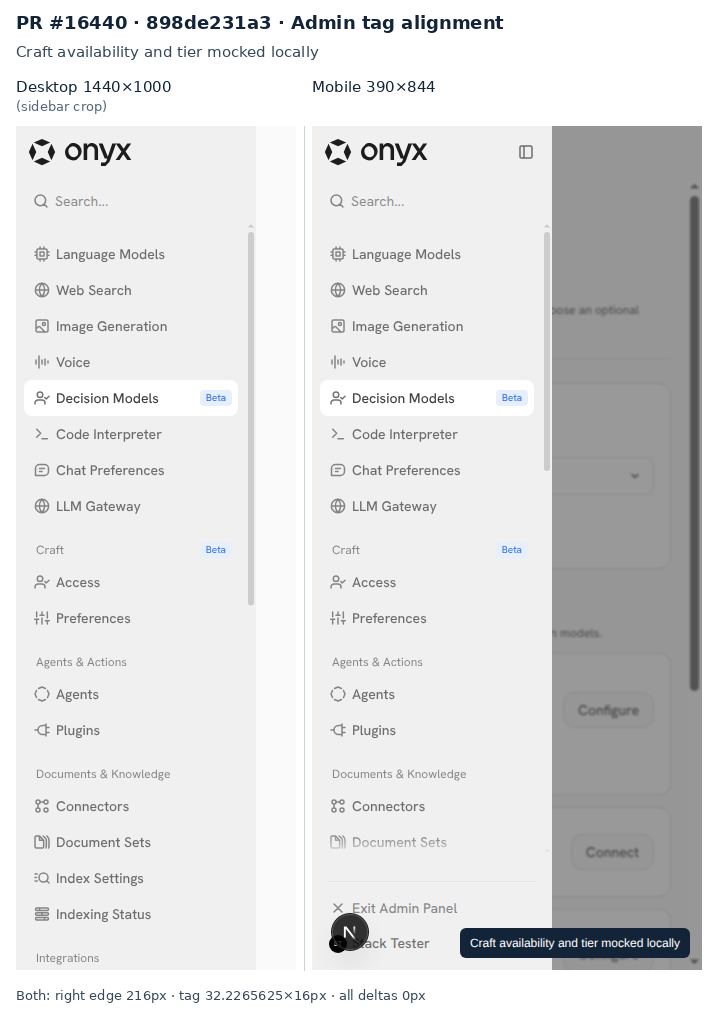 **`/app` Craft row** | Craft available | Upgrade required | |---|---| | 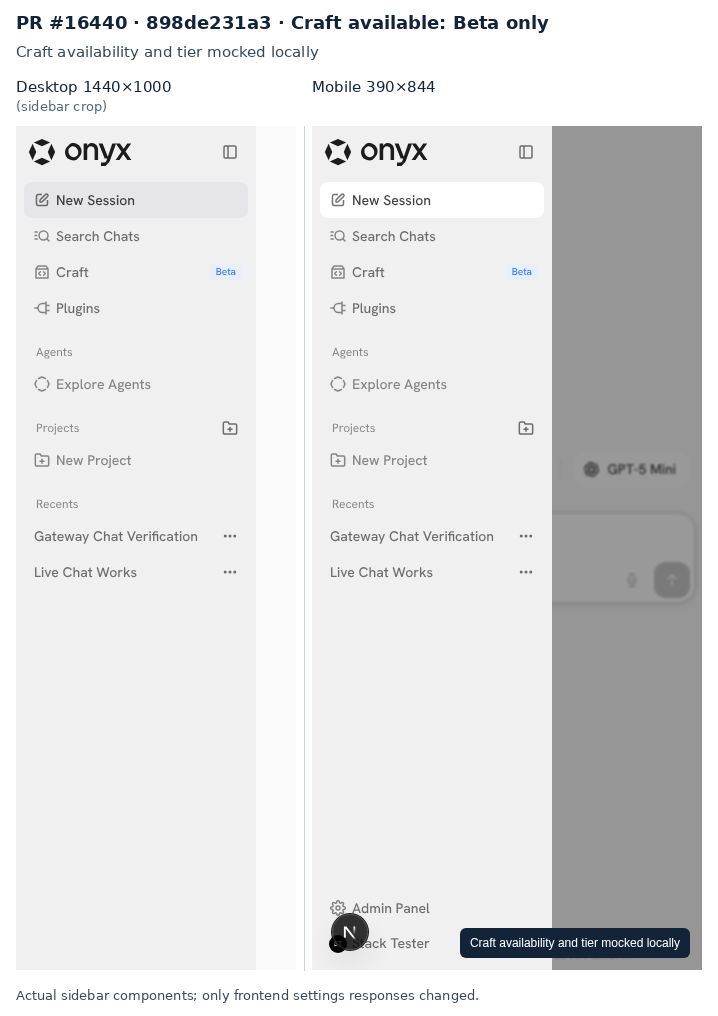 | 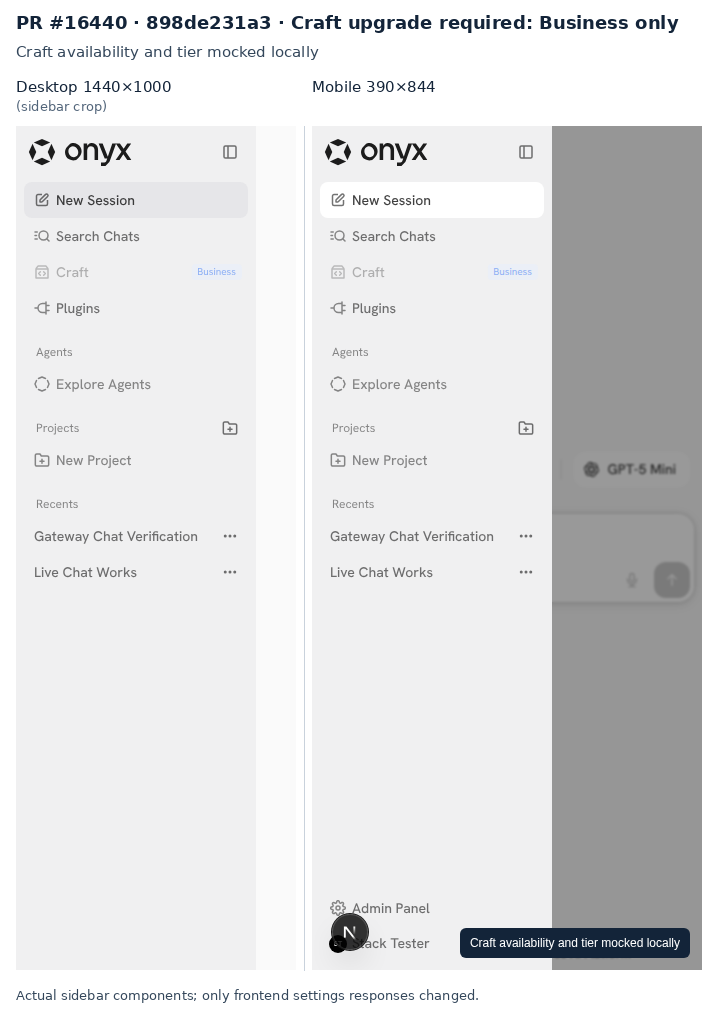 | **Tag clicks and chat-menu regression**  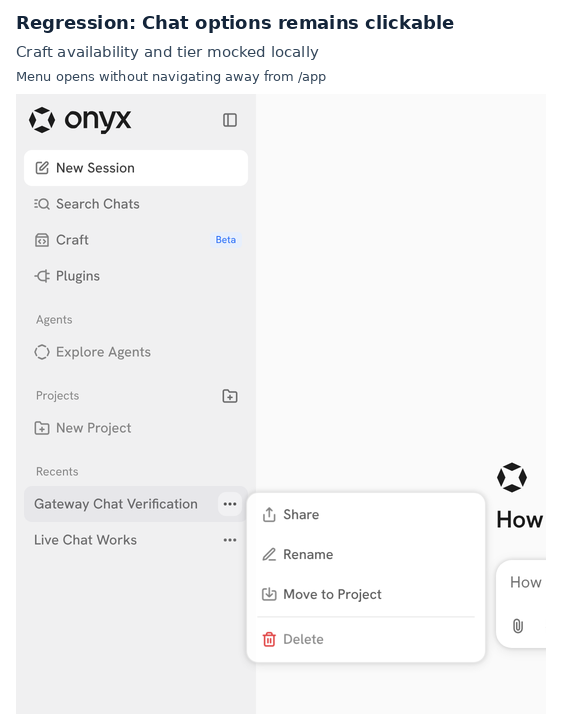 ## Additional Options - [ ] [Optional] Please cherry-pick this PR to the latest release version. Link to Devin session: https://app.devin.ai/sessions/39d77bde91c34b75922bb05c02b93b90 Open in Devin Desktop: https://app.devin.ai/desktop/session/39d77bde91c34b75922bb05c02b93b90?variant=devin Requested by: @rohoswagger <!-- This is an auto-generated comment: release notes by coderabbit.ai --> <!-- coderabbit-ai-generated:v1 --> ## Summary by CodeRabbit - **New Features** - Added Beta labels to relevant admin sidebar sections and items, including Decision Models. - Added Beta labeling to the Craft sidebar entry alongside its existing Business label. - Added support for optional tags in sidebar section headers. - Localized new Beta labels across supported languages. - **Bug Fixes** - Sidebar tags no longer block clicks on their underlying navigation items. <!-- end of auto-generated comment: release notes by coderabbit.ai --> |
||
|
roshan
|
cc110e2bbf |
feat(llm): add TypeSafe AI provider setup (#16262)
## Summary Add TypeSafe AI as a model provider so admins can save System One credentials before decision-model support lands. - Add the real TypeSafe AI logo, provider card, and credential form in Language Models. - Test credentials through TypeSafe's native System One endpoint and reuse encrypted provider storage. - Support creation, editing, and deletion without creating chat models or setting a chat default. - Keep TypeSafe out of chat onboarding. Reject tests that send saved credentials to another provider. - Keep the setup form focused on credentials. Remove the roadmap and internal validation paragraph from all nine locales. This PR covers provider setup only. #16276 moves TypeSafe to the dedicated Decision Models page and adds discovery and optional selection. No review or classification workflow ships in this stack. ## Validation - Previously created and edited the provider in the live admin UI with a real TypeSafe key. Verified saved credentials against System One. - Confirmed that the provider stores no chat models, stays out of chat listings, and can be deleted through the API. - 232 backend unit tests, 25 PostgreSQL tests, and 12 frontend tests passed. - Touched-file hooks passed for typing, lint, formatting, translations, secrets, and feature-map checks. - After the copy removal, ten setup and locale tests passed on this PR. Thirteen passed on the full stack. Typecheck and lint passed. ## Screenshots Current provider-only setup at `475ae5d`, with the real TypeSafe AI logo and no implementation-status paragraph. Credentials are empty. This screenshot is separate from the earlier real-key validation.  ## Stack testing (`29eec61fb4`) Tested the full stack at the top commit on a local dev stack, desktop and 390×844 mobile. OpenAI decisions and chat used a real key. TypeSafe, Zoom, OpenRouter, and Vercel AI Gateway used local mock upstreams; Onyx auth, validation, persistence, encryption, and UI were real. - Passed: bad credentials show an error; good credentials reach `/v1/systemone`. - Passed: create, rename, refresh, model removal, and delete. - Passed: TypeSafe stores decision models only, never becomes the chat default, and is absent from the chat picker. - Passed: both credential-test endpoints reject reuse of saved TypeSafe credentials against another provider; no request reached the other base. 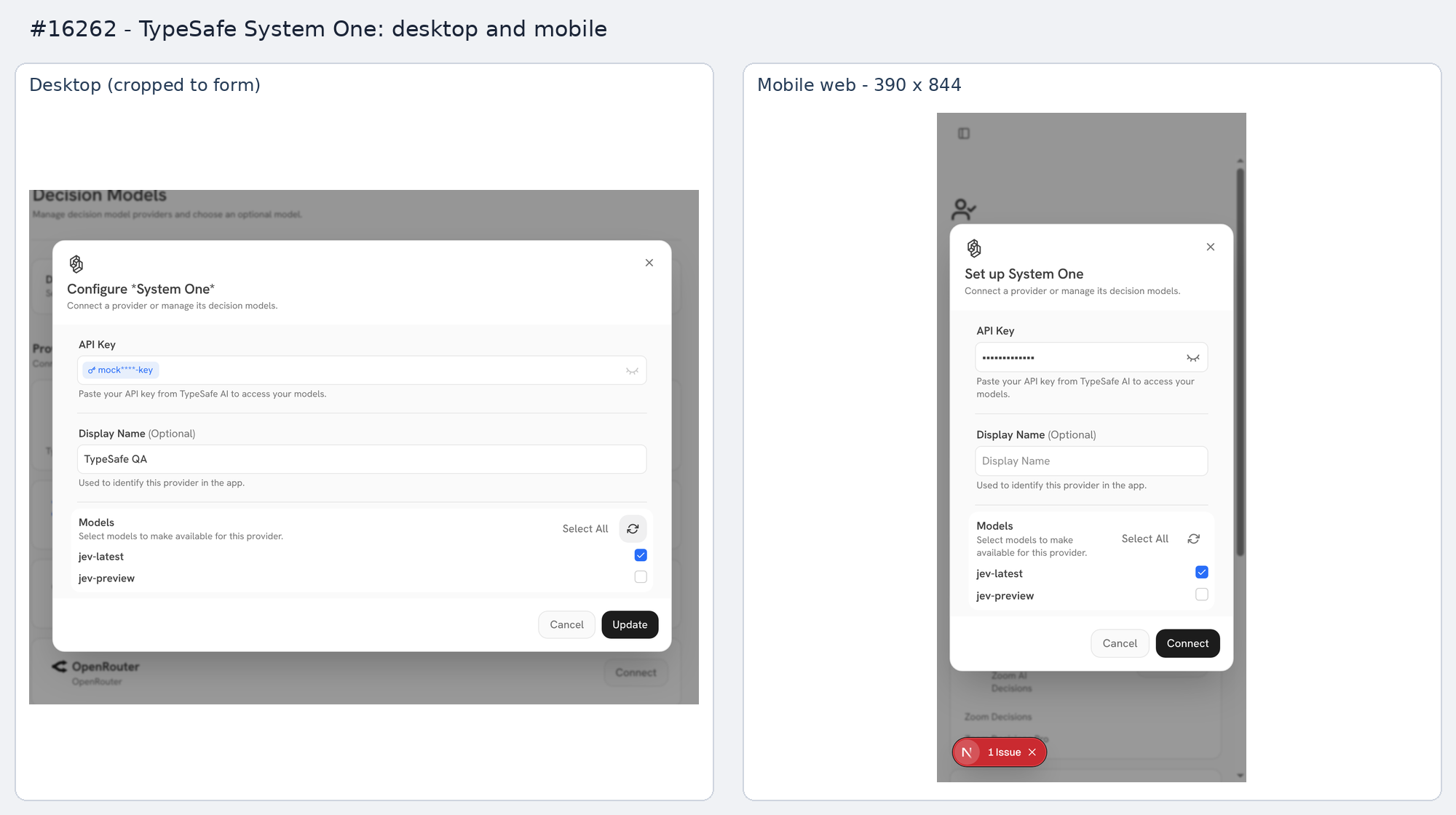  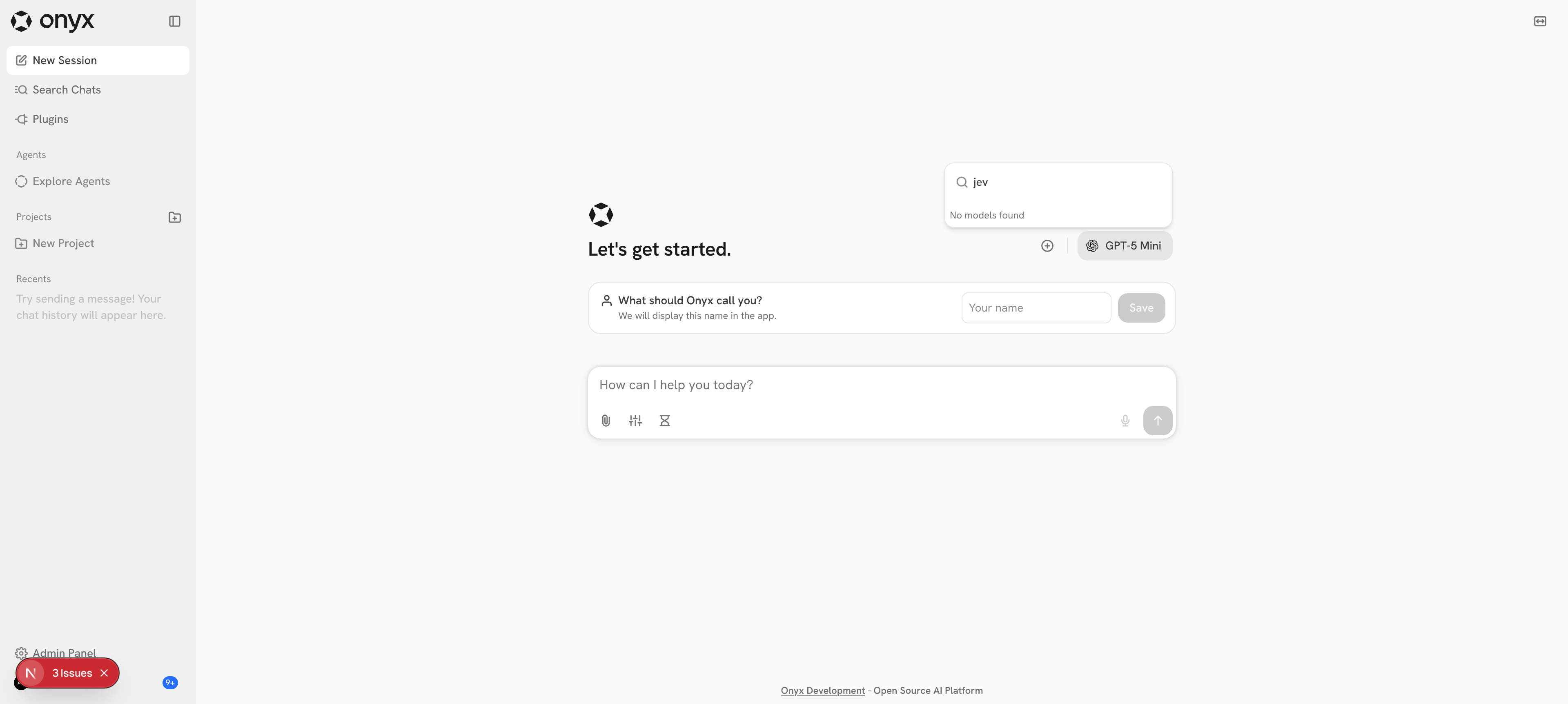 ## Stack PR 1 of 4: **#16262** → #16276 → #16280 → #16284. Link to Devin session: https://app.devin.ai/sessions/39d77bde91c34b75922bb05c02b93b90 Open in Devin Desktop: https://app.devin.ai/desktop/session/39d77bde91c34b75922bb05c02b93b90?variant=devin Requested by: @rohoswagger |
||
|
Wenxi
|
381123cae9 |
fix(plugins): improve MCP setup and configuration (#16414)
## Description MCP setup focuses Server Name when opened and when returning from Authentication. MCP setup shows neutral indicators until a valid server URL starts discovery. Spinners begin after the existing 700-millisecond debounce. Clearing or changing the URL resets both indicators and cancels the previous probe. OAuth Pass-through appears in the authentication dropdown when Onyx supports OAuth login, even with advanced settings collapsed. It remains an explicit choice. Configuration now shows the server URL. Users with edit permission can change it; other viewers see a read-only field. Saving a new URL uses the existing backend credential reset and opens Authentication to reconnect and discover tools. The saved response replaces cached server data before reloading. Whitespace-only edits preserve the existing connection, and metadata-only saves omit the URL. The preview also exposed missing client boundaries in Opal. The date-range picker and toast hooks now declare their client boundary at their source modules. ## How Has This Been Tested? - Setup focus regression: 40 component tests passed; signed-in browser confirmed Server Name receives initial focus. - MCP setup and authentication component suites: 79 tests pass. - MCP configuration and detail component suites: 51 tests pass, including invalid URLs, edit permissions, unchanged URL preservation, and a failed reload after saving a new URL. - Date-range picker component suite: 6 tests pass. - Changed-file pre-commit checks pass, including TypeScript and type coverage, formatting, lint, and feature-map integrity. - Live signed-in preview: Configuration shows the saved URL and permits admin edits, with no browser page errors. No live server URL was changed. - Live preview: `/app` and `/admin/plugins` render without page errors. Blank MCP setup shows both discovery stages idle. ## Additional Options - [ ] [Optional] Please cherry-pick this PR to the latest release version. <!-- This is an auto-generated comment: release notes by coderabbit.ai --> <!-- coderabbit-ai-generated:v1 --> ## Summary by CodeRabbit * **New Features** * MCP server URLs can be edited with required HTTP(S) validation and remain read-only for viewers. * URL changes trigger authentication, reconnection, and tool rediscovery as needed. * OAuth pass-through is available whenever OAuth login is enabled. * Probe stages clearly show idle, pending, successful, and failed states. * Direct tab navigation and improved focus handling are supported in server setup and details. * **Bug Fixes** * Clearing or changing a URL resets probe status and cancels outdated checks. * Metadata-only saves preserve the existing endpoint. * Updated server details remain visible if reloading fails. <!-- end of auto-generated comment: release notes by coderabbit.ai --> |
||
|
Wenxi
|
ad9c0030e9 |
feat(craft): simplify scheduled task details and plugin controls (#16408)
## Description
<img width="1014" height="660" alt="Screenshot 2026-10-21 at 12 10
14 PM"
src="https://github.com/user-attachments/assets/d885f4ef-8d88-49ee-aab8-4245e755a75b"
/>
<img width="1014" height="1200" alt="Screenshot 2026-10-21 at 12 10
03 PM"
src="https://github.com/user-attachments/assets/14b6d481-8d11-4d4d-b267-1b9cb9d2926f"
/>
fixes:
https://linear.app/onyx-app/issue/ENG-4406/runs-of-an-existing-scheduled-task-are-hard-to-find
Make scheduled tasks easier to inspect and edit. The detail page now
puts a compact prompt preview and enabled plugin labels above run
history. Its header keeps Edit, Run once, and Pause or Resume visible.
The editor groups schedule controls in a panel and replaces the app list
with plugin cards. Connected, enabled cards have a white background.
Disabled cards use the gray surface. Disconnected cards show an orange
dot and a connect button instead of the enable toggle. Clicking a card
opens action settings or the shared connection dialog.
Keep task drafts and modal selection in the editor, with separate
components for cards, action edits, and the read-only summary. Missing
connection data cannot enable a plugin. Editing actions before first
enabling now preserves untouched personal defaults. Update all nine
translations and the feature map.
## How Has This Been Tested?
- 33 tests across task policies, the summary, detail page, task form,
and schedule helpers.
- 9 translation catalog tests.
- TypeScript type and coverage checks, lint, formatting, translation
checks, and feature-map integrity.
- Playwright browser checks at desktop and mobile widths: prompt
expansion, edit navigation, schedule inputs, plugin toggles, connection
modal, card backgrounds, hover, and pointer cursor. No horizontal page
overflow.
- Browser checks used intercepted fixture data. No real scheduled run or
external OAuth sign-in was performed.
## Additional Options
- [x] [Optional] Please cherry-pick this PR to the latest release
version.
<!-- This is an auto-generated description by cubic. -->
---
## Summary by cubic
Redesigns the scheduled task detail page and editor so tasks are easier
to inspect and edit. The detail page now shows an expandable prompt
preview and enabled plugin labels above run history, with no tabs, and
the header keeps Edit, Run once, and Pause or Resume visible.
Plugin editing
- The app list is now a grid of plugin cards: connected and enabled
cards use a white surface, disabled cards use the gray surface, and
disconnected cards show an orange dot with a connect button.
- Clicking a connected card opens its action settings even when the
plugin is disabled for the task; clicking a disconnected card opens the
shared connection dialog.
- Disconnected plugins can still be disabled, but missing connection
data blocks their action settings.
- First edit or enable snapshots personal defaults, including untouched
actions, so they survive an enable toggle.
- Splits the editor into `TaskPluginCard`, `TaskAppActionsModal`, and
`TaskActionPoliciesSummary`, and updates all nine translations and the
feature map.
Schedule and load handling
- The schedule editor now groups controls in a panel and notes that
times use the local timezone.
- Action-policy load failures show an error with a retry button, and the
detail page links to Edit instead of using a tab.
<sup>Written for commit
|
||
|
Wenxi
|
0db5771304 |
fix(opal): forward card DOM props and click handlers (#16354)
## Description Forward native DOM props through the shared card component. Preserve its visual and interaction state while allowing callers to open previews through click handlers. This lets required skill cards remain previewable when their toggle is unavailable. ## How Has This Been Tested? The card regression tests passed within 65 frontend tests on the complete stack. TypeScript, formatting, lint, and pre-commit checks passed. ## Additional Options - [ ] [Optional] Please cherry-pick this PR to the latest release version. <!-- This is an auto-generated comment: release notes by coderabbit.ai --> <!-- coderabbit-ai-generated:v1 --> ## Summary by CodeRabbit * **New Features** * Cards now support standard HTML attributes, DOM events, and accessibility attributes in plain and expandable modes. * Custom classes are merged with built-in card styling. * Internal expansion controls are kept out of the rendered element. * **Documentation** * Clarified attribute forwarding and interactive composition requirements. * Documented that styles are not forwarded and that callers provide keyboard and button behavior. <!-- end of auto-generated comment: release notes by coderabbit.ai --> |
||
|
Raunak Bhagat
|
5159bd8287 |
feat(web): rework the cost-overrides panel and modal (#16324)
## Description
Reworks the Cost Overrides panel on the admin Language Models page.
- **Modal:** adding and editing happen in a "New / Edit Cost Override"
modal instead of an inline form. It runs on Formik with a Yup schema,
like the language-model provider modals: Save / Add stay disabled until
the form is valid and changed, and Enter submits.
- **Fields:** `InputHorizontal` rows with short titles and descriptions.
The three rates use `InputCurrency` (2 decimals). The edit path shows
the override's model in the model selector, disabled.
- **Cards:** each override is a `SelectCard` like the provider cards:
model icon, model name, provider and update date, the rates on a line
below, and trash / settings buttons beside the title. Delete now asks
for confirmation.
- **Search focus:** `InputSingleSelect` and `SimpleModelSelector` take a
`container`, passed to the `Dropdown`. The modal passes its content
element so the model search field keeps focus inside the dialog's focus
trap.
- Copy updated in all nine locales; unused placeholder keys removed.
UI only: it works with the current cost-override API. The data-model
change (overrides referencing `model_configuration`) comes in a separate
PR.
## Changes
### No overrides
<img width="867" height="203" alt="image"
src="https://github.com/user-attachments/assets/4ad5ee5a-27b9-49f1-b3e3-b7d0eb1140db"
/>
### >1 overrides
<img width="876" height="226" alt="image"
src="https://github.com/user-attachments/assets/0031f8cb-8f55-4d92-a809-c9fdf3f6e960"
/>
### Creating new override
<img width="655" height="420" alt="image"
src="https://github.com/user-attachments/assets/c700c36b-e099-4d98-b71e-855ff10f56e6"
/>
### Editing existing override
<img width="660" height="429" alt="image"
src="https://github.com/user-attachments/assets/121a09fc-5653-4435-894e-1c23cb002819"
/>
<!-- This is an auto-generated description by cubic. -->
---
## Summary by cubic
Reworks the Cost Overrides panel on the admin Language Models page:
adding and editing now happen in a New/Edit Cost Override modal, and
each override renders as a card matching the provider cards above it. UI
only — the overrides API is unchanged.
**New Features**
- Add/edit moved from an inline form to a Formik + Yup modal; Add/Save
stays disabled until the form is valid and changed, and Enter submits.
Fields use `InputHorizontal` with short titles and unit descriptions.
- Rates use `InputCurrency` with unlimited precision, so sub-cent
negotiated rates ($0.075, $0.01875) save and display exactly; each card
lists In, Out, and (when set) Cache as separate items on a line under
the description. The edit path shows the override's model in a disabled
selector, or a read-only field when no configured model matches.
- Delete now asks for confirmation, disables itself while the request
runs, and shows success/error toasts; copy is updated in all nine
locales, unused placeholder keys were removed, and the API error path
now reuses `parseErrorDetail`.
- Tests that drove a mocked model picker were dropped: they didn't
exercise the real modal.
**Bug Fixes**
- `InputSingleSelect` and `SimpleModelSelector` accept a `container`
passed to the `Dropdown`, so the model search field keeps focus inside
the modal's focus trap.
<sup>Written for commit
|
||
|
Raunak Bhagat
|
610809c564 |
feat(opal): type and paste into InputDatePicker like InputCurrency (#16364)
## Description
`InputDatePicker` now types and pastes like `InputCurrency`.
- Typing: a separator key (`/`, `-` or `.`) in the month or day splits
the segment at the caret. Digits before it stay and get padded (`1`
becomes `01`). Digits after it move to the front of the next segment,
and focus moves there. So `1/2/2026` types as it reads. Typing past a
full segment is blocked. Other non-digits do nothing.
- Pasting reads the text as a date in any segment:
- a whole date fills every segment: `10/19/2026`, `10-19-2026`,
`10.19.2026` or ISO `2026-10-19`;
- digits alone go into the focused segment at the caret, clipped to fit;
- anything else (`10/19`, `Oct 19 2026`, `1/2/26`) is ignored.
- Arabic-Indic digits and invisible direction marks are handled as in
`InputCurrency`.
- A pasted date commits like a typed one, on blur or Enter.
`toAsciiDigits`, `cleanPastedText` and `usePendingCaret` move from
`InputCurrency` into `inputs/segmented.tsx`, so both fields share one
implementation. `InputTime` also reads Arabic-Indic digits now.
## Changes
TODO
<!-- This is an auto-generated description by cubic. -->
---
## Summary by cubic
`InputDatePicker` now types and pastes like `InputCurrency`, so a date
can be entered as it reads.
- Typing a separator (`/`, `-`, `.`) in the month or day splits the
segment at the caret: digits before it stay and get padded (`1` → `01`),
digits after it move to the front of the next segment, and focus moves
there, so `1/2/2026` fills all three segments. A separator in an empty
segment does nothing, keeping `10/19/2026` typing as it reads. Other
non-digits do nothing, and typing past a full segment is blocked.
- Pasting reads the text as a date in any segment: a whole date
(`10/19/2026`, `10-19-2026`, `10.19.2026`, or ISO `2026-10-19`) fills
every segment, digits alone go into the focused segment at the caret
clipped to fit, and anything else (`10/19`, `Oct 19 2026`, `1/2/26`) is
ignored. A pasted date commits like a typed one, on blur or Enter.
- Arabic-Indic digits and invisible direction marks are handled as in
`InputCurrency`.
The digit, paste-cleanup, and caret helpers move from `InputCurrency`
into `inputs/segmented.tsx` so both fields share one implementation; the
caret helper is now typed on the segments shape. `InputTime` also reads
Arabic-Indic digits now.
<sup>Written for commit
|
||
|
Raunak Bhagat
|
d8a6fe50b6 |
feat(opal): add @opal/InputCurrency (#16323)
## Description
Adds `InputCurrency` to Opal: a segmented amount field that reads `$
[whole] . [fraction]` on the shared segmented-input chrome.
- `currency` (ISO 4217, default `USD`): the host locale sets the symbol,
its side (`3,00 €`) and the decimal separator, through a new
`OpalStrings.inputCurrencyParts`. `getCurrencyParts(locale, currency)`
is exported for the app's `OpalStringsBridge`.
- `precision` (default: the currency's usual decimals): the fraction
accepts at most this many digits; typing more is blocked. `0` hides the
fraction.
- The whole segment always resolves: leading zeros trim as soon as focus
leaves it (`0000` → `0`).
- Keyboard: `.` / `,` jump to the fraction, pasting `12.50` fills both
segments, arrows cross segment edges. Inside a form, Enter submits from
either segment; outside a form, Enter steps to the fraction.
- `onChange` fires on every edit (every draft is a valid amount); blur
and Enter tidy the display (`3.5` → `3.50`).
- New `inputs/numbers/` group: `InputCurrency` lives there and
`InputNumber` moves in beside it.
- New Opal strings for the field and segment labels, in all nine
locales.
<!-- This is an auto-generated description by cubic. -->
---
## Summary by cubic
Adds `@opal/InputCurrency`, a segmented currency amount field that reads
`$ [whole] . [fraction]` on the shared segmented-input chrome, with the
symbol, its side, and the decimal separator driven by the host locale.
**New Features**
- Typing `.` or `,` jumps to the fraction and splits the amount at the
caret: an empty whole part fills `0` first (so `.5` reads `0.5`), digits
after the caret move to the front of the fraction clipped to the
precision, dropping any padded zeros (`1|234` on `1234.00` reads `1 .
234`), and with no fraction segment the separator does nothing. Other
non-digits, grouping keys included, do nothing. Pasting reads the text
as an amount: it drops whitespace, direction marks, grouping, and the
symbol or code, fills both segments (`12.50`) or inserts into the
focused segment, and ignores anything that is not an amount.
- `precision` caps the fraction digits (`0` hides the fraction,
`"unlimited"` and larger numbers clamp to 15, the most digits a JS
number holds exactly) and `currency` is typed as an ISO 4217
`CurrencyCode`; either change rebuilds the segments. Display rounds half
up from the shortest decimal form (0.075 shows 0.075, or 0.08 at
precision 2); leading zeros trim as soon as the whole segment loses
focus.
- `onChange` fires on every edit; blur and Enter tidy the display; Enter
submits a surrounding form from either segment.
- `getCurrencyParts(locale, currency)` is exported for
`OpalStringsBridge`, with new strings in all nine locales.
- `InputNumber` moves into a new `inputs/numbers/` group next to it.
<sup>Written for commit
|
||
|
Raunak Bhagat
|
a6d3b6bc05 |
feat(opal): move between segments with the arrow keys (#16322)
## Description
Segmented fields (`InputTime`, `InputDatePicker`) now move between
segments with the arrow keys. ArrowLeft at the start of a segment
focuses the previous segment, with the caret at its end. ArrowRight at
the end focuses the next segment, with the caret at its start.
Shift+Arrow and caret moves inside a segment stay native.
The change is in the shared `makeSegmentKeyDownHandler`
(`inputs/segmented.tsx`), which now takes an optional next-segment ref.
Both pickers pass it.
First PR of a stack: this → `InputCurrency` → cost-overrides modal.
<!-- This is an auto-generated description by cubic. -->
---
## Summary by cubic
Adds arrow key navigation between segments in `InputTime` and
`InputDatePicker`. ArrowLeft at a segment's start moves focus to the
previous segment's end, and ArrowRight at the end moves to the next
segment's start.
Only a plain arrow with a collapsed caret crosses an edge;
Shift/Ctrl/Meta/Alt arrows and mid-segment moves stay native. Handled in
the shared `makeSegmentKeyDownHandler`, which now takes an optional
next-segment ref, and tests cover edge crossing and all guard cases.
<sup>Written for commit
|
||
|
devin-ai-integration[bot]andraunak
|
b8c31c5b70 |
fix(web): clamp agents table cells and stop drag-reorder reshuffle (#16282)
## Description
These are fixes to the admin Agents table (`AgentsTable`), plus a new
opt-in column option in `@opal/Table`.
**1. Text overflow.** Long names and descriptions wrapped past the fixed
row height and overlapped the next row.
- The Name and Description cells now use `@opal/OverflowText` in place
of the legacy `refresh-components` `Text`. The text is clamped to 1
line. When the text is cut, hover it to see the full text in a tooltip.
- The `Content` cells now clamp to 1 line. Created By sets
`titleMaxLines={1}`. Access sets `titleMaxLines={1}` and
`descriptionMaxLines={1}`.
- `@opal/Table` data columns get a new option, `truncate?: boolean`.
When it is set, `TableCell` adds `w-0 min-w-full` to `.tbl-cell-inner`.
Under `table-layout: auto`, the content then cannot widen the column, so
long content truncates. Before this change, the Agents table grew to
2844px inside an 840px container. All Agents data columns set `truncate:
true`. The option is off by default, so other tables do not change. For
example, the Users `GroupsCell` measures its own width and needs the old
behavior.
**2. Random reshuffle after a drag-reorder.** The causes:
- `GET /api/admin/persona` (`get_persona_snapshots_for_user`) has no
`ORDER BY`, so the refetch after a save came back in arbitrary DB order.
- `handleReorder` sent only the moved range, as indexes into the visible
list. Other agents kept `null` or stale priorities, which collided with
the new values.
- The row snapped back until the refetch finished.
The fix:
- The table sorts agents client-side the way the paginated endpoint
does: `display_priority` ascending with nulls last, then `|id|`.
- `buildDisplayPriorityMap` merges the reordered visible IDs back into
the full agent list. It then sends a priority for every agent whose
position changed.
- The new priorities go into the SWR cache before the PATCH.
- `@opal/Table` now passes the `query`-filtered rows to
`useDraggableRows`, not all `items`. A drag while a search is active no
longer shifts hidden rows.
## How Has This Been Tested?
- `bun run types:check`, `oxlint`, `oxfmt` and the `@opal/Table` jest
tests pass.
- I tested in the browser on a local stack with 8 agents; see the
comment below. The checks were: no horizontal overflow at 840px and
1600px, ellipsis plus hover tooltip on long cells, and normal, far-below
and search-filtered drags. Each order persisted across reload and
matched the DB priorities.
## Additional Options
- [ ] [Optional] Please cherry-pick this PR to the latest release
version.
Link to Devin session:
https://app.devin.ai/sessions/0d13205be9bb4560a7a0e55e880edd52
Open in Devin Desktop:
https://app.devin.ai/desktop/session/0d13205be9bb4560a7a0e55e880edd52?variant=devin
<!-- This is an auto-generated description by cubic. -->
---
## Summary by cubic
Fixes two bugs in the admin Agents table: long text no longer overlaps
the next row, and rows stay put after a drag-reorder.
- Data columns now accept an opt-in `truncate` flag; truncated columns
never widen the column, clamp content to one line, and show the full
value in a hover tooltip.
- The Name, Description, Created By, and Access cells clamp this way,
using `OverflowText` or one-line `Content` with max-line limits.
- Drag-reorder operates on query-visible rows only, so hidden rows keep
their positions.
- On drop, the full agent list is renumbered from the new visible order
and the priorities are written to the SWR cache before the PATCH, so
rows don't snap back while saving; nothing is saved when no priority
changed, and a failed save refreshes the table and shows an error.
- The table sorts agents client-side to match the server's order
(`display_priority` ascending with nulls last, then `|id|`).
<sup>Written for commit
|
||
|
Raunak Bhagat
|
0fe91853b1 |
feat(opal): stored-secret password tag, tab keyboard nav, tertiary actions (#16275)
## Description
**1. Stored secrets in `InputPasswordTypeIn`**
- New prop `existingValue`: a stored value from the backend, already
masked.
- While `value === existingValue`:
- the field shows the value as a medium blue `Tag` with the key icon,
and the input itself stays empty;
- the reveal toggle is disabled;
- Backspace or Delete clears the value;
- typing or pasting replaces the value with the new text.
- After the first edit, the field is a normal password field again.
- To keep the stored secret on submit, the caller compares the submitted
value with `existingValue`.
- The tag has no tooltip.
- An unchanged existing value does not block submission: the native
`required` check is off while the tag shows. A `readOnly` field keeps
its existing value, and the caller's `onKeyDown` runs first and can
cancel the deletion.
- The `mask` prop and its ✱ overlay are removed. Password fields always
use the browser's own dots.
**Callers that edit a stored secret now pass `existingValue`**
- LLM provider modals (`APIKeyField`, Bedrock, Ollama), SSO provider
modal, index settings, web search, voice, tracing, image generation
(OpenAI, Azure), OpenAPI OAuth client secret, MCP API token and OAuth
secret, MCP user credentials, Craft app user credentials, Slack bot
tokens.
- In each one, the stored masked string is the field's initial value. So
the untouched field keeps Formik's `dirty` false, and a Save gated on
`dirty` stays blocked. Submit logic does not change: an unchanged value
still counts as unchanged.
- SSO used `isNonRevealable` on edit only to protect the stored value.
It uses `existingValue` now.
- No change where the form starts empty for a stored secret: the hooks
modal (only a placeholder holds the masked key), the Discord bot config
and the custom-analytics key.
**Raw password inputs move to `InputPasswordTypeIn`**
- Slack bot tokens, reset password, impersonate (API key,
`autoComplete="new-password"`), custom analytics secret key, plugin
connection dialog.
**2. Keyboard and tab navigation (from the closed #16238)**
These are the Opal parts of the closed Plugins PR. The plugins-specific
parts are left out.
- `Tabs`:
- new `activationMode`. In `"manual"`, the default, arrows move focus
and Enter or Space selects.
- a focus ring shows while the keyboard moves focus;
- Tab enters the list on the selected tab and the next Tab leaves it, as
the ARIA tabs pattern says;
- Escape leaves the tabs, but only from a tab: a control in
`rightChildren` keeps focus;
- only a left click focuses a tab.
- `orientation` is omitted from the props: Opal tabs are horizontal
only.
- `Interactive` (stateless): keyboard focus shows the hover state in
place of the browser's ring.
- `useGridNavigation`: keyboard focus on a control inside a grid item
shows again.
- `InputTypeIn` clear button: it keeps focus in the field after it
clears the value, it has an `aria-label`, and it sends `onChange` a real
change event.
- Escape on a control beside a text field (the clear button, the reveal
toggle, a chevron, a chip) returns focus to the field, also when a
tooltip consumed the key. This covers `InputTypeIn` and every input
built on it, plus `TagField`. On `InputTime` and `InputDatePicker`,
which have no single input, it focuses the first segment.
**3. Input action buttons**
- The right-side icon buttons use `tertiary` prominence: the clear
buttons of `InputTypeIn`, `TagField`, `InputTime` and `InputDatePicker`,
and the date picker's calendar button.
- The `InputTypeIn` and `UploadControl` clear buttons have tooltips.
- The tooltip-only clear and calendar buttons of `TagField`, `InputTime`
and `InputDatePicker` get an `aria-label`, so they have an accessible
name.
- The clear button is always an input's last control. `InputDatePicker`
drew it before the calendar button, and `TagField` (`InputTypeInTag`,
the multi-select) drew it before the dropdown chevron.
- `TagField` (`InputTypeInTag`, the multi-select) uses `size="sm"` for
its clear button, as the other inputs do. It used `xs`.
## Additional Options
- [ ] [Optional] Please cherry-pick this PR to the latest release
version.
- [x] [Optional] Override Linear Check
<!-- This is an auto-generated description by cubic. -->
---
## Summary by cubic
Adds an `existingValue` prop to `InputPasswordTypeIn` so forms that edit
backend secrets show the saved value as a key tag instead of editable
masked text, and polishes Opal tab keyboard navigation, focus handling,
and input action buttons.
**Stored secrets**
- `existingValue` marks a stored backend value: while the field's value
equals it, the value renders as a key tag, the input stays empty, and
the reveal toggle is disabled.
- Backspace or Delete clears it; typing or pasting replaces it whole. A
read-only field keeps the value, the caller's `onKeyDown` can cancel the
deletion, and an unchanged tag doesn't fail a native required check.
- Secret-editing forms (Slack tokens, SSO, MCP, language-model and
image-gen modals, tracing, voice, web search, and more) now pass
`existingValue`; a few raw password inputs move to
`InputPasswordTypeIn`. The `mask` prop and idle asterisk overlay are
removed.
- E2E specs for OpenAPI OAuth, index settings, and web search now verify
the stored value appears as a tag with an empty input.
**Keyboard and input actions**
- `Tabs` defaults to manual activation: arrows move focus, Enter or
Space selects, a focus ring tracks keyboard movement, and Escape leaves
the tabs. Only a plain left click focuses a tab; a caller's `onKeyDown`
can cancel the Escape.
- Keyboard focus on `Interactive` surfaces replaces the browser ring
with the hover state; `useGridNavigation` now shows focus on controls
inside grid items.
- `InputTypeIn`'s clear button sends a real change event, keeps focus in
the field after clearing, and gains an `aria-label`.
- Escape on an input's side controls (clear, reveal toggle, chevron,
chip) returns focus to the field, even when a tooltip consumed the key;
on `InputTime` and `InputDatePicker` it focuses the first segment.
- Input action buttons use `tertiary` prominence, the clear button is
always an input's last control, and `TagField`'s clear button is `sm`
like the other inputs'.
<sup>Written for commit
|
||
|
Wenxi
|
a4b53993a8 |
fix(skills): allow invalid skill deletion and reuse previews (#16270)
## Description Allow owners and editors to delete custom skills directly from cards, including invalid skills. Reuse preview content inside plugin modals. Preserve formatted close labels and finish deletion without waiting for optional app revalidation. Correct the shared Button children type so its existing formatted-label support is usable by callers. ## How Has This Been Tested? 34 skill page, card, and preview tests passed, including formatted labels and a pending optional refresh. Type, lint, and formatting checks passed. ## Additional Options - [ ] [Optional] Please cherry-pick this PR to the latest release version. <!-- This is an auto-generated comment: release notes by coderabbit.ai --> ## Summary by CodeRabbit * **New Features** * Custom skills can be deleted from their cards, including invalid skills that cannot be opened. Deletion requires confirmation and is available to owners and editors. * After deletion, the skill is removed from the list and a success message appears. If deletion fails, the skill remains and an error message appears. * **Bug Fixes** * Updated skill-preview error messages across supported languages to clarify when instructions could not be loaded. <!-- end of auto-generated comment: release notes by coderabbit.ai --> |
||
|
Wenxi
|
81bba4a299 |
fix(opal): keep dropdowns within available viewport space (#16269)
## Description Association pickers can open above a modal and clip their search field or options. Cap dropdown height to Floating UI’s available space and keep the search field visible while options scroll. ## How Has This Been Tested? Dropdown component suite: 33 tests passed. Chromium regression tests cover 320px and 600px viewports, above-trigger placement, scrolling to the last option, and a visible search field. Type, lint, and formatting checks passed. ## Additional Options - [ ] [Optional] Please cherry-pick this PR to the latest release version. <!-- This is an auto-generated comment: release notes by coderabbit.ai --> ## Summary by CodeRabbit * **Bug Fixes** * Dropdown cards now fit within the available screen space, including near viewport edges or within clipped areas. The search field remains visible while scrolling through long lists. * **Documentation** * Updated dropdown guidance to describe available-height limits and search behavior. * Added instructions for running shared-component browser tests locally. * **Tests** * Added browser coverage for dropdown positioning and scrolling at different viewport heights. <!-- end of auto-generated comment: release notes by coderabbit.ai --> |
||
|
roshan
|
c6e437b018 |
refactor(web): migrate replaced refresh-components to Opal (#16242)
## Description This is the third of four cleanup PRs on top of #16234, which is merged (stack: #16240 icons, #16241 raw elements, #16242 refresh components, #16243 Text). It migrates the refresh-components that `opal/no-replaced-refresh-import` flags, except `Text`, which the next PR migrates. These are `Card`, `Truncated`, `SelectButton`, `LineItem` and `Divider`. 13 of 22 files are migrated, and the other 9 are kept for the reasons below. ### Changes (under `web/src/`) **`Card` to Opal `Card`** (9 sites in 4 files: `app/admin/discord-bot/page.tsx`, `app/admin/discord-bot/[guild-id]/page.tsx`, `app/app/settings/usage/UsageSettings.tsx`, `views/admin/GroupsPage/GroupPermissionsSection.tsx`) - The refresh `Card` put an inner `Section` inside its box, but Opal `Card` does not. So each site wraps its children in `<Section alignItems="start" height="fit">` and passes `rounding={4}` for the same 16px corner. One discord-bot card has a single full-width `Section` child, so it gets no wrapper. - The variants map like this: - `primary` → `border="solid"`; - `secondary` → `color="transparent" border="solid"`; - the computed `"disabled"` variant → `border="solid" disabled={...}`. **`Truncated` to `OverflowText`** (9 files: `app/ee/admin/theme/Preview.tsx`, `lib/app/components.tsx`, `refresh-components/messages/InfoBlock.tsx`, `sections/onboarding/components/LLMProviderCard.tsx`, `ee/sections/SearchCard.tsx`, `layouts/general-layouts.tsx`, `sections/document-sidebar/ChatDocumentDisplay.tsx`, `sections/knowledge/agent-knowledge/KnowledgeSearch.tsx`, `sections/knowledge/SourceHierarchyBrowser.tsx`) - Each site becomes `as="p" textPosition="text-start"`, with `font` and `color` set explicitly. - Sites with no color flag get `color="text-05"`, because the refresh default is `text-05` and the Opal default is `text-04`. - `className="line-clamp-2"` becomes `maxLines={2}`. - `applicationName` can be null, so it renders `{applicationName ?? ""}`. **`SelectButton` to Opal `SelectButton`** (`sections/knowledge/SourceHierarchyBrowser.tsx`) - It uses `variant="select-light"`, and `transient` maps to `interaction={sortDropdownOpen ? "hover" : "rest"}`. ### Visual differences reviewers should check - **`ChatDocumentDisplay`:** the old tooltip opened with `side="start"`. `OverflowText` has no side prop, so its tooltip always opens above the text, aligned to the start. - **`SourceHierarchyBrowser` sort button:** the label at rest changes from `text-03` to `text-04`. The size is Opal's default `lg`, where the old button used `px-2 py-2 rounded-12`. - **All `OverflowText` sites:** - Opal `Text` always adds `px-[2px]`. - The old `grow w-full` wrapper is gone. The parents are start-aligned, so the layout should look the same. - **Card borders:** Opal draws `border-border-01`. The old card used the global default border color. ### Kept on purpose - **`app/admin/billing/BillingDetailsView.tsx`, `PlansView.tsx`:** these Cards pass a `className` (`billing-card-enter`, `billing-payment-card`, `plan-card`), and Opal `Card` takes no `className`. The deprecation note on refresh `Card` already says these need a decision. - **`app/admin/billing/CheckoutView.tsx`:** one Card is clickable and has `className` and `data-selected`, so it is probably a `SelectCard`. That needs a design decision. - **`refresh-components/buttons/LineItem.tsx`:** its title `Truncated` gets per-variant `line-item-text-*` classes that `OverflowText` cannot take. - **`refresh-components/buttons/source-tag/SourceTag.tsx`:** its `Truncated` shares a `TextStyleProps` object with the refresh `Text` beside it. - **`refresh-components/commandmenu/CommandMenu.tsx`:** - Its `Divider`s use `icon` and highlight states that Opal `Divider` does not support. - Its `LineItem` rows depend on muted, action and emphasized colors and on the keyboard-nav hover in `line-item.css`. - **`views/admin/UsersPage/EditUserModal.tsx`, `ServiceAccountsPage/EditServiceAccountModal.tsx`, `ServiceAccountsPage/ApiKeyFormModal.tsx`:** each has `skeleton` LineItems (dashed border, 12px text), and neither `LineItemButton` nor `EmptyMessageCard` matches that look. ## How Has This Been Tested? - oxlint: in the 13 migrated files, the only `opal(no-replaced-refresh-import)` diagnostics left are refresh `Text`, which the next PR migrates. The full run has 0 errors. - `bun run types:check`: no type errors, and type coverage stays at 99.04%. - pre-commit (oxfmt, oxlint) passes on the changed files. ## Additional Options - [ ] [Optional] Please cherry-pick this PR to the latest release version. <!-- This is an auto-generated comment: release notes by coderabbit.ai --> ## Summary by CodeRabbit * **Bug Fixes** * Hovering over a suppressed tooltip no longer closes its enclosing tooltip. * **UI Improvements** * Text exceeding available space now has consistent overflow handling across navigation, search results, document lists, onboarding, and informational messages. * Admin, usage, permissions, and Discord settings cards now have consistent borders, rounded corners, disabled states, and content alignment. * The knowledge source sort control now reflects its interaction state while the dropdown is open. <!-- end of auto-generated comment: release notes by coderabbit.ai --> |
||
|
Raunak Bhagat
|
e237afde64 |
fix(opal): redraw icons on a 16x16 viewBox, add file-type icons (#16278)
## Description
This PR holds the icon changes that were first in #16275. It does not
depend on that PR.
**Why**
- Many Opal icons were drawn on viewBoxes other than 16×16: 24, 28, 32,
18, 15, or cropped to the path. At the same `size`, they rendered
heavier, lighter or larger than the 16×16 icons. For example, the 28×28
`x` made every input clear button look small.
**Redrawn at 16×16** (31 icons, converted from the mocks with
`scripts/convert-svg.sh`; export names do not change)
- `alert-circle`, `arrow-down-dot`, `arrow-left-dot`, `arrow-right-dot`,
`arrow-up-dot`, `arrow-up-down`, `arrow-wall-left`, `arrow-wall-right`,
`bracket-curly`, `calendar`, `corner-right-up-dot`, `download`,
`download-cloud`, `eye`, `eye-closed`, `files`, `link`, `log-out`,
`mcp`, `menu`, `paint-brush`, `pause-circle`, `play-circle`,
`stop-circle`, `text-lines`, `upload-cloud`, `x`, `x-circle`,
`x-octagon`, `zoom-in`, `zoom-out`.
- `download`, `arrow-wall-left` and `files` were already 16×16. They are
redrawn to match the mocks.
**New icons**
- File types: `binary-file`, `code-file`, `excel-file`,
`executable-file`, `markdown-file`, `pdf-file`, `powerpoint-file`,
`word-file`, `zip-file`.
- `quote-lines`.
**Removed**
- `pencil-ruler`, `quote-start`, `quote-end`: they had no callers.
- `file-broadcast`: it was the `files` icon on an 18×18 viewBox. The EE
hooks page uses `SvgFiles`.
- `file-braces`: its call sites use `SvgCodeFile`. These are the OpenAPI
plugin icon and the fallback action icon in `PluginsPage`,
`MemberPluginsPage`, `PluginRow`, `ChatPluginsPopover` and
`MemberPluginDetailModal`, and `getFileIcon` for code files.
- `file-chart-pie`: `getFileIcon` uses `SvgPowerpointFile` for `.ppt`
and `.pptx`.
**Still not 16×16:** `step1`, `step2`, `step3`, `step3-end`,
`notification-bubble`, `blocks`, `handle`.
## Changes
<img width="1995" height="590" alt="image"
src="https://github.com/user-attachments/assets/d78e5287-f5dc-4473-a257-f44bb8932fff"
/>
## Additional Options
- [ ] [Optional] Please cherry-pick this PR to the latest release
version.
- [x] [Optional] Override Linear Check
<!-- This is an auto-generated description by cubic. -->
---
## Summary by cubic
Redraws Opal icons that were on viewBoxes other than 16×16 (24, 28, 32,
18, 15, or path-cropped) so all icons render at a consistent weight and
size at the same `size`; the 28×28 `x` made every input clear button
look small. Adds the file-type icon set and `quote-lines`, removes the
ad-hoc or unused duplicates, and drops the empty clip paths that were
hiding six icons.
**Removals and migrations**
- Removes `pencil-ruler`, `quote-start`, `quote-end`, `file-broadcast`,
`file-braces`, and `file-chart-pie`.
- The hooks page now uses `SvgFiles`, plugin pages use `SvgCodeFile`,
and `getFileIcon` uses `SvgPowerpointFile` for `.ppt`/`.pptx`.
<sup>Written for commit
|
||
|
Wenxi
|
f8c224c145 |
feat(craft): integrate personal and workspace plugin permissions (#16185)
## Description Let users manage external-app and MCP action permissions in the Plugins UI. Scheduled tasks use the same controls and keep independent app selections and policies. Workspace-disabled actions remain locked. External-app admin tabs follow the MCP flow: Configuration, Authentication, and Tools, followed by Skills where supported. Configuration contains the user-management switch. Authentication contains credentials and custom headers. Tools contains individual action policies. Bulk changes use a dropdown; each action uses Auto-approve, Ask, and Disabled buttons. Plugin modals fit their content up to 80% of the viewport. Scrollbars do not shift the tabs or move content off center. MCP descriptions appear below tool names. Save requires changes, and closing an edited form asks for confirmation. Each opening loads fresh settings; refreshes preserve the open draft. Policy links open the matching app's permissions tab. Remove the superseded standalone policy editors. Keep personally disabled MCP servers in permission catalogs while preserving runtime restrictions. ## How Has This Been Tested? - This PR's intermediate tree passed 233 frontend tests across 14 suites after rebasing onto main. - Commit hooks passed, including TypeScript, formatting, lint, and feature-map integrity. - Earlier local Kind/browser checks covered external-app and MCP saves, workspace restrictions, bulk edits, reset, dirty-form dismissal, failed saves, retries, desktop/mobile sizing, and independent browser-tab saves. ## Additional Options - [ ] [Optional] Please cherry-pick this PR to the latest release version. - [x] [Optional] Override Linear Check <!-- This is an auto-generated comment: release notes by coderabbit.ai --> ## Summary by CodeRabbit * **New Features** * Manage approval settings for connected Craft-compatible apps and MCP servers from plugin details. Search actions, apply bulk Auto-approve, Ask, or Disabled choices, and reset to workspace defaults. * Task editors offer the same per-action and bulk controls, with independent task settings and confirmation before discarding unsaved changes. * App configuration lets administrators control whether users can manage approval settings. Editor tabs separate Configuration, Authentication, Tools, and Skills. * Connected app setup cards link directly to approval settings. * **Improvements** * MCP tool descriptions are visible inline, and plugin editors use larger, scrollable modals. * Workspace-disabled actions remain visible but locked with an explanation. <!-- end of auto-generated comment: release notes by coderabbit.ai --> |
||
|
Raunak Bhagat
|
6d3458b369 |
fix(web): show the code interpreter status with @opal/Content (#16223)
|
||
|
devin-ai-integration[bot]andNik
|
40238683c9 |
feat(web): embedded run list, status page shell, and connector page sections per mock (#16171)
Co-authored-by: Nik <nikolas.garza5@gmail.com> Co-authored-by: Devin AI <158243242+devin-ai-integration[bot]@users.noreply.github.com> |
||
|
|
6a2ce321e8 |
feat(web): Manage Index menu, activity cards, and runs card per the indexing mock (#16172)
Co-authored-by: Nik <nikolas.garza5@gmail.com> Co-authored-by: nik <nik@onyx.app> |
||
|
|
4fcd7350d5 |
feat(web): Opal foundations, status icons, copy and formats for the indexing mock (#16165)
Co-authored-by: Nik <nikolas.garza5@gmail.com> Co-authored-by: nik <nik@onyx.app> |
||
|
devin-ai-integration[bot]andNik
|
b9c38745fa |
feat(web): connector page cards per the indexing mock (#16121)
Co-authored-by: Nik <nikolas.garza5@gmail.com> |
||
|
roshan
|
2347a7beed | refactor(opal): support consistent plugin dialogs with shared primitives (#16187) | ||
|
Raunak Bhagat
|
00c9bcd19f | fix(opal): switches keep keyboard focus and get a clearer focus state (#16175) | ||
|
Nikolas Garza
|
f00ddfbc5e | feat(youtrack): index YouTrack Cloud and Server issues (#16135) | ||
|
Raunak Bhagat
|
c3d873181f | feat(opal): input slots, reveal toggle and dropdown polish (#16142) | ||
|
Raunak Bhagat
|
d89f5eb5b1 | fix(opal): keep a dropdown trigger's focused border while it is open (#16127) | ||
|
Raunak Bhagat
|
8d37dbb73c | fix(opal): let the Collapsible section fill a flex parent again (#16123) | ||
|
devin-ai-integration[bot]andnik
|
623beb459b |
fix(web): pin the settings header shadow to its divider (#16122)
Co-authored-by: nik <nik@onyx.app> Co-authored-by: Devin AI <158243242+devin-ai-integration[bot]@users.noreply.github.com> |
||
|
Wenxi
|
0e60d3c681 | feat(mcp): guide users through tool connection and reauthentication (#16092) | ||
|
Raunak Bhagat
|
835689cf64 | refactor(opal): move custom-header collapsibles onto Opal's Collapsible (#16090) | ||
|
devin-ai-integration[bot]andnik
|
7cddaf2278 |
fix(web): stop the settings header shadow from fading (#16091)
Co-authored-by: nik <nik@onyx.app> Co-authored-by: Devin AI <158243242+devin-ai-integration[bot]@users.noreply.github.com> |
||
|
Nikolas Garza
|
f1c3aabad7 | feat(web): open the full activity history beside the status page (#16013) | ||
|
Nikolas Garza
|
c52675c30f | feat: keep a history of connector check runs and prunes, schedule checks, and release the indexing hold (#16028) | ||
|
Nikolas Garza
|
bd33a147f3 | feat: open a run's failed documents and stack trace beside its activity card (#16006) | ||
|
Nikolas Garza
|
7d59814c63 | feat: show a connector's failures and document errors in a side panel (#16004) | ||
|
Nikolas Garza
|
5c2110c948 | feat: list a connector's runs of every kind on its detail page (#15979) | ||
|
Nikolas Garza
|
0f9400fa83 | feat(web): rebuild the connector detail page on Opal (#15972) | ||
|
roshan
|
c2b0f5408d | fix(craft): show the task status inline with the schedule (#15984) | ||
|
Raunak Bhagat
|
458affef19 | feat(connectors): Opal logos for the catalog, and source metadata in the connectors library (#15993) | ||
|
Raunak Bhagat
|
cff8a1db0e | feat(opal): single and multi upload inputs; Google Sites and File use them (#15971) | ||
|
Raunak Bhagat
|
48605418eb |
feat(opal): update InputUpload and remove previous, legacy component (#15965)
|
||
|
Wenxi
|
d7b07f1dd4 | feat(craft): show durable turn output cards (#15921) | ||
|
Raunak Bhagat
|
6fed167d8e | feat(connectors): fold all account cards, rename saved accounts (#15953) | ||
|
Raunak Bhagat
|
587a4a179b | fix(opal): give tabs per-variant minimum heights (#15952) | ||
|
Raunak Bhagat
|
6866d06ddc | feat(connectors): list locked plan options under an upgrade link (#15942) | ||
|
Raunak Bhagat
|
794a5e4832 | feat(connectors): account sharing UI on the add-connector page (#15930) | ||
|
Raunak Bhagat
|
c9df4da344 | feat(admin-sidebar): one pointer-following tooltip over locked pages; logical tooltip sides (#15926) | ||
|
Raunak Bhagat
|
29f8c837d0 | feat(connectors): checks card and account list polish (#15893) |


