 roshan
aaa78990a6
roshan
aaa78990a6
## Description
Part 3 of the
[ENG-4416](https://linear.app/onyx-app/issue/ENG-4416/ux-plugins-and-tool-flow-nits)
stack. A custom tool call blocked by the SSRF check (or answered with a
redirect) raised `ToolCallException` before any `CustomToolDelta`, so
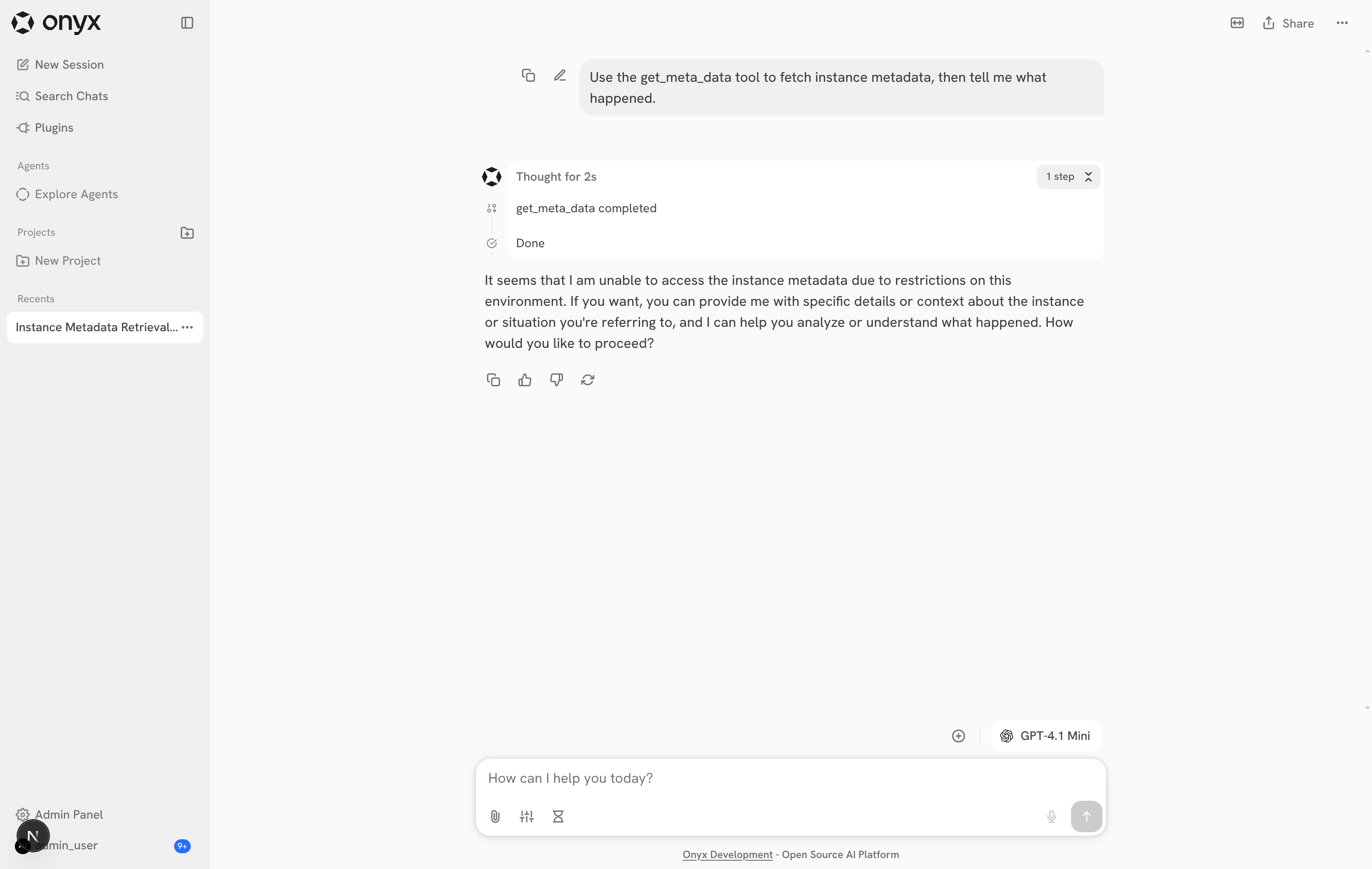
the step list said "get_meta_data completed".
- `CustomTool.run()` now returns a failed `CustomToolCallSummary` and
emits a `CustomToolDelta` with `CustomToolErrorInfo` for blocked
destinations (`status_code=None`) and redirects (the 3xx code). This
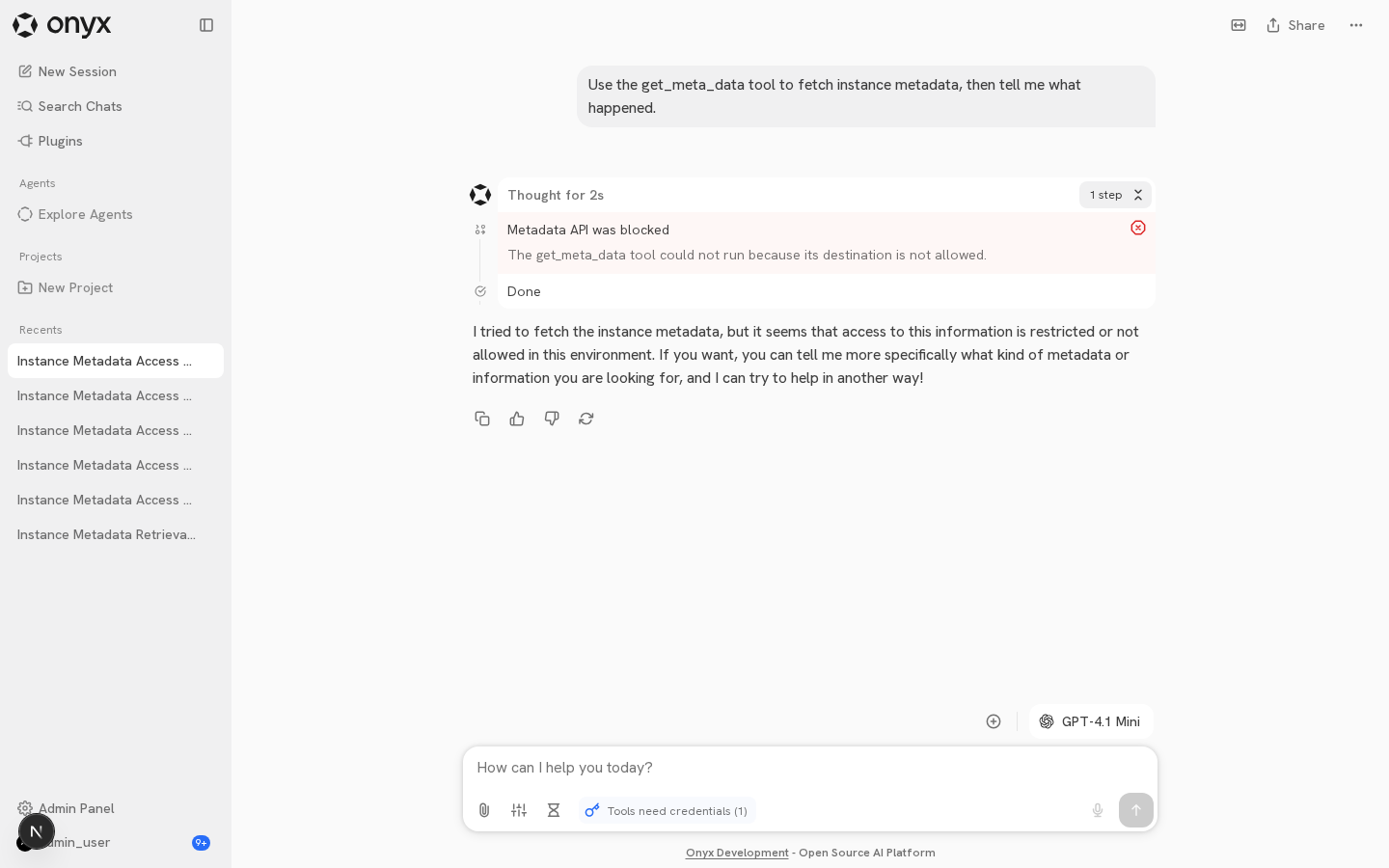
reuses the existing 401/403 error path, so the error also persists in
history.
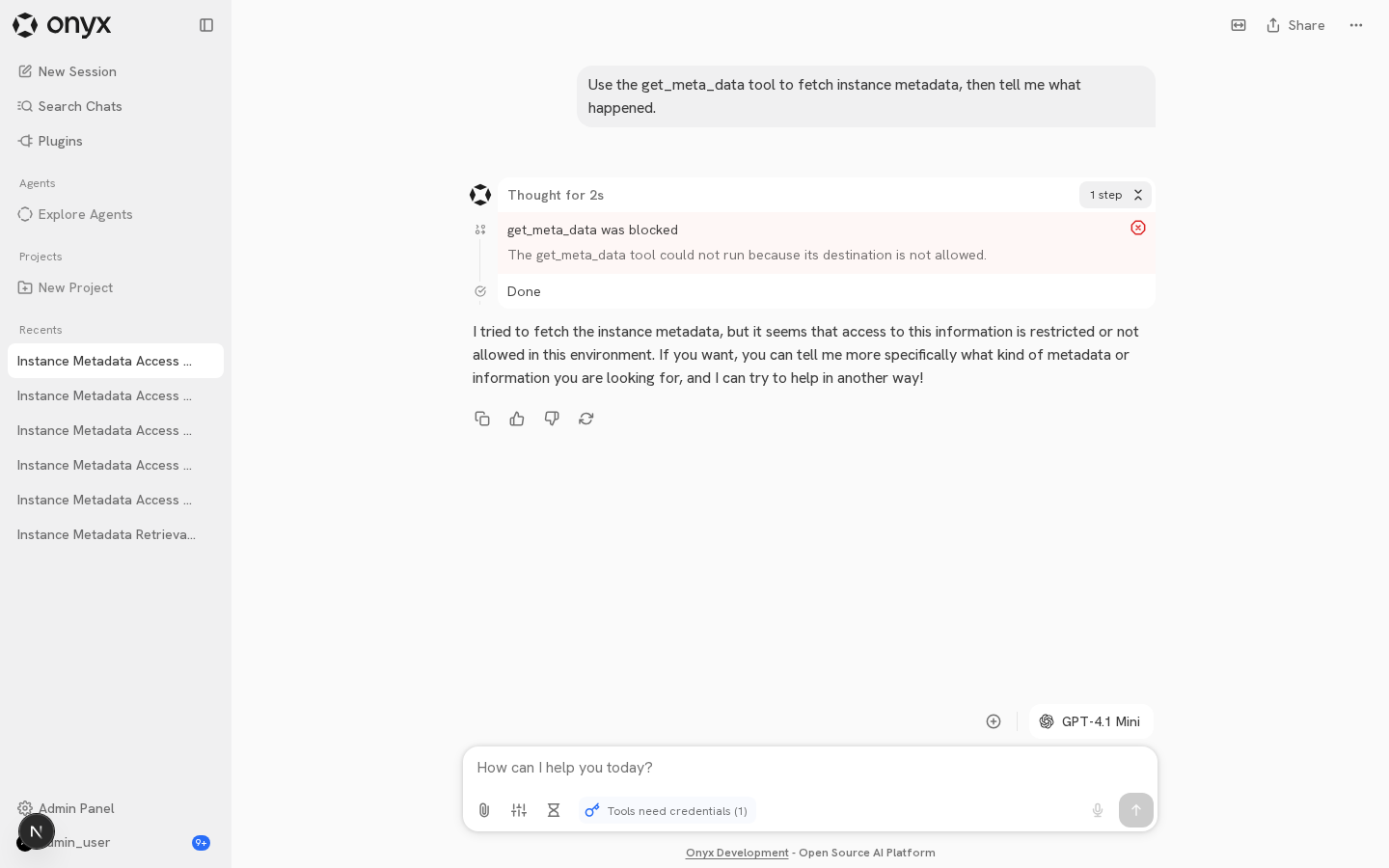
- `CustomToolRenderer` shows "{tool} was blocked" with the error icon
and error surface. HTTP failures keep "{tool} failed ({code})".
- The LLM gets the same short message the user sees.
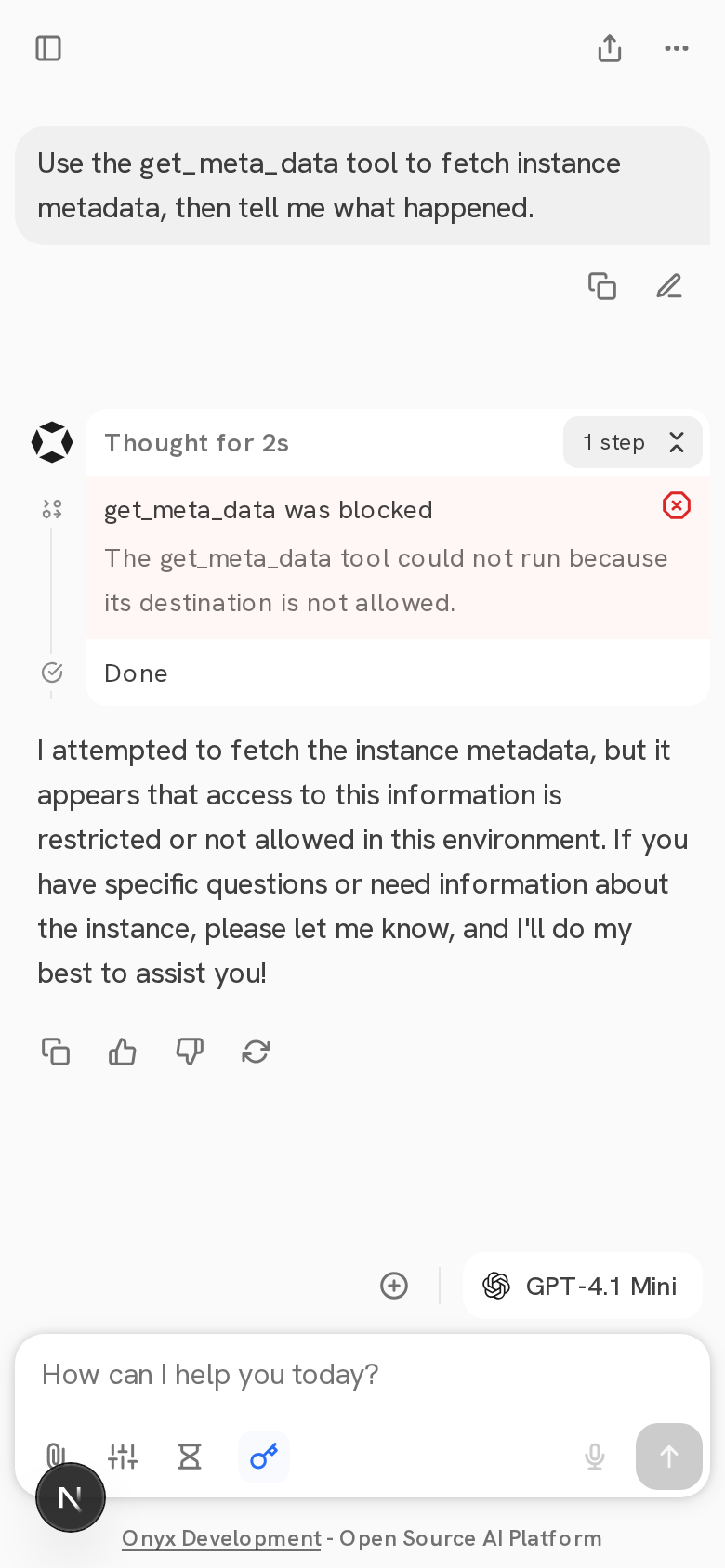
| Before | After | After reload | Mobile |
| --- | --- | --- | --- |
|
|
|
|
|

The last "Done" row is the timeline's turn-finished step (`showDoneStep`
in `useTimelineUIState`), shown for every finished turn. It no longer
reads as the tool's result.
## How Has This Been Tested?
- Local ODS stack + gpt-4.1-mini: an OpenAPI plugin on
`169.254.169.254.nip.io`; asked chat to call it. Desktop, reload and
mobile show "was blocked" and no "completed"; API log shows the
metadata-IP refusal.
- `pytest backend/tests/unit/onyx/tools/custom`: 105 passed (blocked,
redirect, and delta/summary parity cases).
- New `CustomToolRenderer.test.tsx` (blocked + HTTP failure).
- `pre-commit` (ty, ruff, tsc, oxlint) on touched files.
## Additional Options
- [x] [Optional] Please cherry-pick this PR to the latest release
version.
Link to Devin session:
https://app.devin.ai/sessions/09df74c24e19407bbf0e7ab775b5cb0a
Open in Devin Desktop:
https://app.devin.ai/desktop/session/09df74c24e19407bbf0e7ab775b5cb0a?variant=devin
Requested by: @rohoswagger
<!-- This is an auto-generated description by cubic. -->
---
## Summary by cubic
Fixes custom tool calls blocked by the SSRF check or answered with a
redirect so they show as failed instead of "completed" in the chat step
list.
- `CustomTool.run()` now returns a failed `CustomToolCallSummary` and
emits a `CustomToolDelta` with error info for blocked destinations and
redirects instead of raising `ToolCallException`, reusing the existing
401/403 error path so the error persists in history.
- `CustomToolRenderer` shows "{tool} was blocked" with the error icon
and error surface; HTTP failures keep "{tool} failed ({code})".
- The LLM receives the same short message the user sees.
<sup>Written for commit 29b59437a1.
Summary will update on new commits.</sup>
<a
href="https://cubic.dev/pr/onyx-dot-app/onyx/pull/16368?utm_source=github"
target="_blank" rel="noopener noreferrer"
data-no-image-dialog="true"><picture><source
media="(prefers-color-scheme: dark)"
srcset="https://www.cubic.dev/buttons/review-in-cubic-dark.svg"><source
media="(prefers-color-scheme: light)"
srcset="https://www.cubic.dev/buttons/review-in-cubic-light.svg"><img
alt="View guided diff"
src="https://www.cubic.dev/buttons/review-in-cubic-light.svg"></picture></a>
<a
href="https://www.cubic.dev/action/auto-fix/pr/onyx-dot-app/onyx/16368?returnTo=https%3A%2F%2Fgithub.com%2Fonyx-dot-app%2Fonyx%2Fpull%2F16368&source=description"
target="_blank" rel="noopener noreferrer"
data-no-image-dialog="true"><picture><source
media="(prefers-color-scheme: dark)"
srcset="https://www.cubic.dev/buttons/turn-on-auto-fix-dark.svg"><source
media="(prefers-color-scheme: light)"
srcset="https://www.cubic.dev/buttons/turn-on-auto-fix-light.svg"><img
alt="Turn on auto-fix"
src="https://www.cubic.dev/buttons/turn-on-auto-fix-light.svg"></picture></a>
<!-- End of auto-generated description by cubic. -->
<!-- This is an auto-generated comment: release notes by coderabbit.ai
-->
<!-- coderabbit-ai-generated:v1 -->
## Summary by CodeRabbit
- **Bug Fixes**
- Custom tool requests blocked by security checks or redirects now
appear as structured failures instead of unexpected errors.
- Error details, including HTTP status codes where available, are
consistently shown in the conversation.
- Blocked and authentication-related errors now display clear,
non-collapsible status messages.
- **Localization**
- Added blocked-tool status translations across supported languages.
- **Tests**
- Added coverage for blocked destinations, redirects, HTTP failures, and
error rendering.
<!-- end of auto-generated comment: release notes by coderabbit.ai -->


Onyx Mobile (Expo)
A standalone React Native app for Onyx, under mobile/ — independent of web/ (its own
dependencies, lockfile, and tooling). Scaffolded with create-expo-app (Expo Router template).
Stack
- Expo SDK 56 (managed, New Architecture) · Expo Router · React 19.2 / RN 0.85 · Bun.
- NativeWind v4 for styling.
No design system wired yet — tokens/theme will be imported from the
@onyx-ai/sharedpackage later (see theSubash-Mohan/shared-package-mobile-webbranch). - TanStack Query (MMKV-persisted) · Zustand · react-native-mmkv · @shopify/flash-list.
Prerequisites
First-time machine setup (Xcode, Android Studio, JDK 17, NDK, simulator/emulator) is in
GETTING_STARTED.md. The list below is the short version.
- Node LTS on PATH, Bun, Xcode 26.4+ (older versions fail to build — see
GETTING_STARTED.md) + an iOS simulator, CocoaPods. - Recommended:
brew install watchman(faster, more reliable Metro file watching). - The project path must contain no spaces (RN/Xcode build scripts break otherwise).
- Runs as a development build (not Expo Go) —
react-native-mmkvv4 and FlashList are native modules absent from Expo Go.
Setup (from inside mobile/)
bun install
bunx expo install --fix      # reconcile any deps to SDK 56
Run (iOS simulator)
bun run prebuild -- -p ios   # or: bunx expo prebuild --clean -p ios  (generates ios/)
bun run run:ios              # or: bunx expo run:ios --port 8082
The first iOS build compiles React Native from source (~15 min) — RN 0.85 has no prebuilt CocoaPods artifact; this is expected, not a hang. Subsequent builds are incremental. Metro runs on port 8082 (8081 is commonly taken by Docker).
Android (
bun run run:android): the build must compile with JDK 17 — pointJAVA_HOMEat one first:export JAVA_HOME=$(/usr/libexec/java_home -v 17)(Android Studio's bundled JDK 21 won't work). The first Android build compiles native C++ via the NDK (~10–15 min).
Scripts
| Command | What it does |
|---|---|
bun run start / ios / android / web |
Metro / dev menu (port 8082). |
bun run run:ios / run:android |
Build + launch the native dev build. |
bun run prebuild |
Regenerate the native ios/ + android/ projects (CNG). |
bun run typecheck |
tsc --noEmit. |
bun run lint |
expo lint (ESLint flat config + eslint-config-expo). |
bun run format / format:check |
Prettier write / check (sorts NativeWind classes). |
Project layout
src/app/        Expo Router routes (_layout.tsx provider stack, index.tsx placeholder home)
src/query/      TanStack Query client + MMKV persister
src/state/      MMKV instances + storage adapter (shared by Query + zustand persist)
src/global.css  Tailwind entry stylesheet (NativeWind)
Design system
Not wired yet. Tokens, theme, and shared utilities will be imported from the @onyx-ai/shared
package once it lands (see the Subash-Mohan/shared-package-mobile-web branch). Nothing is
vendored locally — the package owns the Style Dictionary build and the design tokens.
The splash logo (
assets/images/splash-icon.png) is a placeholder on the Onyx-blue background (#208AEF) — replace it with the real Onyx logo art.