 roshan
bf62f4bf65
roshan
bf62f4bf65
## Summary Add Admin > Decision Models for TypeSafe AI, OpenAI, and OpenRouter. Decision-model selection starts unset and never falls back to the chat default. Decision providers have dedicated save and credential-test endpoints. Their request accepts connection fields and explicit `selected_model_names`. It rejects chat settings. The database operation changes decision selections while preserving shared chat settings, visibility, defaults, and access. The dedicated decision form separates catalog capability from saved selection. Catalog refresh and auto-mode synchronization do not select additional decision models. Clear the selected workspace decision model before removing its model or provider. Remove decision-scope flags and branches from the shared chat provider forms and updates. Shared model settings remain on Language Models. No classification or review workflow ships in this stack. ## Validation - 247 related backend unit tests passed, including stored-capability preservation. - 15 tests against isolated PostgreSQL passed. - 24 frontend component tests and full web type checks passed. - Live requests through the frontend proxy verified selection changes, chat preservation, and rejection of chat settings. - All applicable pre-commit hooks passed, including Python and TypeScript types, Ruff, oxlint, oxfmt, secret scanning, and feature-map integrity. - The standard local Playwright setup requires paid group APIs unavailable on this local deployment. The browser test did not reach its assertions. ## Stack testing (`29eec61fb4`) Tested the full stack at the top commit on a local dev stack, desktop and 390×844 mobile. OpenAI decisions and chat used a real key. TypeSafe, Zoom, OpenRouter, and Vercel AI Gateway used local mock upstreams; Onyx auth, validation, persistence, encryption, and UI were real. - Passed: decision selection starts **Not configured**, independent of the chat default. - Passed: live OpenAI decision validation saved `gpt-6-luna`. OpenRouter discovery and validation worked; bad keys fail visibly. - Passed: decision saves keep shared chat settings, visibility, defaults, and access (DB before/after compared). - Passed: save/test endpoints reject chat settings (422). Catalog refresh and chat auto-mode do not add decision selections. - Passed: model and provider removal are blocked until the workspace selection is cleared. - Passed (regression): live GPT-5 Mini chat works; decision-only models are absent from the chat picker. - **Fixed (`37c248ec04`):** two UI bugs found here. See *Fix retest* below. 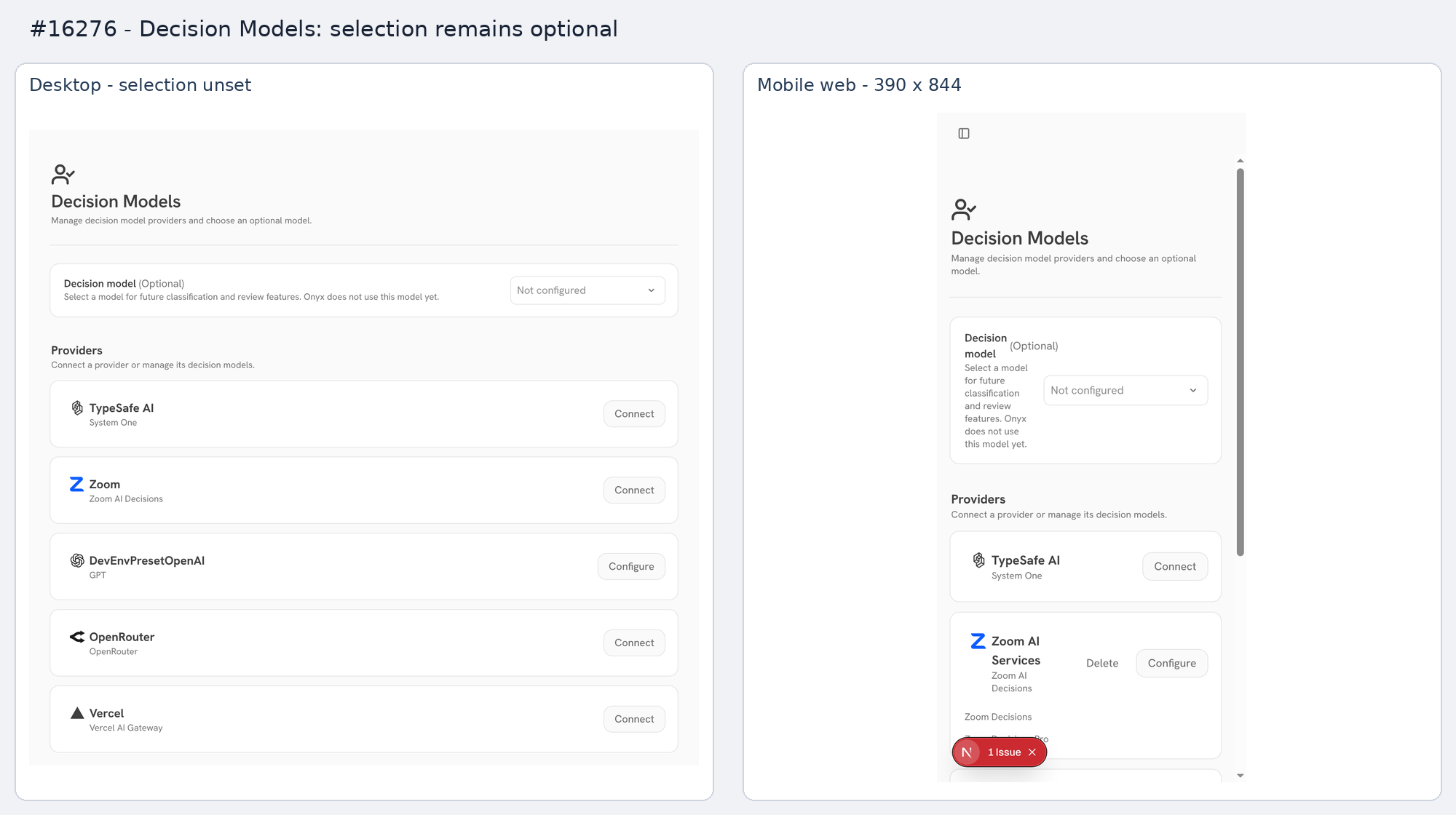 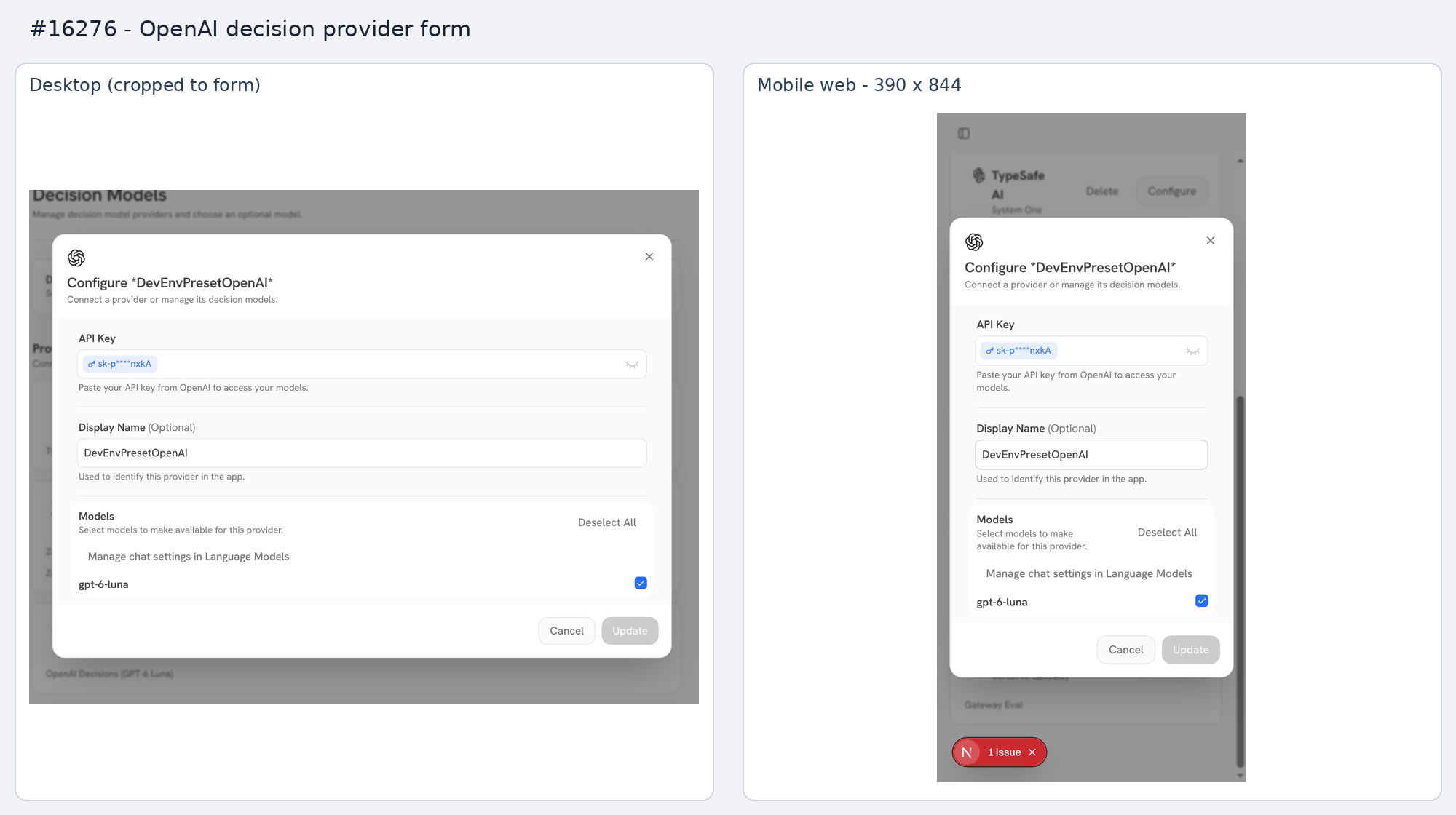 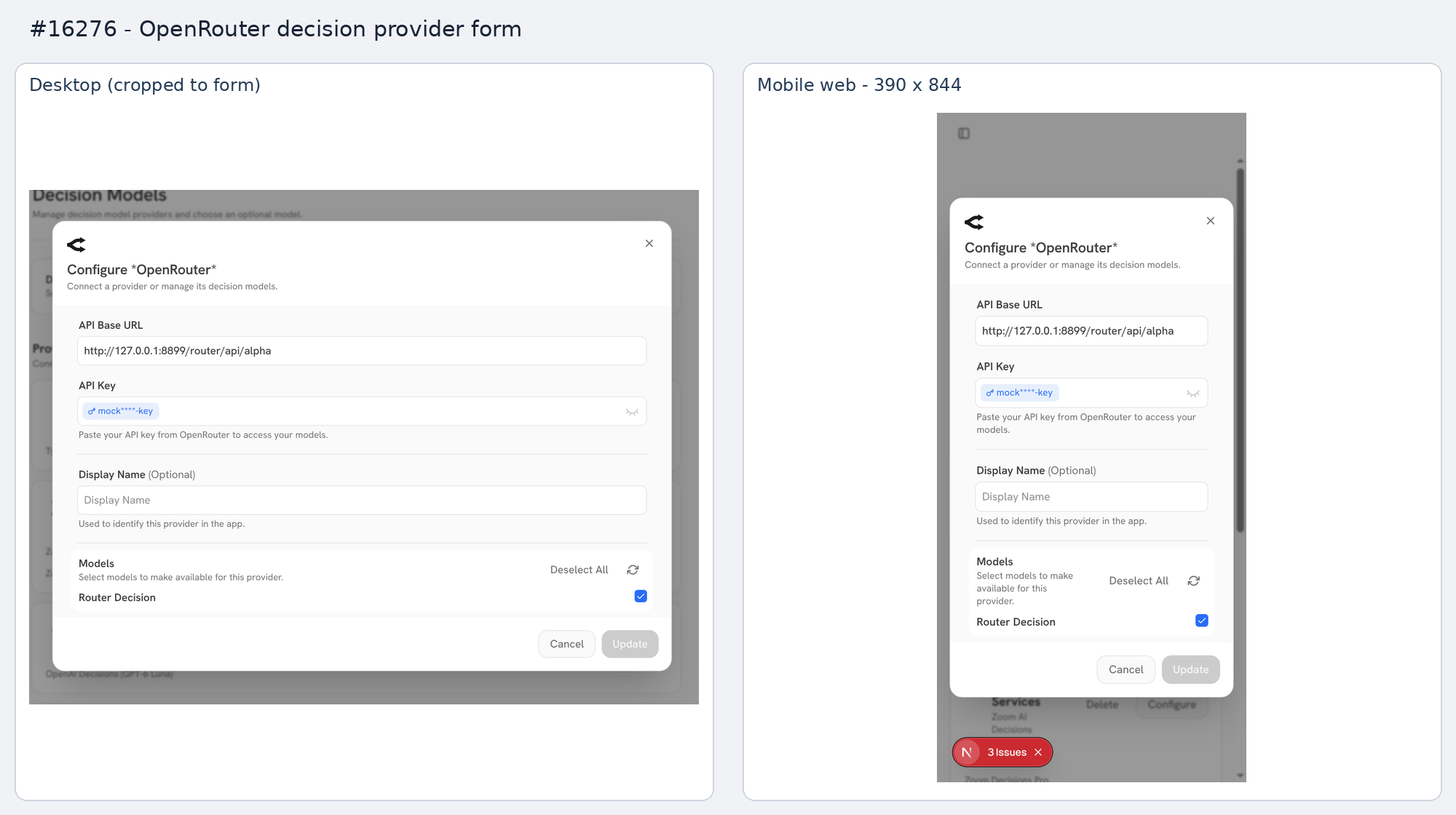  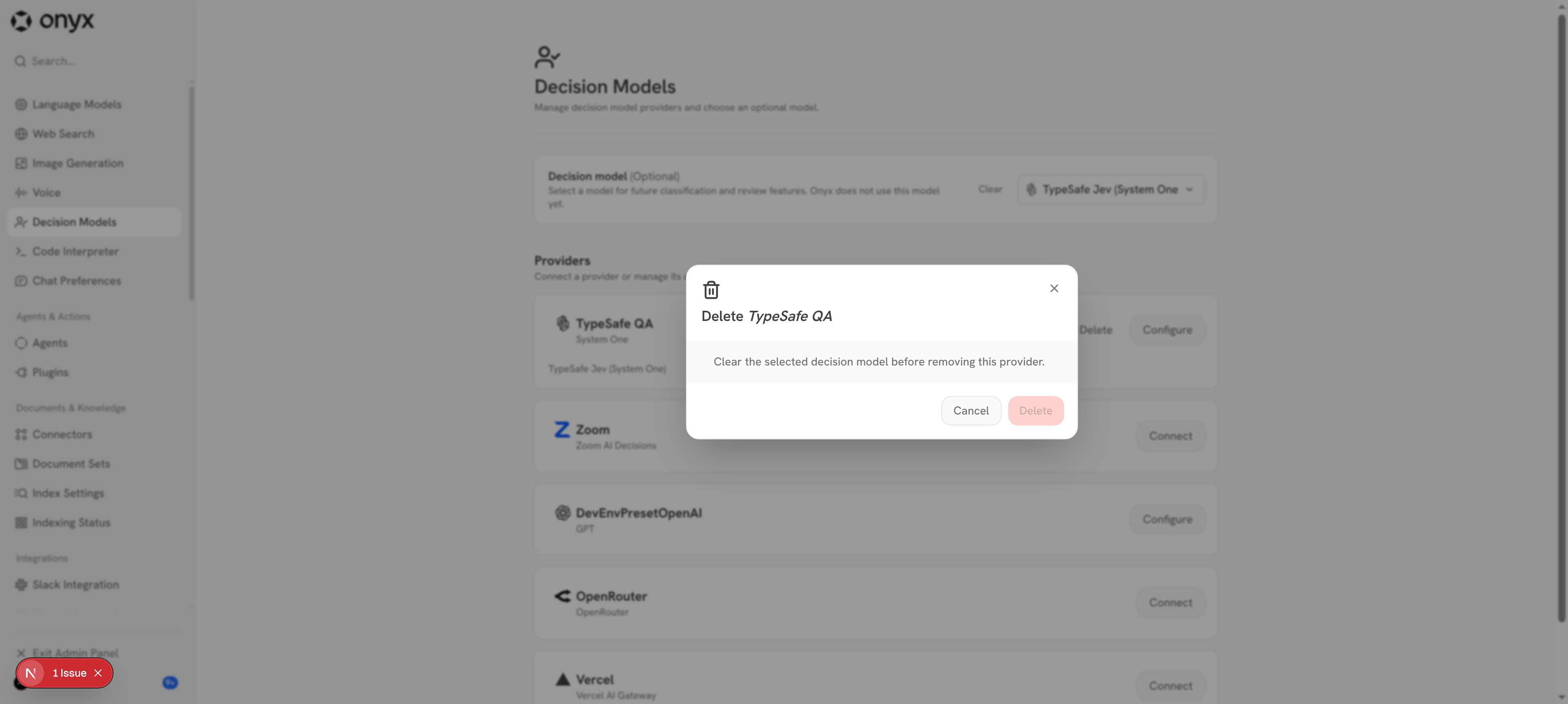 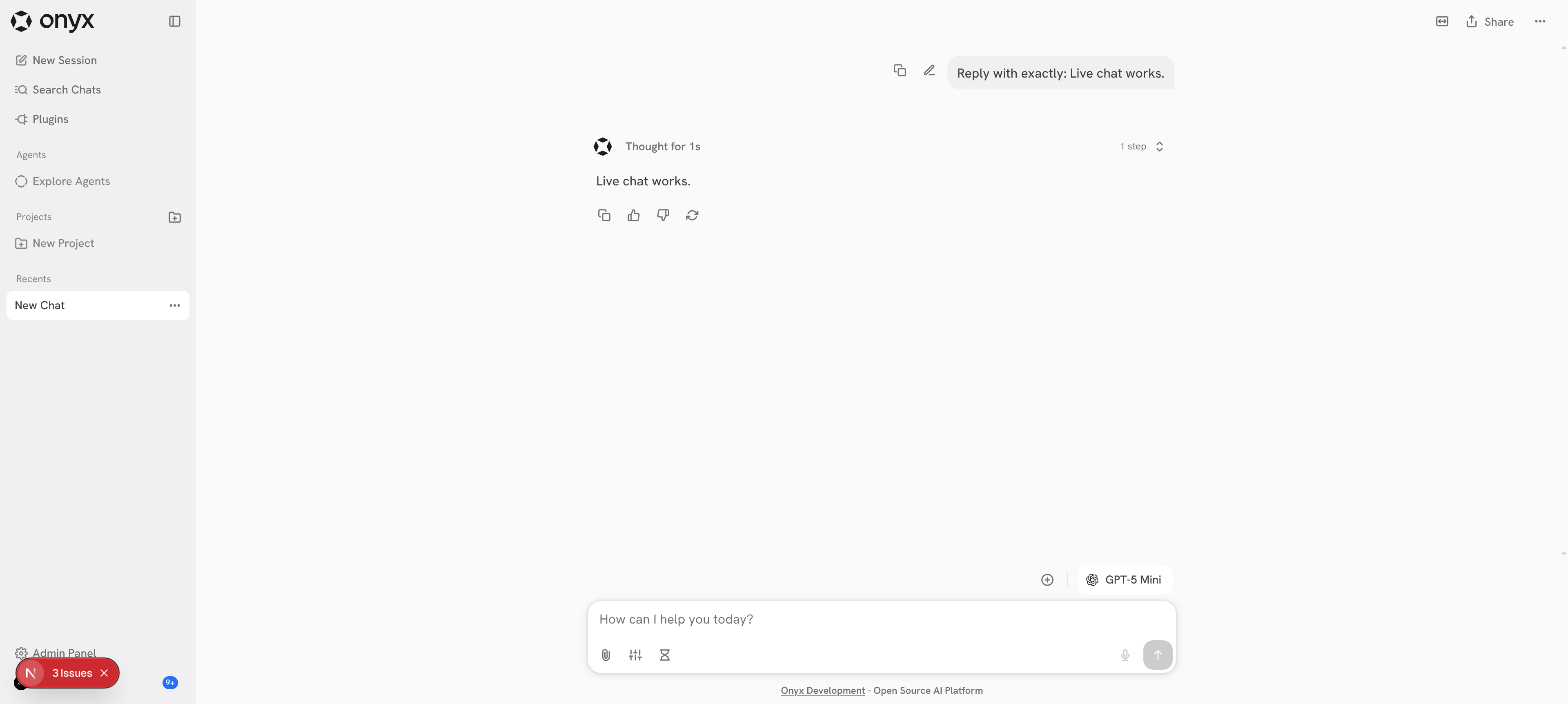 ## Fix retest (`78cf4ccb12`) `37c248ec04` fixes two bugs found by the stack test: - Decision Models showed a deleted provider (e.g. Zoom removed on Voice) as Configure/Delete until a full reload. `useAdminLanguageModels` now takes `{ revalidateIfStale }`; Decision Models passes `true`, so the cached provider list refetches on mount. - Configure headings rendered literal asterisks (`Configure *Vercel AI Gateway*`). `DecisionProviderModal` now wraps the title in `markdown()`, like the shared LLM modal. Retested in the UI, no page reloads: - Passed: Zoom connected on Voice and Decision Models, selection cleared, Zoom disconnected on Voice. Sidebar navigation to Decision Models showed **Connect**. - Passed: a Gateway connection made on Language Models showed **Configure** on Decision Models. - Passed: Gateway and OpenAI Configure headings show no asterisks. - Passed: both pages load, and display-name edits save and persist. - Jest: new regression test for a stale cached provider list, and a heading assertion. 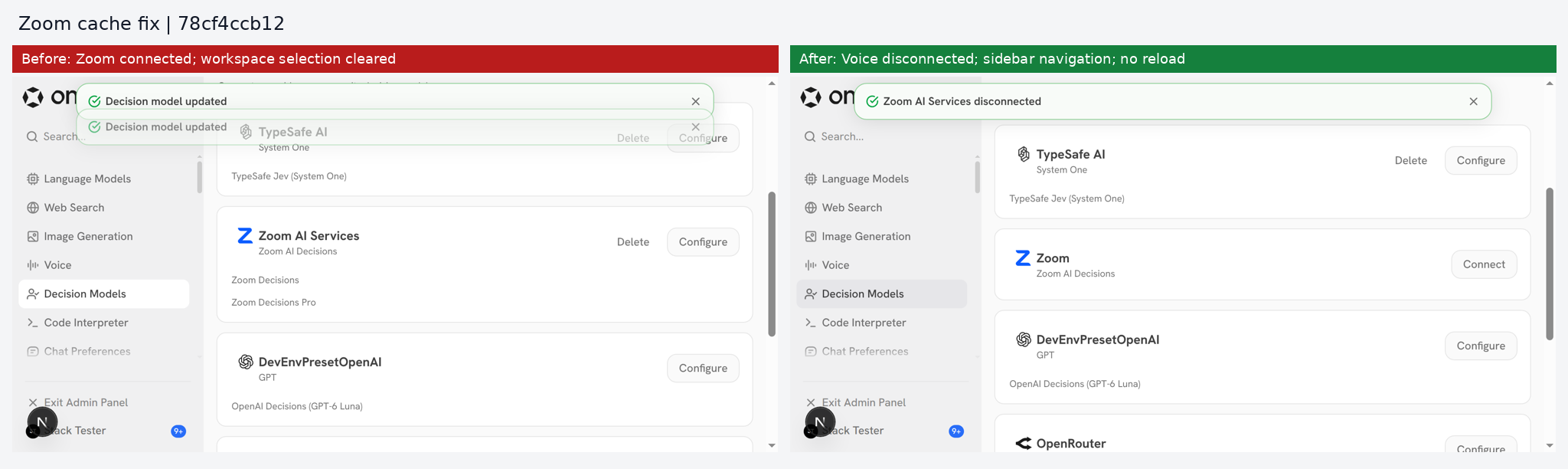  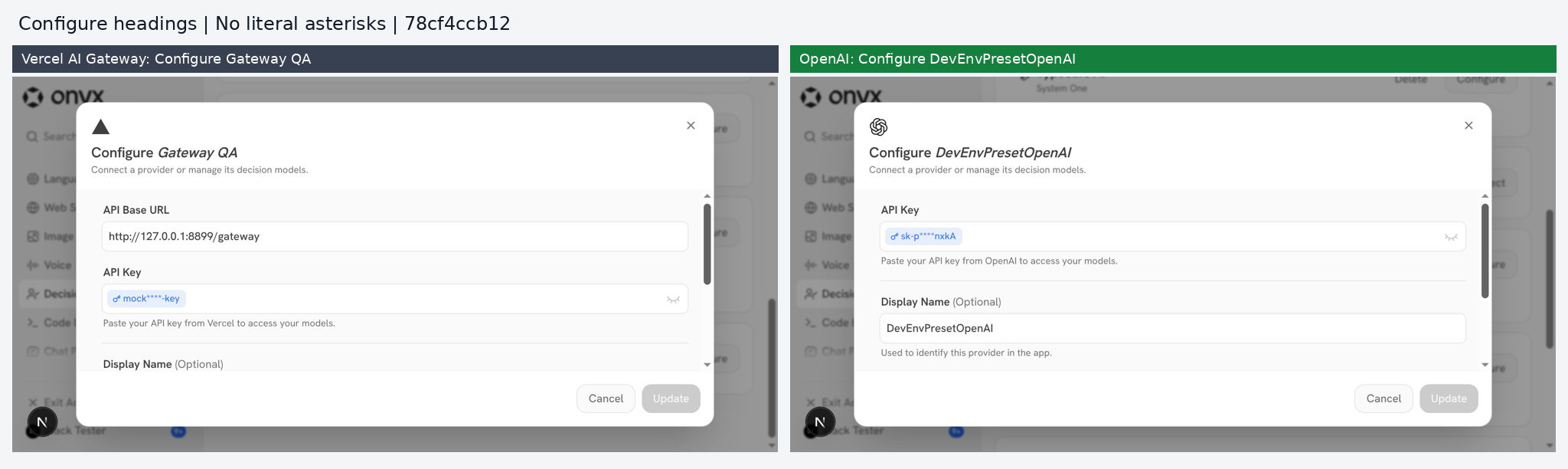 ## Stack PR 2 of 4: #16262 → **#16276** → #16280 → #16284. Link to Devin session: https://app.devin.ai/sessions/39d77bde91c34b75922bb05c02b93b90 Open in Devin Desktop: https://app.devin.ai/desktop/session/39d77bde91c34b75922bb05c02b93b90?variant=devin Requested by: @rohoswagger
React Integration Testing Guide
Comprehensive guide for writing integration tests in the Onyx web application using Jest and React Testing Library.
Playwright end-to-end tests live under
web/tests/e2e/. Seeweb/tests/e2e/README.mdfor the rules that apply there (Page Object Model, auto-retrying matchers).
Table of Contents
- Running Tests
- Core Concepts
- Writing Tests
- Query Selectors
- User Interactions
- Async Operations
- Mocking
- Common Patterns
- Testing Philosophy
- Troubleshooting
Running Tests
# Run all tests
bun run test

# Run specific test file
bun run test -- EmailPasswordForm.test

# Run tests matching pattern
bun run test -- --testPathPattern="auth"

# Run without coverage
bun run test -- --no-coverage

# Run in watch mode
bun run test -- --watch

# Run with verbose output
bun run test -- --verbose
Core Concepts
Test Structure
Tests are co-located with source files for easy discovery and maintenance:
src/app/auth/login/
├── EmailPasswordForm.tsx
└── EmailPasswordForm.test.tsx
Test Anatomy
Every test follows this structure:
import { render, screen, setupUser, waitFor } from "@tests/setup/test-utils";
import MyComponent from "./MyComponent";

test("descriptive test name explaining user behavior", async () => {
  // 1. Setup - Create user, mock APIs
  const user = setupUser();
  const fetchSpy = jest.spyOn(global, "fetch");

  fetchSpy.mockResolvedValueOnce({
    ok: true,
    json: async () => ({ data: "value" }),
  } as Response);

  // 2. Render - Display the component
  render(<MyComponent />);

  // 3. Act - Simulate user interactions
  await user.type(screen.getByRole("textbox"), "test input");
  await user.click(screen.getByRole("button", { name: /submit/i }));

  // 4. Assert - Verify expected outcomes
  await waitFor(() => {
    expect(screen.getByText(/success/i)).toBeInTheDocument();
  });

  // 5. Cleanup - Restore mocks
  fetchSpy.mockRestore();
});
setupUser() - Automatic act() Wrapping
ALWAYS use setupUser() instead of userEvent.setup()
// ✅ Correct - Automatic act() wrapping
const user = setupUser();
await user.click(button);
await user.type(input, "text");

// ❌ Wrong - Manual act() required, verbose
const user = userEvent.setup();
await act(async () => {
  await user.click(button);
});
The setupUser() helper automatically wraps all user interactions in React's act() to prevent warnings and ensure proper state updates.
Writing Tests
Query Selectors
Use queries in this priority order (most accessible first):
1. Role Queries (Preferred)
// Buttons
screen.getByRole("button", { name: /submit/i });
screen.getByRole("button", { name: /cancel/i });

// Text inputs
screen.getByRole("textbox", { name: /email/i });

// Checkboxes
screen.getByRole("checkbox", { name: /remember me/i });

// Links
screen.getByRole("link", { name: /learn more/i });

// Headings
screen.getByRole("heading", { name: /welcome/i });
2. Label Queries
// For form inputs with labels
screen.getByLabelText(/password/i);
screen.getByLabelText(/email address/i);
3. Placeholder Queries
// When no label exists
screen.getByPlaceholderText(/enter email/i);
4. Text Queries
// For non-interactive text
screen.getByText(/welcome back/i);
screen.getByText(/error occurred/i);
Query Variants
// getBy - Throws error if not found (immediate)
screen.getByRole("button");

// queryBy - Returns null if not found (checking absence)
expect(screen.queryByText(/error/i)).not.toBeInTheDocument();

// findBy - Returns promise, waits for element (async)
expect(await screen.findByText(/success/i)).toBeInTheDocument();

// getAllBy - Returns array of all matches
const inputs = screen.getAllByRole("textbox");
Query Selectors: The Wrong Way
❌ Avoid these anti-patterns:
// DON'T query by test IDs
screen.getByTestId("submit-button");

// DON'T query by class names
container.querySelector(".submit-btn");

// DON'T query by element types
container.querySelector("button");
User Interactions
Basic Interactions
const user = setupUser();

// Click
await user.click(screen.getByRole("button", { name: /submit/i }));

// Type text
await user.type(screen.getByRole("textbox"), "test input");

// Clear and type
await user.clear(input);
await user.type(input, "new value");

// Check/uncheck checkbox
await user.click(screen.getByRole("checkbox"));

// Select from dropdown
await user.selectOptions(screen.getByRole("combobox"), "option-value");

// Upload file
const file = new File(["content"], "test.txt", { type: "text/plain" });
const input = screen.getByLabelText(/upload/i);
await user.upload(input, file);
Form Interactions
test("user can fill and submit form", async () => {
  const user = setupUser();

  render(<ContactForm />);

  await user.type(screen.getByLabelText(/name/i), "John Doe");
  await user.type(screen.getByLabelText(/email/i), "john@example.com");
  await user.type(screen.getByLabelText(/message/i), "Hello!");
  await user.click(screen.getByRole("button", { name: /send/i }));

  await waitFor(() => {
    expect(screen.getByText(/message sent/i)).toBeInTheDocument();
  });
});
Async Operations
Handling Async State Updates
Rule: After triggering state changes, always wait for UI updates before asserting.
Pattern 1: findBy Queries (Simplest)
// Element appears after async operation
await user.click(createButton);
expect(await screen.findByRole("textbox")).toBeInTheDocument();
Pattern 2: waitFor (Complex Assertions)
await user.click(submitButton);

await waitFor(() => {
  expect(screen.getByText("Success")).toBeInTheDocument();
  expect(screen.getByText("Count: 5")).toBeInTheDocument();
});
Pattern 3: waitForElementToBeRemoved
await user.click(deleteButton);

await waitForElementToBeRemoved(() => screen.queryByText(/item name/i));
Common Async Mistakes
// ❌ Wrong - getBy immediately after state change
await user.click(button);
expect(screen.getByText("Updated")).toBeInTheDocument(); // May fail!

// ✅ Correct - Wait for state update
await user.click(button);
expect(await screen.findByText("Updated")).toBeInTheDocument();

// ❌ Wrong - Multiple getBy calls without waiting
await user.click(button);
expect(screen.getByText("Success")).toBeInTheDocument();
expect(screen.getByText("Data loaded")).toBeInTheDocument();

// ✅ Correct - Single waitFor with multiple assertions
await user.click(button);
await waitFor(() => {
  expect(screen.getByText("Success")).toBeInTheDocument();
  expect(screen.getByText("Data loaded")).toBeInTheDocument();
});
Mocking
Mocking fetch API
IMPORTANT: Always document which endpoint each mock corresponds to using comments.
let fetchSpy: jest.SpyInstance;

beforeEach(() => {
  fetchSpy = jest.spyOn(global, "fetch");
});

afterEach(() => {
  fetchSpy.mockRestore();
});

test("fetches data successfully", async () => {
  // Mock GET /api/data
  fetchSpy.mockResolvedValueOnce({
    ok: true,
    json: async () => ({ data: [1, 2, 3] }),
  } as Response);

  render(<MyComponent />);

  await waitFor(() => {
    expect(fetchSpy).toHaveBeenCalledWith("/api/data");
  });
});
Why comment the endpoint? Sequential mocks can be confusing. Comments make it clear which API call each mock corresponds to, making tests easier to understand and maintain.
Multiple API Calls
Pattern: Document each endpoint with a comment, then verify it was called correctly.
test("handles multiple API calls", async () => {
  const user = setupUser();

  // Mock GET /api/items
  fetchSpy.mockResolvedValueOnce({
    ok: true,
    json: async () => ({ items: [] }),
  } as Response);

  // Mock POST /api/items
  fetchSpy.mockResolvedValueOnce({
    ok: true,
    json: async () => ({ id: 1, name: "New Item" }),
  } as Response);

  render(<MyComponent />);

  // Verify GET was called
  await waitFor(() => {
    expect(fetchSpy).toHaveBeenCalledWith("/api/items");
  });

  await user.click(screen.getByRole("button", { name: /create/i }));

  // Verify POST was called
  await waitFor(() => {
    expect(fetchSpy).toHaveBeenCalledWith(
      "/api/items",
      expect.objectContaining({ method: "POST" })
    );
  });
});
Three API calls example:
test("test, create, and set as default", async () => {
  const user = setupUser();

  // Mock POST /api/llm/test
  fetchSpy.mockResolvedValueOnce({
    ok: true,
    json: async () => ({}),
  } as Response);

  // Mock PUT /api/llm/provider?is_creation=true
  fetchSpy.mockResolvedValueOnce({
    ok: true,
    json: async () => ({ id: 5, name: "New Provider" }),
  } as Response);

  // Mock POST /api/llm/provider/5/default
  fetchSpy.mockResolvedValueOnce({
    ok: true,
    json: async () => ({}),
  } as Response);

  render(<MyForm />);

  await user.type(screen.getByLabelText(/name/i), "New Provider");
  await user.click(screen.getByRole("button", { name: /create/i }));

  // Verify all three endpoints were called
  await waitFor(() => {
    expect(fetchSpy).toHaveBeenCalledWith(
      "/api/llm/test",
      expect.objectContaining({ method: "POST" })
    );
    expect(fetchSpy).toHaveBeenCalledWith(
      "/api/llm/provider",
      expect.objectContaining({ method: "PUT" })
    );
    expect(fetchSpy).toHaveBeenCalledWith(
      "/api/llm/provider/5/default",
      expect.objectContaining({ method: "POST" })
    );
  });
});
Verifying Request Body
test("sends correct data", async () => {
  const user = setupUser();

  fetchSpy.mockResolvedValueOnce({
    ok: true,
    json: async () => ({}),
  } as Response);

  render(<MyForm />);

  await user.type(screen.getByLabelText(/name/i), "Test");
  await user.click(screen.getByRole("button", { name: /submit/i }));

  await waitFor(() => {
    expect(fetchSpy).toHaveBeenCalled();
  });

  const callArgs = fetchSpy.mock.calls[0];
  const requestBody = JSON.parse(callArgs[1].body);

  expect(requestBody).toEqual({
    name: "Test",
    active: true,
  });
});
Mocking Errors
test("displays error message on failure", async () => {
  // Mock GET /api/data (network error)
  fetchSpy.mockRejectedValueOnce(new Error("Network error"));

  render(<MyComponent />);

  await waitFor(() => {
    expect(screen.getByText(/failed to load/i)).toBeInTheDocument();
  });
});

test("handles API error response", async () => {
  // Mock POST /api/items (server error)
  fetchSpy.mockResolvedValueOnce({
    ok: false,
    status: 500,
  } as Response);

  render(<MyComponent />);

  await waitFor(() => {
    expect(screen.getByText(/something went wrong/i)).toBeInTheDocument();
  });
});
Mocking Next.js Router
// At top of test file
jest.mock("next/navigation", () => ({
  useRouter: () => ({
    push: jest.fn(),
    back: jest.fn(),
    refresh: jest.fn(),
  }),
  usePathname: () => "/current-path",
}));
Common Patterns
Testing CRUD Operations
describe("User Management", () => {
  test("creates new user", async () => {
    const user = setupUser();

    fetchSpy.mockResolvedValueOnce({
      ok: true,
      json: async () => ({ id: 1, name: "New User" }),
    } as Response);

    render(<UserForm />);

    await user.type(screen.getByLabelText(/name/i), "New User");
    await user.click(screen.getByRole("button", { name: /create/i }));

    await waitFor(() => {
      expect(screen.getByText(/user created/i)).toBeInTheDocument();
    });
  });

  test("edits existing user", async () => {
    const user = setupUser();

    fetchSpy.mockResolvedValueOnce({
      ok: true,
      json: async () => ({ id: 1, name: "Updated User" }),
    } as Response);

    render(<UserForm initialData={{ id: 1, name: "Old Name" }} />);

    await user.clear(screen.getByLabelText(/name/i));
    await user.type(screen.getByLabelText(/name/i), "Updated User");
    await user.click(screen.getByRole("button", { name: /save/i }));

    await waitFor(() => {
      expect(screen.getByText(/user updated/i)).toBeInTheDocument();
    });
  });

  test("deletes user", async () => {
    const user = setupUser();

    fetchSpy.mockResolvedValueOnce({
      ok: true,
      json: async () => ({}),
    } as Response);

    render(<UserList />);

    await waitFor(() => {
      expect(screen.getByText("John Doe")).toBeInTheDocument();
    });

    await user.click(screen.getByRole("button", { name: /delete/i }));

    await waitFor(() => {
      expect(screen.queryByText("John Doe")).not.toBeInTheDocument();
    });
  });
});
Testing Conditional Rendering
test("shows edit form when edit button clicked", async () => {
  const user = setupUser();

  render(<MyComponent />);

  expect(screen.queryByRole("textbox")).not.toBeInTheDocument();

  await user.click(screen.getByRole("button", { name: /edit/i }));

  expect(await screen.findByRole("textbox")).toBeInTheDocument();
});

test("toggles between states", async () => {
  const user = setupUser();

  render(<Toggle />);

  const button = screen.getByRole("button", { name: /show details/i });

  await user.click(button);
  expect(await screen.findByText(/details content/i)).toBeInTheDocument();

  await user.click(button);
  expect(screen.queryByText(/details content/i)).not.toBeInTheDocument();
});
Testing Lists and Tables
test("displays list of items", async () => {
  fetchSpy.mockResolvedValueOnce({
    ok: true,
    json: async () => ({
      items: [
        { id: 1, name: "Item 1" },
        { id: 2, name: "Item 2" },
        { id: 3, name: "Item 3" },
      ],
    }),
  } as Response);

  render(<ItemList />);

  await waitFor(() => {
    expect(screen.getByText("Item 1")).toBeInTheDocument();
    expect(screen.getByText("Item 2")).toBeInTheDocument();
    expect(screen.getByText("Item 3")).toBeInTheDocument();
  });
});

test("filters items", async () => {
  const user = setupUser();

  render(<FilterableList items={mockItems} />);

  await user.type(screen.getByRole("searchbox"), "specific");

  await waitFor(() => {
    expect(screen.getByText("Specific Item")).toBeInTheDocument();
    expect(screen.queryByText("Other Item")).not.toBeInTheDocument();
  });
});
Testing Validation
test("shows validation errors", async () => {
  const user = setupUser();

  render(<LoginForm />);

  await user.click(screen.getByRole("button", { name: /submit/i }));

  await waitFor(() => {
    expect(screen.getByText(/email is required/i)).toBeInTheDocument();
    expect(screen.getByText(/password is required/i)).toBeInTheDocument();
  });
});

test("clears validation on valid input", async () => {
  const user = setupUser();

  render(<LoginForm />);

  await user.click(screen.getByRole("button", { name: /submit/i }));

  await waitFor(() => {
    expect(screen.getByText(/email is required/i)).toBeInTheDocument();
  });

  await user.type(screen.getByLabelText(/email/i), "valid@email.com");

  await waitFor(() => {
    expect(screen.queryByText(/email is required/i)).not.toBeInTheDocument();
  });
});
Testing Philosophy
What to Test
✅ Test user-visible behavior:
- Forms can be filled and submitted
- Buttons trigger expected actions
- Success/error messages appear
- Navigation works correctly
- Data is displayed after loading
- Validation errors show and clear appropriately
✅ Test integration points:
- API calls are made with correct parameters
- Responses are handled properly
- Error states are handled
- Loading states appear
❌ Don't test implementation details:
- Internal state values
- Component lifecycle methods
- CSS class names
- Specific React hooks being used
Test Naming
Write test names that describe user behavior:
// ✅ Good - Describes what user can do
test("user can create new prompt", async () => {});
test("shows error when API call fails", async () => {});
test("filters items by search term", async () => {});

// ❌ Bad - Implementation-focused
test("handleSubmit is called", async () => {});
test("state updates correctly", async () => {});
test("renders without crashing", async () => {});
Minimal Mocking
Only mock external dependencies:
// ✅ Mock external APIs
jest.spyOn(global, "fetch");

// ✅ Mock Next.js router
jest.mock("next/navigation");

// ✅ Mock problematic packages
// (configured in tests/setup/__mocks__)

// ❌ Don't mock application code
// ❌ Don't mock component internals
// ❌ Don't mock utility functions
Troubleshooting
"Not wrapped in act()" Warning
Solution: Always use setupUser() instead of userEvent.setup()
// ✅ Correct
const user = setupUser();

// ❌ Wrong
const user = userEvent.setup();
"Unable to find element" Error
Solution: Element hasn't appeared yet, use findBy or waitFor
// ❌ Wrong - getBy doesn't wait
await user.click(button);
expect(screen.getByText("Success")).toBeInTheDocument();

// ✅ Correct - findBy waits
await user.click(button);
expect(await screen.findByText("Success")).toBeInTheDocument();
"Multiple elements found" Error
Solution: Be more specific with your query
// ❌ Too broad
screen.getByRole("button");

// ✅ Specific
screen.getByRole("button", { name: /submit/i });
Test Times Out
Causes:
- Async operation never completes
- Waiting for element that never appears
- Missing mock for API call
Solutions:
// Check fetch is mocked
expect(fetchSpy).toHaveBeenCalled()

// Use queryBy to check if element exists
expect(screen.queryByText("Text")).toBeInTheDocument()

// Verify mock is set up before render
fetchSpy.mockResolvedValueOnce(...)
render(<Component />)
Examples
See comprehensive test examples:
src/components/admin/connectors/AccessTypeForm.test.tsx- Form defaults that depend on permissionssrc/views/SkillsPage.test.tsx- Optimistic updates, conditional renderingsrc/sections/modals/skills/CreateSkillModal.test.tsx- Modal workflows, pending and error states
Built-in Mocks
Only essential mocks in tests/setup/__mocks__/:
UserProvider- Removes auth requirement for testsreact-markdown/remark-gfm- ESM compatibility
See tests/setup/__mocks__/README.md for details.