mirror of
https://github.com/DXC-0/linux-hdr-guide.git
synced 2026-10-19 00:39:46 -05:00

273 lines
11 KiB
Markdown
273 lines
11 KiB
Markdown
### 📘 Linux HDR Guide
|
|
|
|
- [Preparation](https://github.com/DXC-0/Linux-HDR-Guide?tab=readme-ov-file#-preparation)
|
|
- [HDR Video Streaming](https://github.com/DXC-0/Linux-HDR-Guide?tab=readme-ov-file#-hdr-video-streaming-on-linux)
|
|
- [AutoHDR for MPV (RTX Video HDR Equivalent)](https://github.com/DXC-0/Linux-HDR-Guide?tab=readme-ov-file#-autohdr-for-mpv-rtx-video-hdr-equivalent)
|
|
- [HDR in Video Games with Proton](https://github.com/DXC-0/Linux-HDR-Guide?tab=readme-ov-file#-hdr-supported-games)
|
|
- [AutoHDR with Reshade and Proton](https://github.com/DXC-0/Linux-HDR-Guide?tab=readme-ov-file#-auto-hdr-in-sdr-games)
|
|
|
|
---
|
|
|
|
### 🔧 Preparation
|
|
|
|
You will need the following tools installed on you distribution to get HDR working on Linux:
|
|
|
|
- [KDE Plasma ( > 6.4)](https://kde.org/plasma-desktop/)
|
|
- [Vk-Hdr-Layer](https://github.com/Zamundaaa/VK_hdr_layer) (check the vulkan layer part)
|
|
- [ProtonGE](https://github.com/GloriousEggroll/proton-ge-custom) or [ProtonCachy](https://github.com/CachyOS/proton-cachyos)
|
|
- [Chromium based browser](https://github.com/chromium/chromium)
|
|
- [MPV](https://mpv.io/)
|
|
|
|
➡️ Make sure you have the latest [Nvidia-Open](https://github.com/NVIDIA/open-gpu-kernel-modules) drivers or the most recent [Mesa](https://mesa3d.org/) version. Properly install the codecs and prerequisites according to your distribution.
|
|
|
|
---
|
|
|
|
### 📦 Vulkan HDR Layer Requirements
|
|
|
|
If your distribution's driver version is below the requirements above, you must install `VK_HDR_LAYER` and set `ENABLE_HDR_WSI=1` (per-application or globally for your desktop environment) to enable HDR support.
|
|
|
|
| GPU | Version to Remove VK_HDR_LAYER |
|
|
|-----|-------------------------------|
|
|
| **NVIDIA** | 610.43.02+ |
|
|
| **AMD** | Mesa 25.1+ |
|
|
|
|
### Verification Commands
|
|
|
|
```bash
|
|
nvidia-smi | grep "Driver Version" #Nvidia
|
|
glxinfo | grep "OpenGL version" #AMD
|
|
|
|
vulkaninfo | grep -E "swapchain_colorspace|hdr_metadata"
|
|
|
|
ls /usr/share/vulkan/implicit_layer.d/
|
|
```
|
|
---
|
|
|
|
### 🎬 HDR Video Streaming on Linux
|
|
|
|
HDR streaming is possible on Linux, but the features are still limited and require a carefully configured setup. The most reliable experience currently comes from using **MPV** under **KDE Plasma 6.4+** with proper GPU support. <br>
|
|
<br>
|
|
Required components are : [KDE](https://kde.org/plasma-desktop/), [Chromium](https://github.com/chromium/chromium) and [mpv](https://mpv.io/)
|
|
|
|
#### ➡️ Option 1: Streaming via Chromium (Limited HDR)
|
|
|
|
Chromium offers experimental HDR support, but it's unstable and not ideal for platforms like Netflix.
|
|
|
|
```bash
|
|
chromium --enable-features=UseHDRTransferFunction,UseSkiaRenderer \
|
|
--use-gl=egl --ozone-platform=wayland
|
|
|
|
```
|
|
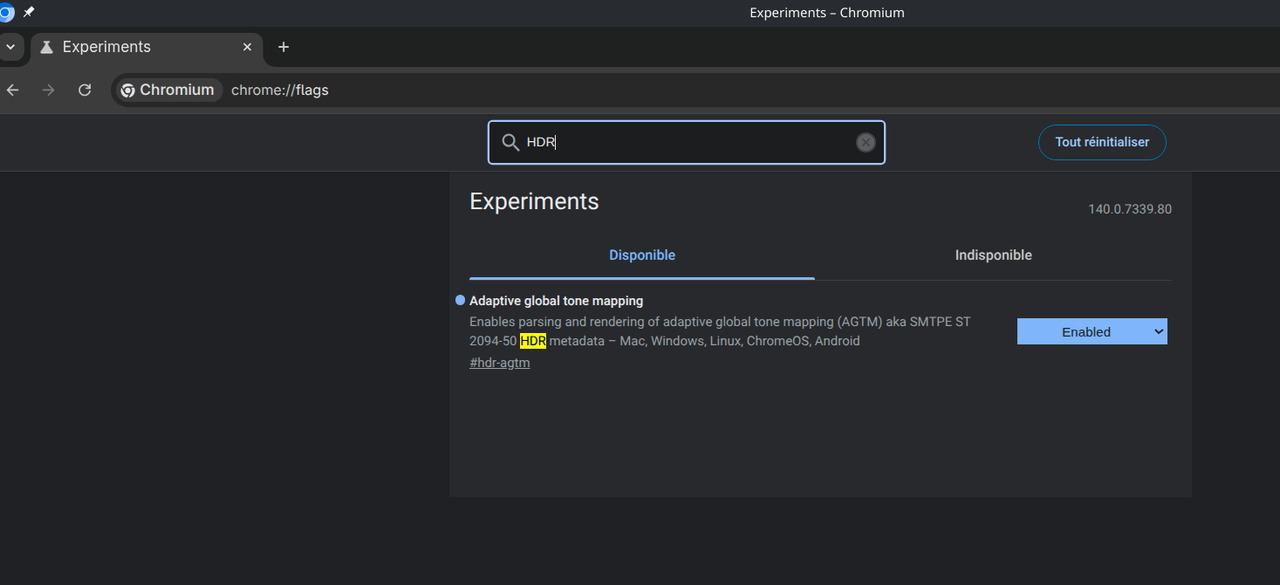
You can also permanently enable HDR in Chromium in the flags. Search for HDR and enable the experimental feature. (you will need to restart the browser)
|
|
</br>
|
|
|
|
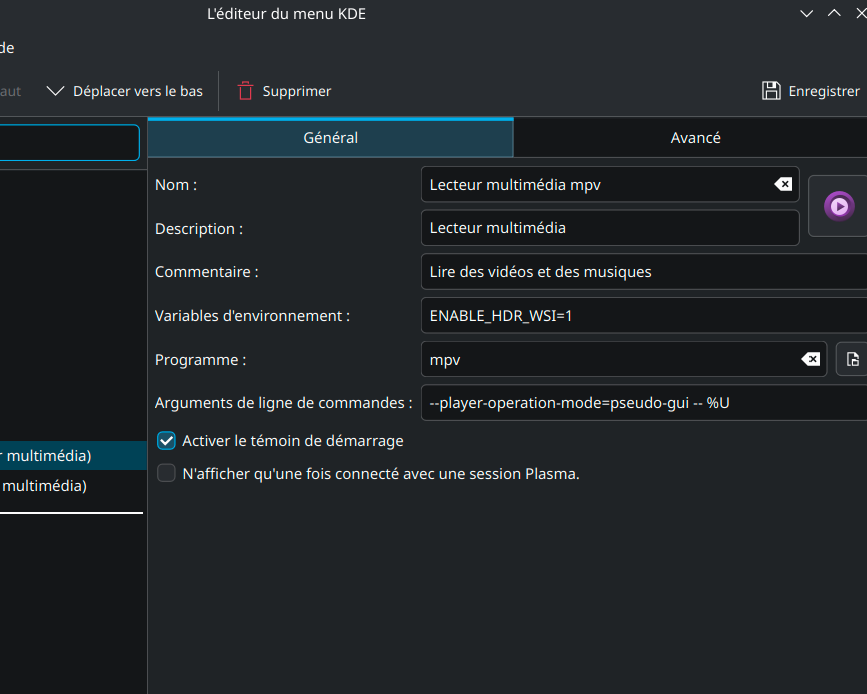
⚠️ **Depending on your case:** Add or omit the `ENABLE_HDR_WSI=1` environment variable.
|
|
|
|
|
|
[](https://postimg.cc/949STPzL)
|
|
|
|
|
|
#### ➡️ Option 2: Streaming via MPV (Recommended)
|
|
|
|
MPV offers the most reliable HDR experience on Linux thanks to its advanced tone mapping and passthrough capabilities.
|
|
|
|
📌 To enable HDR in MPV, edit your `mpv.conf` file
|
|
```
|
|
tone-mapping=hdr
|
|
target-peak=1000
|
|
hdr-compute-peak=yes
|
|
```
|
|
|
|
📌 Ajust the target peak with the maximum luminosity 10% of your screen.
|
|
These settings ensure proper HDR rendering and dynamic peak brightness adjustment (you can check monitor reference on [TFTcentral](https://tftcentral.co.uk/) or [RTINGS](https://www.rtings.com/monitor) - If the whites are too bright or exaggerated, lower the value until you do not lose in constrast / detail.
|
|
</br>
|
|
|
|
⚠️ **Depending on your case:** Add or omit the `ENABLE_HDR_WSI=1` environment variable.
|
|
|
|
</br>
|
|
|
|
|
|
[](https://postimg.cc/34w01fr3)
|
|
|
|
</br>
|
|
|
|
📌 To watch an HDR video, simply open it with MPV as usual. Alternatively, you can paste the link to a YouTube video or another platform directly into MPV.
|
|
|
|
</br>
|
|
|
|
[](https://postimg.cc/gn6pRyWQ)
|
|
|
|
</br>
|
|
|
|
---
|
|
|
|
### 🎬 AutoHDR for MPV (RTX Video HDR Equivalent)
|
|
|
|
AutoHDR is a technology that automatically converts SDR (Standard Dynamic Range) content into HDR (High Dynamic Range), enhancing brightness, contrast, and color for a more vivid display. Reverse tonemapping works by reconstructing HDR-like details from SDR images, essentially estimating and restoring highlights and dynamic range that were previously compressed. Together, they allow older or non-HDR visuals to look more vibrant and immersive on modern screens.
|
|
|
|
With MPV you can get HDR rendering from SDR videos. It's quite similar to what Nvidia offers on Windows with its [RTX Video HDR](https://blogs.nvidia.com/blog/rtx-video-hdr-remix-studio-driver/). Of course, the result isn't as good as native HDR, but it will greatly enhance your videos in terms of contrast and brightness.
|
|
|
|
📌 To enable Auto-HDR in MPV, edit your `mpv.conf`
|
|
|
|
```
|
|
vo=gpu-next
|
|
gpu-api=vulkan
|
|
hdr-compute-peak=yes
|
|
hdr-peak-detect=yes
|
|
target-peak=1300
|
|
target-prim=bt.2020
|
|
target-trc=pq
|
|
inverse-tone-mapping=yes
|
|
tone-mapping=spline
|
|
tone-mapping-mode=auto
|
|
target-colorspace-hint=auto
|
|
gamut-mapping=desaturate
|
|
```
|
|
|
|
Replace the target-peak with the maximum peak brigtness of your screen (you can check monitor reference on [TFTcentral](https://tftcentral.co.uk/) or [RTINGS](https://www.rtings.com/monitor) - If the whites are too bright or exaggerated, lower the value until you do not lose in constrast / detail.
|
|
|
|
|
|
</br>
|
|
|
|
|
|
⚠️ **Depending on your case:** Add or omit the `ENABLE_HDR_WSI=1` environment variable.</br>
|
|
|
|
</br>
|
|
|
|
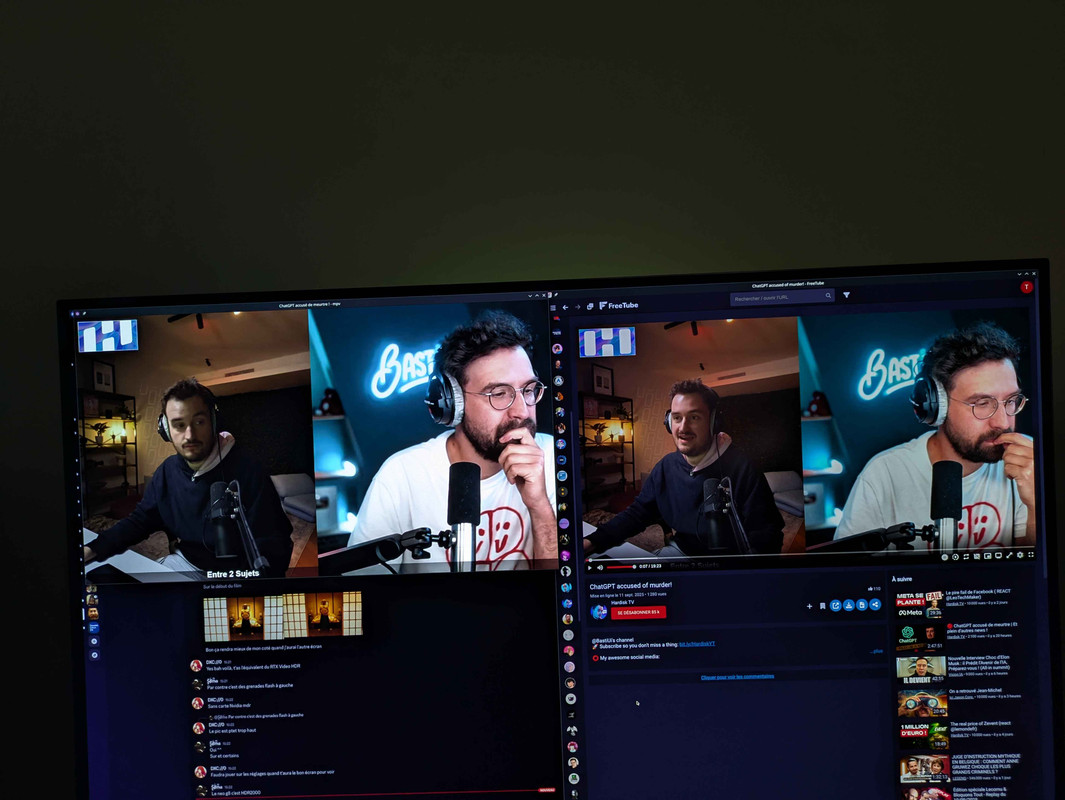
Here is an example comparing an SDR video and one with auto-HDR (Auto-HDR on the left, SDR on the right)
|
|
|
|
</br>
|
|
|
|
[](https://postimg.cc/gwVwqwCq)
|
|
|
|
</br>
|
|
|
|
---
|
|
|
|
### 🎮 HDR supported games:
|
|
|
|
To launch a game with HDR, select protonGE or ProtonCachy in the compatibility options :
|
|
|
|
[](https://postimg.cc/mhm7d7Xr)
|
|
|
|
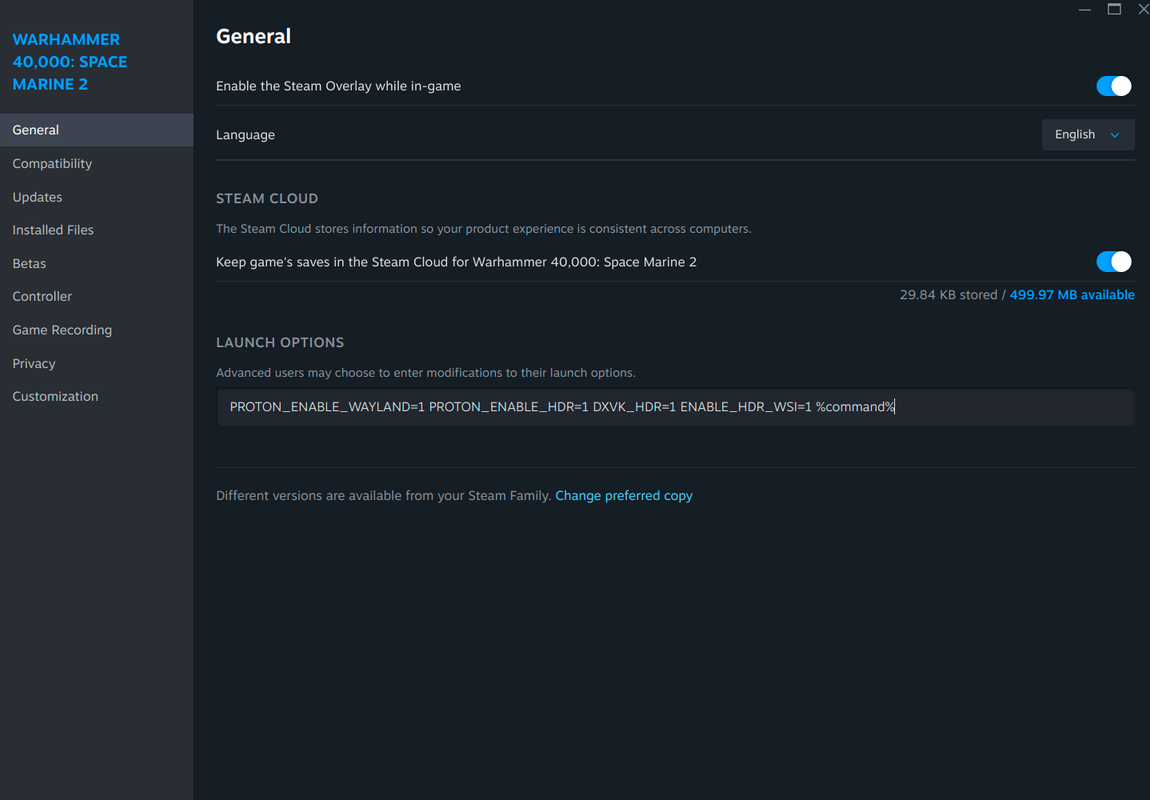
Paste this on steam launch options :
|
|
|
|
- Proton-Cachy : ``` PROTON_ENABLE_WAYLAND=1 PROTON_ENABLE_HDR=1 DXVK_HDR=1 %command%```
|
|
|
|
- ProtonGE : ``` PROTON_ENABLE_WAYLAND=1 PROTON_ENABLE_HDR=1 %command%```
|
|
|
|
- Full (+vklayer) : ``` PROTON_ENABLE_WAYLAND=1 PROTON_ENABLE_HDR=1 DXVK_HDR=1 ENABLE_HDR_WSI=1 %command%```
|
|
|
|
</br>
|
|
|
|
When you are in a game, check in the options if the **HDR is available** and activate it.
|
|
Remember to adjust your gamma to avoid an overly denatured image.
|
|
|
|
</br>
|
|
|
|
|
|
[](https://postimg.cc/grNcv907)
|
|
|
|
---
|
|
|
|
### 🎮 Auto-HDR in SDR games:
|
|
|
|
Download reshade with full add-on support [here](https://reshade.me/downloads/ReShade_Setup_6.5.1_Addon.exe).
|
|
|
|
➡️ Launch this executable with wine or proton
|
|
|
|
[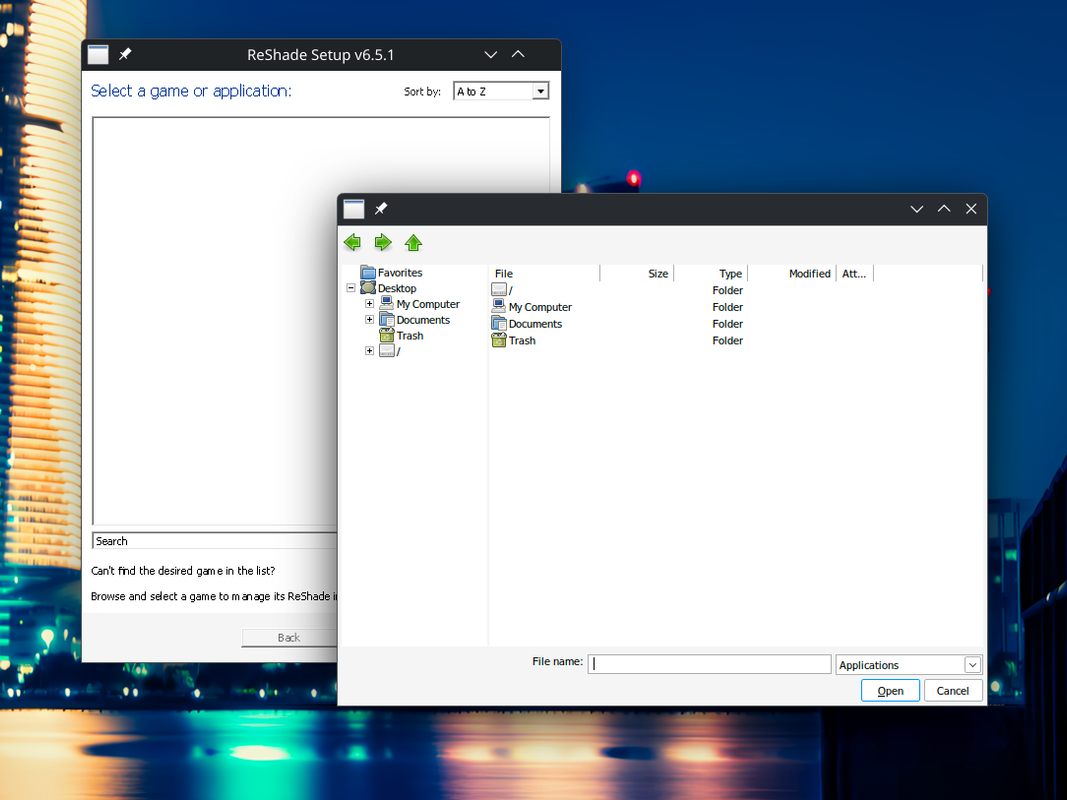](https://postimg.cc/BPJ9tr9J)
|
|
|
|
➡️ Open the directory of your steam game
|
|
|
|
[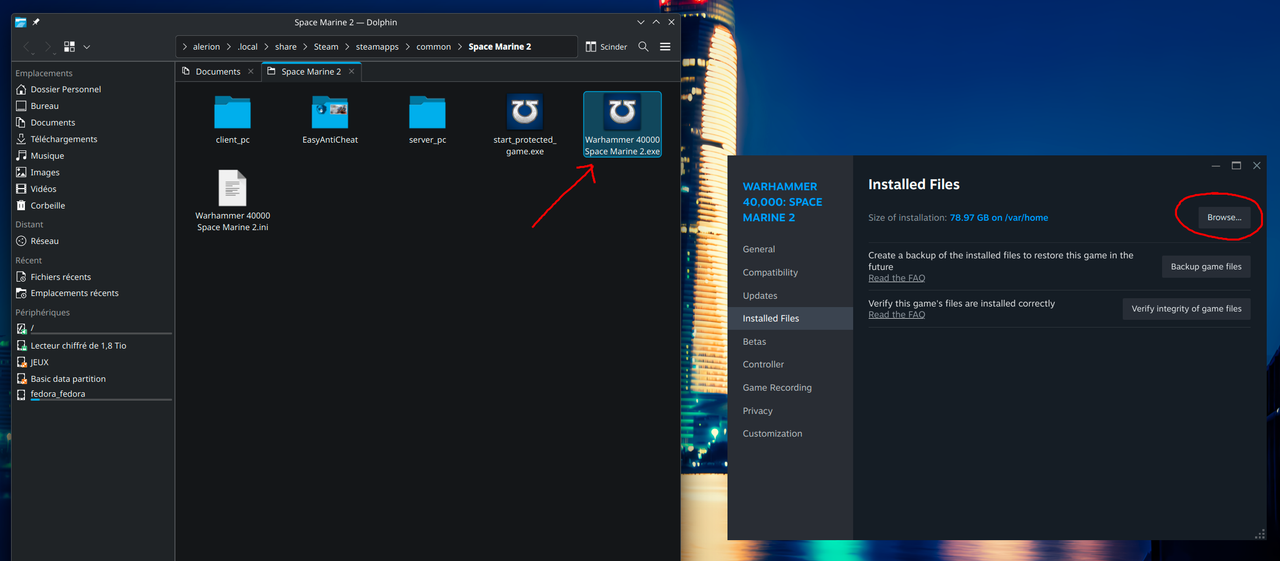](https://postimg.cc/4n1nwZ3b)
|
|
|
|
➡️ Pase the link and select the DirectX version of your game
|
|
|
|
[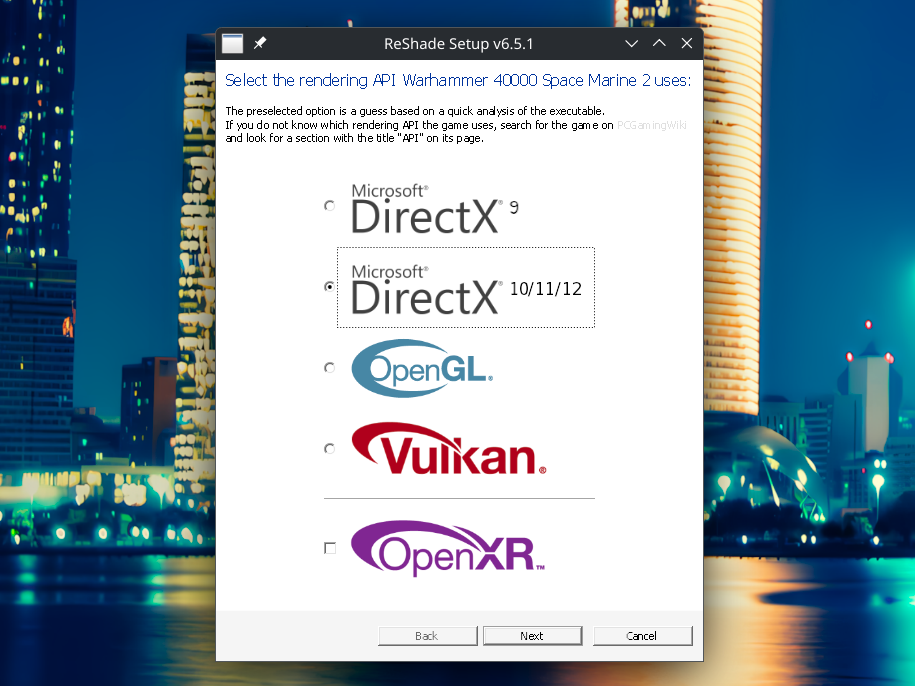](https://postimg.cc/2116zZ72)
|
|
|
|
➡️ Install PumboAutoHDR
|
|
|
|
[](https://postimg.cc/p98LjM7j)
|
|
|
|
➡️ Install Lilium HDR Shaders
|
|
|
|
[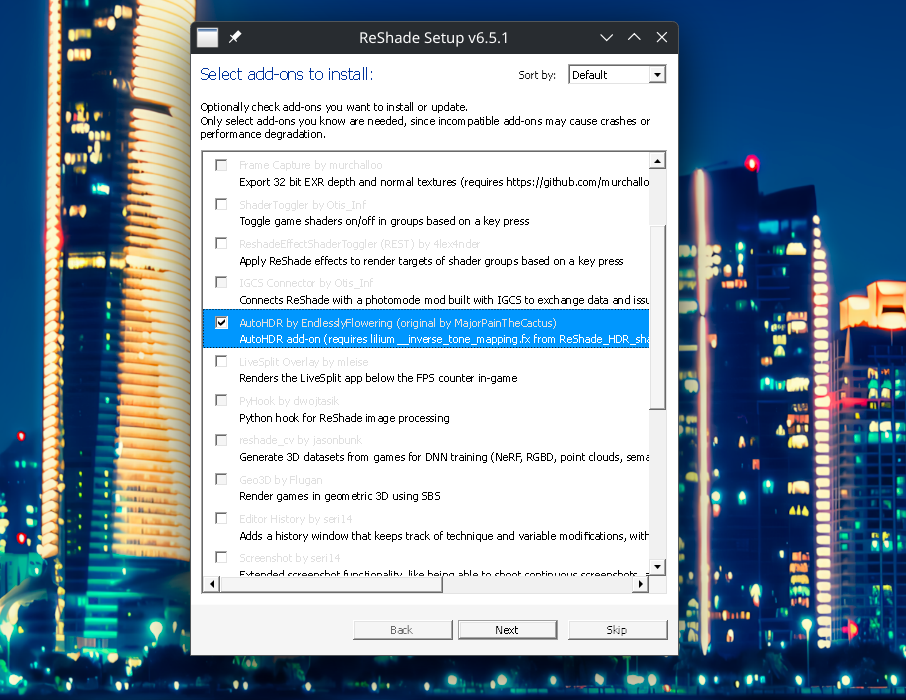](https://postimg.cc/7GnPBMqY)
|
|
|
|
</br>
|
|
|
|
➡️ Launch your game with ProtonGE with the concerned launch option
|
|
|
|
|
|
[](https://postimg.cc/grNcv907)
|
|
|
|
Launch options :
|
|
|
|
- Proton-Cachy : ``` PROTON_ENABLE_WAYLAND=1 PROTON_ENABLE_HDR=1 DXVK_HDR=1 %command%```
|
|
|
|
- ProtonGE : ``` PROTON_ENABLE_WAYLAND=1 PROTON_ENABLE_HDR=1 %command%```
|
|
|
|
- Full (+vklayer) : ``` PROTON_ENABLE_WAYLAND=1 PROTON_ENABLE_HDR=1 DXVK_HDR=1 ENABLE_HDR_WSI=1 %command%```
|
|
|
|
</br>
|
|
|
|
➡️ In the game press **"Home"** keyboard key to open reshade. If `AdvancedAutoHDR.fx` failed to compile, use `protontricks` to install `d3dcompiler` into the games prefix.
|
|
|
|
➡️ Go the the **addon** section :
|
|
|
|
[](https://postimg.cc/tYxXDt93)
|
|
|
|
➡️ **Enable HDR** in the options :
|
|
|
|
[](https://postimg.cc/JtTySqwS)
|
|
|
|
|
|
➡️ Select the **AdvancedAutoHDR mod**.
|
|
|
|
[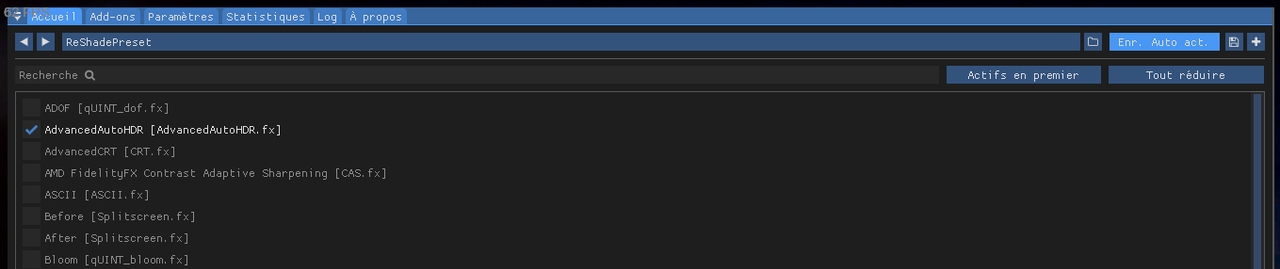](https://postimg.cc/Lh7hfqzM)
|
|
|
|
|
|
➡️ On HDR options, use in input the **SDR Rec. 709 gamma 2.2**. Ajust output at **400**.
|
|
|
|
[](https://postimg.cc/xJZPjSJb)
|
|
|
|
|
|
➡️ For the method, use **Auto HDR (SDR->HDR)** and set By luminance (color hue conserving). Ajust the max autohdr brightness at **750**.
|
|
|
|
[](https://postimg.cc/gnmxwTVw)
|
|
|
|
|
|
➡️ Enable **autosave** for the profile.
|
|
|
|
[](https://postimg.cc/CZkrSfSH)
|
|
|
|
---
|
|
|
|
### renoDX support:
|
|
|
|
This reshade installation support [addons](https://reshade.me/forum/addons-section) :
|
|
|
|
>RenoDX, short for "Renovation Engine for DirectX Games", is a toolset to mod games. Currently it can replace shaders, inject buffers, add overlays, upgrade swapchains, upgrade texture resources, and write user settings to disk. Because RenoDX uses Reshade's add-on system, compatibility is expected to be pretty wide. Using Reshade simplifies all the hooks necessary to tap into DirectX without worrying about patching version-specific exe files.
|
|
|
|
Go to the [RenoDX](https://github.com/clshortfuse/renodx/wiki/Mods) HDR mod page and select desired game. \
|
|
Download the add-on and paste on the game-folder.
|
|
|
|
Press the **"Home"** key to open reshade, renodx is present in the addon section and can be combined with the native HDR.
|
|
|
|
[](https://postimg.cc/p9GC4ZrL)
|
|
|
|
---
|
|
|
|
### Credits:
|
|
|
|
| Team | Description |
|
|
| --- | --- |
|
|
| [PumboAutoHDR](https://github.com/Filoppi/PumboAutoHDR) | Thanks to Filoppi, have created a Auto-HDR mod, it is incredible! Especially under Linux or are absent the car from Microsoft and the RTX-HDR ❤️ |
|
|
| [renoDX](https://github.com/clshortfuse/renodx) | Special Thanks to the renodx team, having done incredible job for HDR 🙏 |
|
|
| [HDR-Addon](https://github.com/EndlesslyFlowering/AutoHDR-ReShade) | Lilium, for this addon, improved version of AutoHDR |
|
|
| [VK_hdr_layer](https://github.com/Zamundaaa/VK_hdr_layer) | Thank Zamundaaa, for the incredible work on the HDR Vulkan compatibility layer for kwin |
|
|
| [ProtonGE](https://github.com/GloriousEggroll/proton-ge-custom) | Better Proton with full wayland HDR support |
|
|
| [proton-cachyos](https://github.com/CachyOS/proton-cachyos) | Proton, supercharged with patches for full Wayland HDR support |
|
|
|
|
|