 Yuhong SunandClaude Opus 5.5
b86caa7332
Yuhong SunandClaude Opus 5.5
b86caa7332
## Description
Add 11 selectable embedding models and an upgrade-only model picker.
Fresh self-hosted installs use Granite. Existing deployments keep their
stored model until an admin starts a re-index. On startup, the API
server waits until the model server can embed with the self-hosted model
in use. If that model is not in its cache, the model server downloads it
first.
| Type | Model | Output dimensions |
| --- | --- | --- |
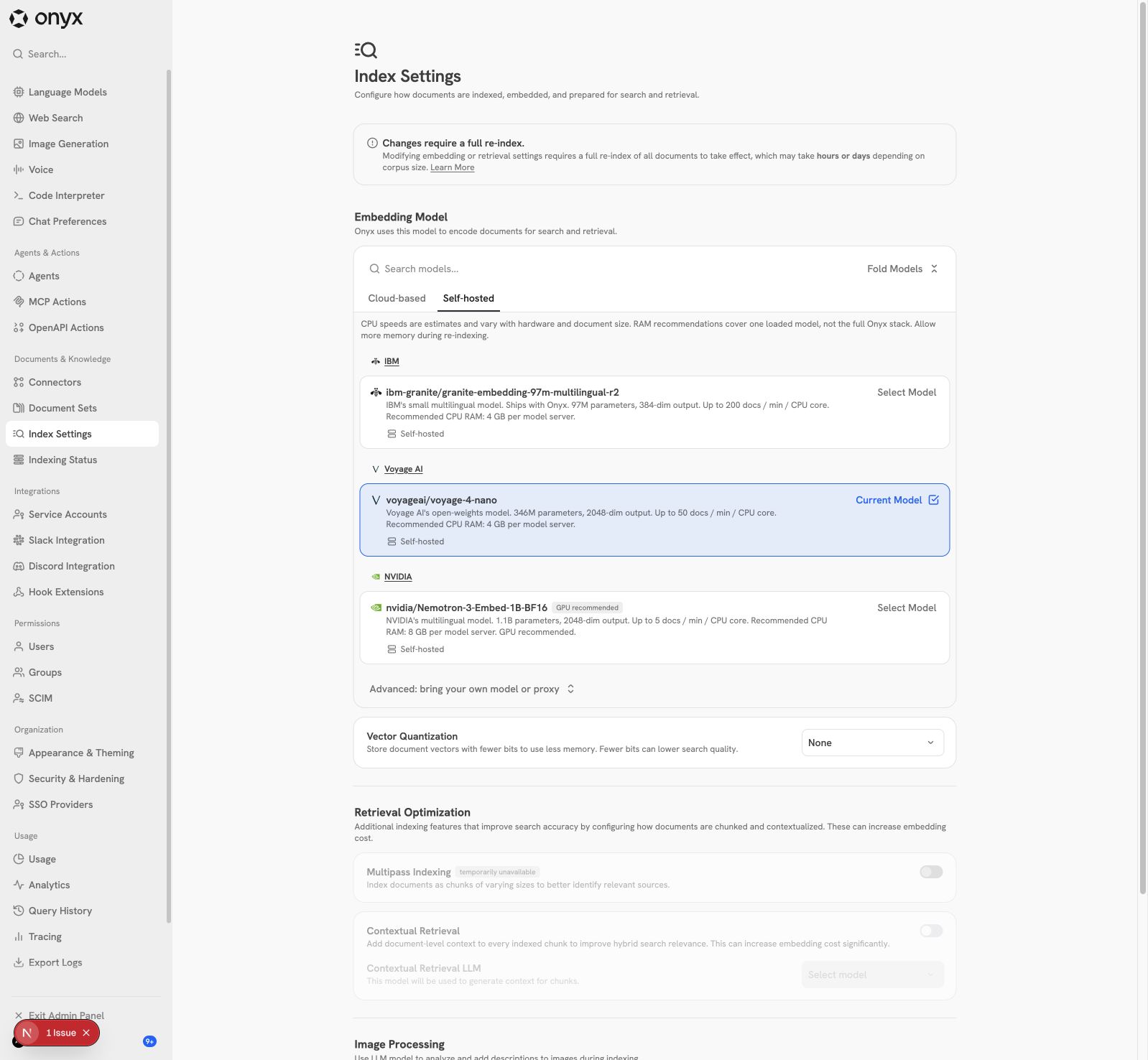
| Self-hosted | `ibm-granite/granite-embedding-97m-multilingual-r2`
(default, in the image) | 384 |
| Self-hosted | `voyageai/voyage-4-nano` | 2048 |
| Self-hosted | `nvidia/Nemotron-3-Embed-1B-BF16` | 2048 |
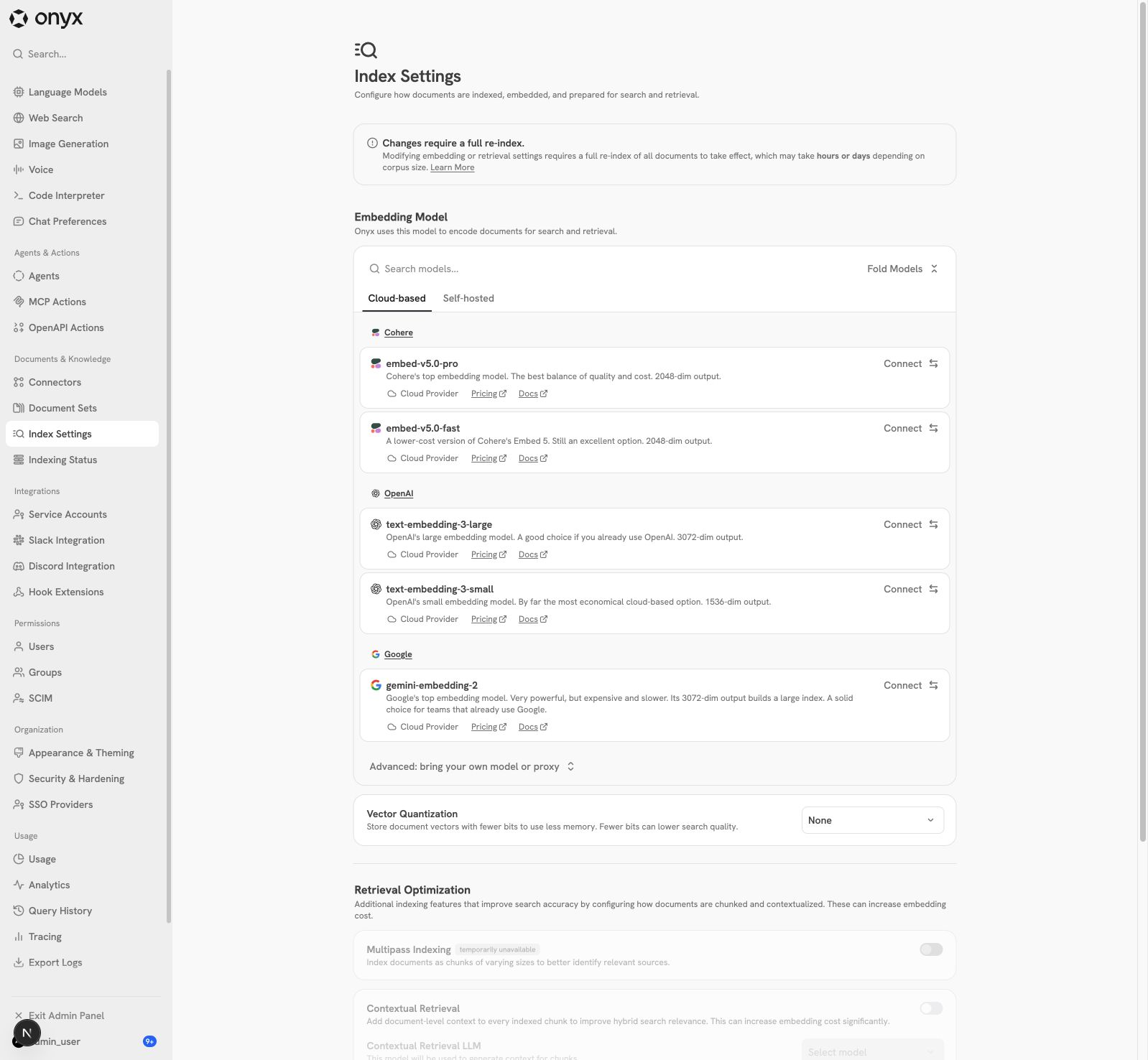
| Cohere | `embed-v5.0-pro`, `embed-v5.0-fast` | 2048 |
| Google | `gemini-embedding-2` | 3072 |
| OpenAI | `text-embedding-3-large`, `text-embedding-3-small` | 3072 /
1536 |
| Voyage | `voyage-4-large`, `voyage-4`, `voyage-4-lite` (added on main)
| 1024 |
The 16 older models are now **legacy**: nomic, E5, GTE-small, Cohere
v3/v4, Voyage v2 and older Gemini/Vertex models. Existing indexes on
them keep working. The API refuses a legacy model as a new target, but a
re-index with the current model is still allowed.
## Size of this PR
After review, I removed the parts that the feature does not need. The
behavior stays the same. The diff against `main` went from **80 files,
+9,855 / −504** to **69 files, +4,740 / −467**.
| Area | Files | Added | Removed |
| --- | --- | --- | --- |
| Backend source | 16 | 1,004 | 96 |
| Backend unit tests and test managers | 16 | 1,568 | 32 |
| Backend manual suites (opt-in, not in CI) | 7 | 617 | 0 |
| Web source | 6 | 617 | 255 |
| Web tests | 5 | 630 | 1 |
| Web messages (9 locales) | 9 | 225 | 72 |
| Deployment, CI and feature map | 10 | 79 | 11 |
The feature map (`.agents/feature-map/`) now describes the new selection
rules.
Removed:
- **The branch's own cloud probe.** All selectable cloud models now use
main's probe (`probe_embedding_dimension`), which Bifrost already used.
It now also sends the stored Vertex configuration, the Azure API version
and the deployment name. Before this change, the branch's probe ignored
the Vertex configuration, so a Google provider that uses Workload
Identity could not switch to `gemini-embedding-2`.
- **The Vertex fan-out.** Main already sends `gemini-embedding-2` texts
one at a time. The Vertex code is now the same as on main.
- **The `expected_dim` path** in the model-server loader, and the
startup warning for custom models with registry names. These protected
only one rare case; see **Custom models with a registry name** in [Known
limits](#known-limits).
- **The UI fallback** that tested a new key with a default model when
the key failed with the current model. The credential test now embeds
with the staged or current model of that provider. Only a provider with
neither uses its first selectable model.
- **Picker cards for current and staged bring-your-own models.** Main
does not show them either. The current model shows in the summary at the
top of the page.
- **Shared gates and fixtures for the manual suites.** Each suite has
one gate env var.
- **The screenshots in `docs/assets`.** The images below come from an
earlier commit of this PR.
- **Tests for removed code, and repeated test cases.** The unit tests
went from 3,842 to 2,667 lines.
### CPU speed and memory cards
All nine locales show these planning estimates:
| Model | Card speed | Recommended CPU RAM |
| --- | --- | --- |
| Granite 97M | Up to **200 docs / min / CPU core** | **4 GB** per model
server |
| Voyage 4 Nano | Up to **50 docs / min / CPU core** | **4 GB** per
model server |
| Nemotron 3 Embed 1B BF16 | Up to **5 docs / min / CPU core** | **8
GB** per model server |
Nemotron says **GPU recommended**. It runs on CPU too, but slowly. The
cards tell the admin that speed changes with the hardware and the
document size. The RAM value is for one loaded model. A re-index and the
rest of Onyx need more memory.
These values are planning estimates, not guarantees. The Nemotron
per-core value is an extrapolation from an earlier multi-thread run.
Document counts depend on chunking, and throughput does not always scale
linearly with cores. The RAM values are recommendations, not measured
minimum or peak values.
## Implementation
- **Registry.** `shared_configs/embedding_models.py` defines the model
names, dimensions, prefixes, normalization, status and pinned Hugging
Face revisions. A parity test compares it with the web registry.
- **Upgrade-only guard.** `_check_embedding_model_target` runs in
`set-new-search-settings`:
- The current model can always re-index, legacy models too. The
dimension must stay the same. In Onyx Cloud, `reduced_dimension` must
also stay the same, because tenants share the index of a model.
- A selectable model must use the registry settings (dimension,
normalization, prefixes).
- Other OpenAI, Cohere, Google and Voyage models, and legacy self-hosted
models, get `INVALID_INPUT`. The error lists the selectable models.
- Custom Hugging Face models, LiteLLM, Azure and Bifrost stay open.
- A self-hosted model gets `INVALID_INPUT` for a new
`reduced_dimension`, because the model server ignores it. A re-index
keeps a stored value.
- **Cloud probe.** Before a re-index to a selectable cloud model, the
API embeds a test text with the stored credentials and checks the
dimension. A bad key, region or model ID fails before indexing starts.
The probe runs before the PRESENT row lock, with no open transaction, as
main's Bifrost probe does.
- **Self-hosted loads.** New models load at a pinned revision with
`trust_remote_code=False`, a dimension check and a finite-vector check.
CPU-only hosts load FP32. CUDA and MPS keep the checkpoint dtype. Legacy
and custom models keep main's `SentenceTransformer` call, so their
vectors do not change.
- **Voyage 4 Nano.** An Onyx loader adds bidirectional attention and the
learned 1024-to-2048 projection. The generic loader with remote code
disabled does not apply them.
- **Model server.** All models load from the cache first, then from
Hugging Face. Loads run off the event loop on two load workers, so at
most two sets of weights (PRESENT and FUTURE) load at the same time.
Registry models get 32 tokens of headroom for the prefix. The RoPE
pre-warm now runs again only for a longer context. On main, it ran for
every change of context length.
- **Image.** The model-server image bundles pinned Granite. It no longer
bundles nomic: nomic downloads on first use. The startup cache merge
keeps the models that a volume already has.
- **Picker.** Self-hosted and cloud groups, a Legacy label on the
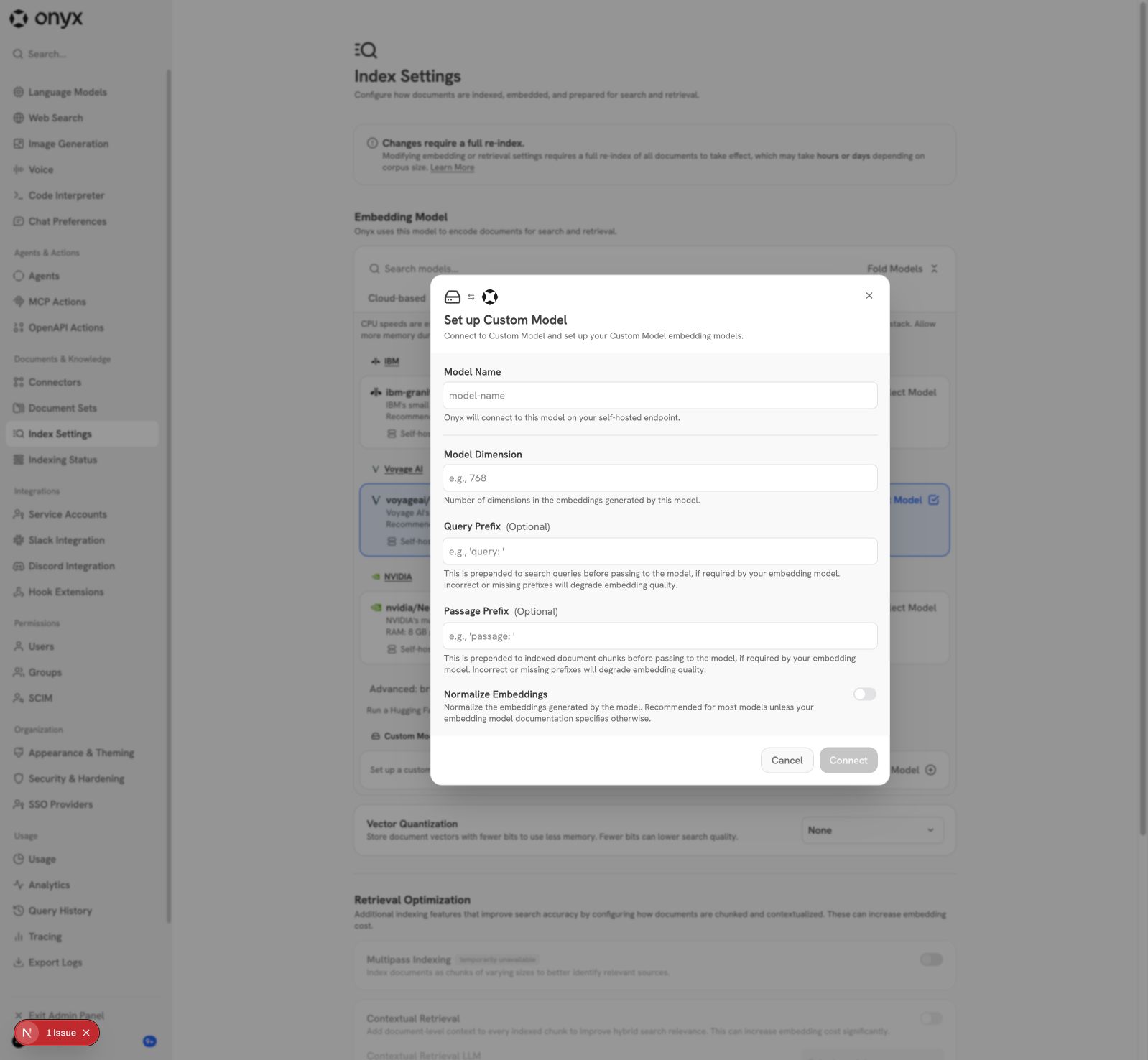
current legacy model, and an **Advanced** section for custom Hugging
Face models, LiteLLM, Azure and Bifrost. A staged custom model keeps the
custom provider, also when its name is the same as a registry model.
- **Error detail.** `EmbeddingModel` now keeps the model server's error
detail. Before, every HTTP failure showed "HTTP error occurred -
response is None".
### Startup wait for self-hosted models
On startup, the API server waits until the inference model server can
embed with the current self-hosted model. The model server loads the
model on the first request, and downloads it first if it is not cached.
Example: a deployment that upgrades while it uses nomic, which the new
image does not bundle.
- The API server logs the wait, each failed attempt with its cause, and
the time when the model is ready. The model server logs a download.
- `LOCAL_EMBEDDING_MODEL_STARTUP_TIMEOUT` sets the wait (default 1800
seconds). When the wait runs out, startup fails. The error names the
model server, the model, the last error and the fix. `0` disables the
wait.
- The check request runs in a daemon thread. A request that still waits
at the deadline (for example, during a slow download) therefore does not
keep the failed process alive. Before this fix, the process stayed alive
until the model server read timeout (600 s by default).
- There is no wait in Onyx Lite (`DISABLE_VECTOR_DB`), for cloud models,
in multi-tenant deployments, in integration tests, or with
`DISABLE_MODEL_SERVER`.
- The wait uses the existing embed endpoint, so it also works with an
older model server during a rolling upgrade.
- This replaces the startup call to `warm_up_bi_encoder`. `SKIP_WARM_UP`
(default `true`) skipped that call, so it did not run by default.
- Only the inference model server is checked. The indexing model server
still loads a model on first use. In Compose, the API server does not
know the host of the indexing model server.
- `env.template` and Helm `values.yaml` document the setting. The Helm
chart is now 0.9.19.
Live test at commit `0eb5881da9`, with an existing nomic deployment on a
local stack. The size reduction did not change the wait:
| Case | Result |
| --- | --- |
| nomic not cached, model server online | The model server downloaded
nomic (523 MB). Startup continued after 19 s. |
| nomic cached | Ready in 3 s, with no download. |
| Model server starts after the API server | A warning every 10 s, then
ready at 33 s. |
| nomic not cached, no internet access | Each warning showed the cause
("not in the model server's Hugging Face cache and could not be
downloaded"). Startup failed at the timeout, and the process exited. |
| Onyx Lite, no model server | No wait. |
| Timeout `0` | No wait. The model loads on first use. |
## Upgrade notes
- **Offline deployments that use nomic.** The new image does not bundle
nomic. A deployment with no internet access and no kept model cache
cannot download it. The API server then fails at startup with a clear
error, instead of starting with a search that cannot embed queries.
Before you upgrade such a deployment, add the current model to the model
server's Hugging Face cache, or keep the cache on a volume. Helm has no
cache volume by default. This PR has no schema migration, so a return to
the previous image works while the current model stays the same.
- **Helm.** The chart has no Hugging Face cache volume for the model
servers, so a model that the image does not bundle (nomic, Voyage 4
Nano, Nemotron) downloads again on every pod start. `values.yaml`
documents an opt-in volume with the existing
`inferenceCapability.volumes` and `volumeMounts` values. A default
volume is not added: a ReadWriteOnce claim hangs rolling updates across
nodes, breaks `replicaCount` above 1, and needs a StorageClass. The
bundled Granite works with or without a volume.
- **API probes.** `/health` answers only after the startup wait. A
liveness probe needs a startup probe that allows the migrations plus
`LOCAL_EMBEDDING_MODEL_STARTUP_TIMEOUT`. The api probe example in
`values.yaml` shows one.
- **Multi-tenant template snapshots.** Migration `dbaa756c2ccf` seeds a
search settings row with `DOCUMENT_ENCODER_MODEL`. When that variable is
empty, the seed is now Granite, not nomic. If a deploy runs
`alembic/check_tenant_snapshot.py`, it reports a difference in
`search_settings` until the template snapshots are built again
(`--snapshot-template`). To keep the seed the same as on main, set
`DOCUMENT_ENCODER_MODEL=nomic-ai/nomic-embed-text-v1`.
- **No return to a legacy model.** After a switch, the old index is
cleaned up and the upgrade-only rule blocks a return to a legacy model.
Keep a compatible backup before you switch.
## Audit: retries and failures
| Layer | Behavior | Compared with main |
| --- | --- | --- |
| Local encode | Catches `RuntimeError`, waits 0.1 seconds, then tries
again: **up to four encode attempts**. It also retries errors that do
not go away, such as OOM. | Unchanged. |
| API to model server | Passage requests retry request failures three
times with five-second waits. HTTP 429 allows ten attempts with
ten-second waits. Connect/read timeouts are 30/600 seconds. Query
requests do not get these retries. | Unchanged. |
| Document indexing | A failed batch falls back to one document at a
time after a two-second delay. Failures are recorded, and the other
documents continue. | Unchanged. |
| Cloud embedding | Authentication errors are separate. Errors mapped to
`RuntimeError` get exponential backoff with jitter: eight attempts in
indexing-only mode, else two. | Unchanged. `gemini-embedding-2` sends
one text per request, in sequence, as on main. |
| Model loading | Cache first, then online. A partial cache falls back
online. A failed load is not cached, so a later request can try again.
Requests for the same model and context length share one load job. |
Cache-first lookup is new for all models. Registry models add pinned
revisions and checks. |
Model downloads run off the event loop. When a waiting request is
cancelled, the shared load continues. A load job has no deadline, so it
can continue after an HTTP timeout.
One gap from main remains: the response JSON is parsed outside the retry
wrapper. See [local
retries](https://github.com/onyx-dot-app/onyx/blob/4784da70697fb59261f43088383d85671544ec98/backend/model_server/encoders.py#L157),
[request
retries](https://github.com/onyx-dot-app/onyx/blob/4784da70697fb59261f43088383d85671544ec98/backend/onyx/natural_language_processing/search_nlp_models.py#L1322),
and [cloud
retries](https://github.com/onyx-dot-app/onyx/blob/4784da70697fb59261f43088383d85671544ec98/backend/onyx/natural_language_processing/search_nlp_models.py#L942).
## Audit: migration and cancellation
There is **no schema migration, and no automatic change to existing
embedding settings**. Granite is the fresh-install default. Cloud tenant
provisioning still uses Cohere v3. Existing stored prefixes and
dimensions stay in use.
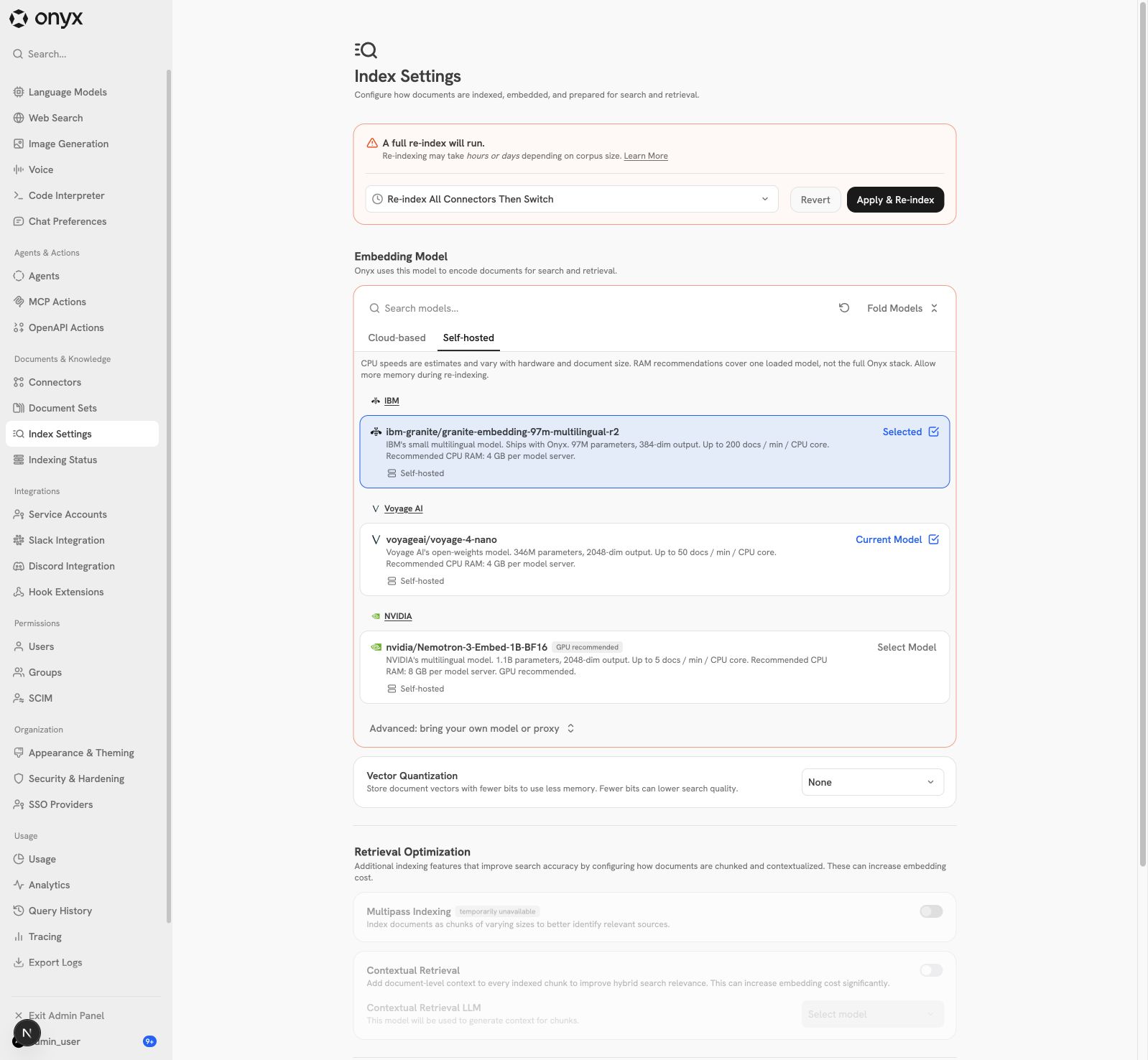
1. The API checks the target with the upgrade-only guard.
2. A new cloud target embeds a test text with the stored credentials
before the migration. The probe checks the dimension. It runs before the
PRESENT row lock.
3. The API locks PRESENT and refuses overlapping migrations. It also
refuses an index name that is live or still waiting for cleanup. FUTURE,
the first work and the cleanup consent commit together.
4. The existing port flow reads stored documents from the current index,
embeds them again and writes the new index. Connectors do not fetch
again. All-connectors mode includes paused connectors. Active-only mode
leaves them out and needs consent for the data that it leaves out. User
files are included.
5. Normal promotion waits for successful required ports, no open writers
or sync work, and a sample check in the new index. A failed or paused
required port blocks promotion. The sample check does not check the full
corpus.
6. Port batches retry up to five times. The cursor moves after a
successful batch. The first watchdog retry is immediate. Repeated
failures at the same cursor use exponential backoff from 30 seconds, up
to one hour. Five failures in sequence at that cursor pause the unit. An
operator can resume it.
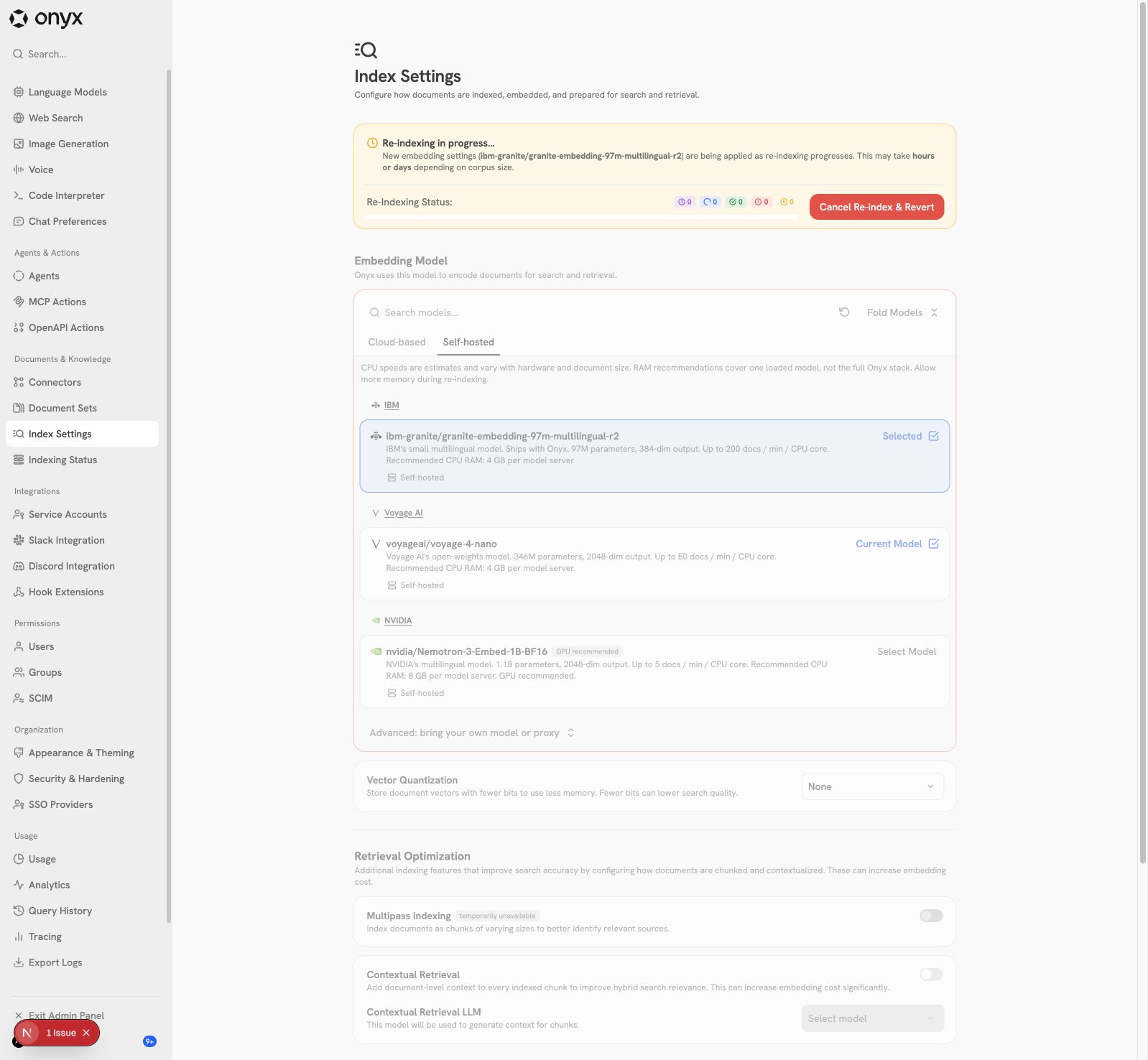
7. A cancel of FUTURE keeps PRESENT active, stops port work at a batch
boundary, and removes the partial index after writers stop. **Instant
switch promotes first**, so search is not complete during backfill, and
this cancel path is not available.
See [migration
endpoint](https://github.com/onyx-dot-app/onyx/blob/4784da70697fb59261f43088383d85671544ec98/backend/onyx/server/manage/search_settings.py#L140),
[upgrade-only
guard](https://github.com/onyx-dot-app/onyx/blob/4784da70697fb59261f43088383d85671544ec98/backend/onyx/server/manage/search_settings.py#L456),
[swap
gates](https://github.com/onyx-dot-app/onyx/blob/4784da70697fb59261f43088383d85671544ec98/backend/onyx/db/swap_index.py#L367),
and
[cancellation](https://github.com/onyx-dot-app/onyx/blob/4784da70697fb59261f43088383d85671544ec98/backend/onyx/server/manage/search_settings.py#L668).
## Known limits
- **Model memory.** Two load workers limit how many models load at the
same time. Loaded models are not evicted (as on main), so the old and
new models stay in memory during a switch. Helm's default memory limit
for the indexing model server is **6 GiB**, below the **8 GB** that the
Nemotron card recommends. See [load
executor](https://github.com/onyx-dot-app/onyx/blob/4784da70697fb59261f43088383d85671544ec98/backend/model_server/encoders.py#L35)
and [Helm
limits](https://github.com/onyx-dot-app/onyx/blob/4784da70697fb59261f43088383d85671544ec98/deployment/helm/charts/onyx/values.yaml#L309).
- **Legacy models are not selectable.** This is by design. The current
legacy model stays visible and can re-index. After a switch, the
standard flow cannot select it again.
- **Bring-your-own options are under Advanced.** Unknown model names for
the built-in OpenAI, Cohere, Google and Voyage providers get
`INVALID_INPUT`. LiteLLM, Azure, Bifrost and custom models stay open.
- **The cloud probe reads the provider settings once.** If an admin
changes the key or region while a re-index starts, the probe can use the
old values. A key can also change at any time during a re-index, so no
preflight check can guarantee the key that the workers use. Indexing
failures then show in the re-index status, and the admin can cancel.
- **Custom models with a registry name.** Before this PR, an admin could
add a registry model name, such as `voyageai/voyage-4-nano`, as a custom
model. The model server now loads that name as the registry model. For
`voyage-4-nano`, the vectors then have 2048 dimensions, not 1024, so a
1024-dimension index fails with an error. Re-index to the registry model
to fix it. For the other registry models, a generic load gives the same
dimension.
- **Shared `max_seq_length`.** The model server changes `max_seq_length`
on the shared model for each request. Two requests with different
context lengths can overlap. This is the same on main. This PR does not
change it.
- **Voyage 4 Nano depends on the Transformers and SentenceTransformers
layout.** Run the real-weight suite when those dependencies change.
- **No reduced dimensions for Cohere v5 and the self-hosted models.**
Cloud provisioning stays on Cohere v3. These are follow-ups.
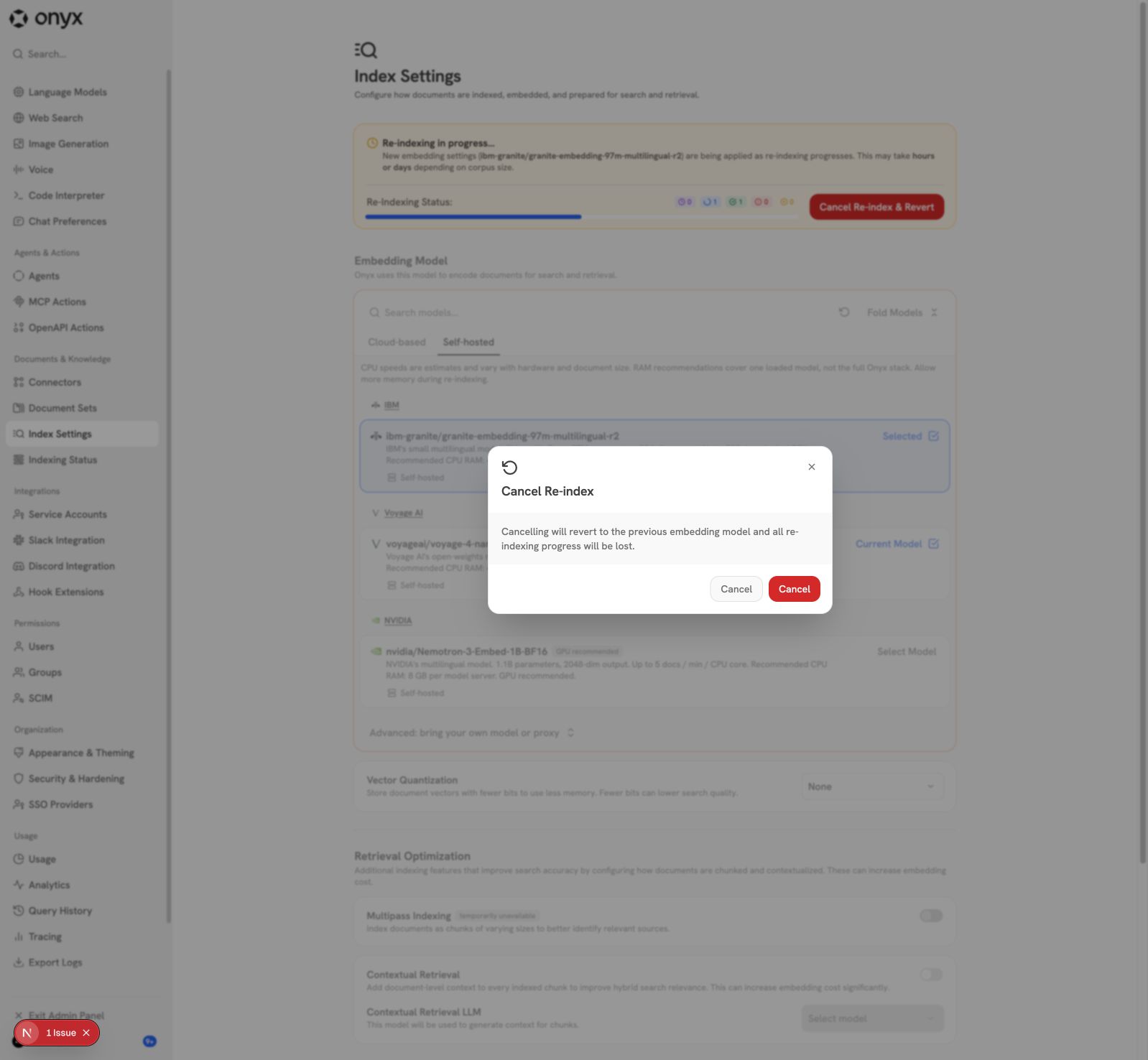
- **The cancel dialog has two buttons labeled Cancel.** One closes the
dialog, the other cancels the re-index. This is the same on main.
- The branch is rebased onto `main` at `ad9c0030e9`. This PR does not
claim better retrieval quality.
## Validation for this update
- **Backend: 15,343 unit tests passed** before the review fixes. I left
out the EE license tests, because they write a key to a live Redis. `ty`
and pre-commit passed. After the review fixes and the merge of `main`,
the PR's backend unit tests passed again (199 tests). Pre-commit passed
on all 69 changed files.
- **Startup exit check:** a fake model server that never answers, with a
3 s wait and a 20 s read timeout. The wait raised at 3.3 s. The process
exited at 5 s with the fix, and at 22 s without it.
- **Web: type check, lint and 3,236 Jest tests (307 suites) passed.**
- **Self-hosted real-weight suite: 6 of 6 passed.** Golden scores and
the bidirectional-attention check for Granite, Voyage 4 Nano and
Nemotron.
- **Cloud live suite: `gemini-embedding-2` passed.**
- **End to end on a local stack with branch code: 11 of 11 passed.** The
API refused all 6 legacy self-hosted targets and accepted a same-model
re-index. Then the stack switched to Granite, Voyage 4 Nano, Nemotron
and `gemini-embedding-2`, in sequence. After each switch, a pure vector
search found each of 5 seeded facts first.
- **Not run for this update: Cohere, OpenAI and Voyage cloud tests.** A
TLS proxy on the test network blocked `api.cohere.com` and
`api.openai.com`. The probe then refused the switch with `400`, as
designed. These tests passed on an earlier commit of this PR, and the
probe that they use is main's probe. I had no Voyage key.
- **CI:** at `9321cb51db`, every check passed except the Dependency
Audit: Playwright, integration, acceptance, database,
external-dependency unit, Jest and quality checks. The audit fails on
open Dependabot alerts for Pillow and certifi in other manifests
(`loadtest/uv.lock` and the Craft sandbox requirements). Other open PRs
fail the same way at the moment.
- **Not run for this update:** speed benchmarks.
<details>
<summary>Earlier validation in this PR, not run again for this
update</summary>
- 28 real-weight tests and 24 cloud tests passed.
- End-to-end switches to all eight selectable models of that time
passed. The API refused all 16 legacy targets.
- Legacy-upgrade equivalence, Docker cache keeping and multi-tenant
provisioning checks passed.
- 11,521 backend unit tests passed. 10 EE license failures also occurred
on main.
</details>
## Voyage retrieval-quality check — October 14, 2026
The branch's Voyage loader passed a local EnterpriseRAG-Bench loading
check. **Vector-only mean document Recall@10 was 91.85%**, above the
proposed 50% threshold. This supports a correct load. It does not prove
numerical equality with the upstream implementation.
The corpus had **5,000 documents**: all **722 labeled supporting
documents** and **4,278 random distractors**, sampled with seed
`20261013`. All **470 questions with document labels** were scored. The
30 questions with no labels were left out. No question or answer text
went into the corpus.
| Retrieval mode | Mean Recall@1 | Mean Recall@5 | Mean Recall@10 | Mean
Recall@20 |
| --- | --- | --- | --- | --- |
| Onyx content-vector-only retrieval | 66.13% | 87.37% | **91.85%** |
94.16% |
| Onyx hybrid search API | 75.85% | 93.32% | **96.37%** | 97.70% |
Recall is the fraction of labeled documents found for each question,
averaged over the questions. Rankings use the first hit of each
document. Vector-only hit rate@10 (at least one relevant document) was
94.26%. That is a different metric from recall.
| Question category | Questions | Vector-only Recall@10 | Hybrid
Recall@10 |
| --- | --- | --- | --- |
| Basic | 175 | 97.71% | 99.43% |
| Semantic | 125 | 84.80% | 92.80% |
| Intra-document reasoning | 40 | 97.50% | 100.00% |
| Project related | 40 | 86.43% | 95.35% |
| Constrained | 30 | 98.33% | 98.33% |
| Conflicting information | 20 | 90.00% | 97.50% |
| Completeness | 20 | 68.03% | 79.03% |
| Miscellaneous | 20 | 100.00% | 100.00% |
The check used CPU FP32, 2048-dimensional normalized vectors, and the
registry's query and document prefixes. MPS and CUDA were off. There was
no query expansion, reranking, or LLM document selection. All 5,000
document IDs matched the saved manifest, with 15,612 indexed chunks. All
query vectors were finite and had unit length. The last indexing attempt
had no document errors. Two earlier attempts stopped after
stale-heartbeat timeouts and continued from saved progress.
**Search path:** on this OpenSearch branch, `hybrid_alpha=1` still runs
hybrid retrieval, so the API result includes keyword scores. The
vector-only result calls `OpenSearchDocumentIndex.semantic_retrieval`
directly, with content vectors only. Keyword matches therefore cannot
hide a broken embedding loader in that result.
**Scope:** this is an easier 5,000-document subset that contains all
gold documents, not the full 511,958-document benchmark. Do not compare
these values with full-corpus leaderboard scores. No loader or ranking
code changed to get these results.
Revisions: Onyx `913bfa8d7a32c9cda340df92f42d0f706fd424c2`;
EnterpriseRAG-Bench `d36685e273713975ee20299bbf1ab64165575b3c`; Voyage
`67fabc9bef010dabc5f6024aa1b1b6b93410426f`. Runtime: PyTorch 2.9.1,
Transformers 5.14.1, SentenceTransformers 5.4.1.
## UI screenshots
From the local development stack at commit `98bfc70080`, before the size
reduction. These show the real flow, not mockups.
<details open>
<summary>Self-hosted cards and current model</summary>
</details>
<details>
<summary>Cloud model catalog</summary>
</details>
<details>
<summary>Staged Granite change and migration strategy</summary>
</details>
<details>
<summary>Re-index in progress</summary>
</details>
<details>
<summary>Cancel confirmation</summary>
</details>
<details>
<summary>Advanced custom model setup</summary>
</details>
## Additional Options
- [ ] [Optional] Please cherry-pick this PR to the latest release
version.
- [ ] [Optional] Override Linear Check
🤖 Generated with [Claude Code](https://claude.com/claude-code)
---------
Co-authored-by: Claude Opus 5.5 <noreply@anthropic.com>






Installing the chart
Helm repository (default)
helm repo add onyx https://onyx-dot-app.github.io/onyx
helm repo update
helm install onyx onyx/onyx -n onyx --create-namespace
Chart tarballs are attached to GitHub releases named helm/onyx-<version>, and
index.yaml on the gh-pages branch points at them. This is an implementation
detail: the repository URL above does not change and helm repo add,
helm search repo and helm upgrade all work as before.
OCI registry (alternative)
The same chart is published to GHCR:
helm install onyx oci://ghcr.io/onyx-dot-app/charts/onyx \
  --version 0.8.16 -n onyx --create-namespace
helm repo add does not accept oci:// URLs, so an OCI install needs an
explicit --version. There is no helm repo update or helm search repo for
OCI and no helm command that lists the available versions. Read them from the
helm/onyx-<version> releases
or from the Helm repository index:
helm search repo onyx/onyx --versions # needs `helm repo add` from above
To inspect one version before installing it:
helm show chart oci://ghcr.io/onyx-dot-app/charts/onyx --version 0.8.16
Both channels ship identical bytes from the same build. Use the Helm repository unless you specifically need OCI.
Recent chart changes (0.5.0)
If you are upgrading from an earlier 0.4.x release, read MIGRATION.md first. The 0.5.0 release dropped the bundled Vespa subchart. Onyx no longer uses Vespa.
Other 0.5.0 changes:
- Redis — the chart now bundles the
redis-operatorsubchart alongside theredissubchart. The operator installs the CRD that the Redis CR binds to, sohelm installworks on a clean cluster without a separate CRD step. - PostgreSQL — a CloudNativePG
ClusterCR is now rendered fromtemplates/postgres-cluster.yaml, sohelm installprovisions postgres out of the box. The Cluster is named<release>-pg(service:<release>-pg-rw). Setpostgresql.enabled: falseand overrideconfigMap.POSTGRES_HOSTif you use an external database (RDS, etc.). - REDIS_HOST — the configmap no longer appends
-masterto the redis service name. If you previously overrodeREDIS_HOSTor had clients that hard-coded the-mastersuffix, update them to point at the redis-operator standalone service. - CNPG CRDs — copied into
crds/cnpg-crds.yamlso Helm pre-installs them before templates. The subchart's own CRD template is disabled (postgresql.crds.create: false). Runscripts/check-cnpg-crds.shafter bumping the CNPG subchart version to verify the copy is in sync. - Pre-delete hook — a cleanup Job (
templates/pre-delete-cleanup.yaml) deletes this release's CNPG Cluster and Redis CRs, by name, beforehelm uninstalltears down the operators. This makes sure finalizers are processed and namespace cleanup completes promptly. Setpostgresql.cluster.retainOnUninstall: trueto keep the CNPG Cluster and its PVCs instead. The operator is still removed, so the kept Cluster has no controller: reinstall with the same release name to adopt it, or delete it and clear its finalizers (see the comment invalues.yaml).
Dependency updates (when subchart versions are bumped)
- If updating subcharts, you need to run this before committing!
- cd charts/onyx
- helm dependency update .
Prerequisites
Redis operator (automatic with bundled Redis)
When redis.enabled: true (the chart default), the chart bundles and automatically
installs the redis-operator subchart alongside the redis subchart. The operator
provides the CRD that the Redis CR binds to, so helm install works on a clean
cluster without manual preparation.
No separate pre-install step is needed — the chart handles the redis-operator
CRD and controller automatically as part of helm install onyx onyx/onyx.
If you don't want the bundled Redis (recommended for production environments using
managed Redis like AWS ElastiCache), see Using an external Redis
below and set redis.enabled: false to skip the operator entirely.
Onyx Craft with Kubernetes sandboxes
When configMap.ENABLE_CRAFT="true", the target cluster must run Kubernetes
>= 1.33. Craft Helm deployments provision Kubernetes sandbox pods; Docker
is not a Helm deployment backend for Craft and configMap.SANDBOX_BACKEND is
not a bypass for this requirement.
Craft sandbox pods use native restartable init sidecar containers:
sandbox-init runs and completes first, sidecar starts next as an
initContainers entry with restartPolicy: Always, and the main sandbox app
container starts after the sidecar's startup restore gate is ready.
The chart fails during render/install on older clusters so the incompatibility is caught before sandbox provisioning. This guard does not apply to non-Craft installs.
Sandbox runtime and network enforcement
The default sandbox uses the cluster's default runtime and installs iptables rules before any workload starts. You can select a cluster-provided RuntimeClass:
sandboxPod:
  runtimeClassName: your-runtime
  netAdminLockdown: true
The cluster administrator must configure the runtime and compatible nodes.
Runtime selection does not replace network restrictions. Test the chosen runtime
with Craft. The current sandbox image uses nft-based iptables. With gVisor
release-20261005.0 in its default configuration, firewall bootstrap fails with
Protocol not supported. That tested configuration needs external network
enforcement with lockdown disabled. Other firewall backends or runtime settings
need separate validation.
These settings apply to newly created sandbox pods after a Helm upgrade.
The image prepuller uses the same RuntimeClass to follow its scheduling constraints.
For clusters that prohibit NET_ADMIN, set sandboxPod.netAdminLockdown: false
only when the cluster enforces equivalent network restrictions from pod creation.
This removes NET_ADMIN from sandbox-init and skips firewall commands and
verification. CA installation still runs as root. This setting alone does not
make the pod compatible with policies that prohibit root init containers.
Use a sandbox image built with this option; older images still run iptables.
In this mode, the chart's policies allow only the proxy endpoint. A separate DNS
policy excludes pods created with lockdown disabled, including after Helm upgrades.
This also applies to craft.dnsExtraCIDRs. The backend supplies the proxy address
through pod hostAliases. Proxy environment variables, CA
trust, destination checks, and approval handling remain active.
The operator must use a CNI that enforces NetworkPolicy before workload startup. Other policies must not grant broader access. Verify IPv4 and IPv6 restrictions, including internal services, node addresses, and cloud metadata. Standard NetworkPolicy has node-traffic exceptions; additional cluster controls may be needed. A rendered policy cannot prove enforcement. Test direct connections with proxy variables removed, and confirm approved requests still work through the proxy. Do not disable lockdown solely because a sandboxed runtime is selected.
The proxy also needs cluster access to the Kubernetes API, DNS, and Onyx services. Some CNIs exclude cluster destinations from IP-range rules; see Cilium CIDR policies. Configure explicit proxy access for these destinations when required by the CNI. Keep those rules scoped to the proxy pods.
Docker deployments retain mandatory iptables enforcement. The bootstrap rejects disabling lockdown in Docker entrypoint mode.
Using an external Redis
To point Onyx at an externally-managed Redis (e.g. AWS ElastiCache) and skip the bundled Redis + operator entirely:
redis:
  enabled: false

configMap:
  # Override the chart-computed REDIS_HOST. Use the cluster/primary endpoint
  # from your managed Redis. Avoid underscores — they are invalid in K8s DNS
  # labels and look identical to a hung service.
  REDIS_HOST: "<elasticache-primary-endpoint>"
  REDIS_PORT: "6379"

# Enables verified TLS and mounts the Redis server CA into all Redis clients,
# including the Craft sandbox proxy.
redisTls:
  enabled: true
  caConfigMapName: "elasticache-ca"
  caKey: ca.crt

auth:
  redis:
    enabled: true
    # Pre-create a Secret in the release namespace holding the Redis password
    # under the key `redis_password`.
    existingSecret: "elasticache-auth-secret"
    secretKeys:
      REDIS_PASSWORD: redis_password
Sourcing secrets from an external secret manager (ESO)
The chart can render an ExternalSecret CR that has External Secrets
Operator materialize a single Kubernetes Secret
from an upstream provider (AWS Secrets Manager, GCP Secret Manager, Vault,
etc.). All auth.* sections then read their per-section keys from that
materialized Secret, and any loose env-var secrets are projected into pods
via envFrom.
Prerequisite: the chart does not install ESO. Install it separately and
create a SecretStore or ClusterSecretStore (e.g. aws-secrets-manager)
before enabling externalSecret. See https://external-secrets.io/ for setup.
The upstream secret should be a JSON object whose top-level keys map 1:1 to
the keys the chart expects in the materialized Secret (the union of every
auth.<section>.secretKeys value plus any loose env-var names you project via
extraEnvFromSecret).
externalSecret:
  enabled: true
  # Identifier of the upstream secret (e.g. AWS Secrets Manager secret name).
  refPath: "onyx/<customer>/app-secrets"
  # Name of the materialized k8s Secret. Point auth.*.existingSecret here.
  secretName: onyx-app-secrets
  secretStoreRef:
    name: aws-secrets-manager
    kind: ClusterSecretStore
  refreshInterval: 1h

# Inject every key from onyx-app-secrets as an env var on backend pods.
# Use for secrets that today live as plaintext in `configMap:` blocks.
extraEnvFromSecret: onyx-app-secrets

auth:
  postgresql:
    existingSecret: onyx-app-secrets
    secretKeys:
      POSTGRES_USER: postgres_user
      POSTGRES_PASSWORD: postgres_password
  redis:
    existingSecret: onyx-app-secrets
    secretKeys:
      REDIS_PASSWORD: redis_password
  # ...repeat for any other auth section that should read from the shared Secret.
When externalSecret.enabled: false (the default) the chart renders exactly
as before — no ExternalSecret CR is created and envFrom is unchanged.
First-install reconciliation window
The Helm release renders both the ExternalSecret CR and the Deployments that
reference the materialized Secret in the same apply. ESO reconciles the CR
asynchronously, typically within a few seconds. During that brief window,
backend pods will be in CreateContainerConfigError because their
envFrom: secretRef references a Secret that does not yet exist. The kubelet
retries pod creation automatically; once ESO materializes the Secret, pods
transition to Running without manual intervention.
We intentionally leave the secretRef non-optional. Marking it optional would
allow pods to boot with empty env vars and fail later in a way that is harder
to diagnose; the brief CreateContainerConfigError is the clearer failure
mode if anything is misconfigured (wrong SM path, missing IRSA permissions,
missing keys in the upstream blob).
If you need pods to be Ready before traffic is routed, rely on the existing
readiness probes — they will not pass until the env vars are present.
Model-server pods
indexing-model-deployment and inference-model-deployment deliberately do
not consume extraEnvFromSecret. Model servers only need model-config
env vars (already in the chart's configMap), so injecting application-level
secrets like POSTGRES_PASSWORD would needlessly widen their secret-exposure
surface.
Values that come from docker-compose (do not copy them)
The Onyx docker-compose stack uses service-name hostnames like api_server,
inference_model_server, and cache. Those names contain underscores, which
are invalid in Kubernetes DNS labels — DNS lookups for them will fail and
the symptom is often a blank login page or TypeError: fetch failed in web
pod logs.
The chart computes correct K8s service hostnames for you. If you are
adapting an .env file from docker-compose, remove these keys from your
Helm configMap: and let the chart fill them in:
| Key | Don't set to (docker-compose) | Chart-computed default |
|---|---|---|
REDIS_HOST |
cache |
`redis.redisStandalone.name |
INTERNAL_URL |
http://api_server:8080 |
http://<release>-api-service:8080 |
API_SERVER_HOST |
api_server |
computed |
MODEL_SERVER_HOST |
inference_model_server |
<release>-inference-model-service |
INDEXING_MODEL_SERVER_HOST |
indexing_model_server |
<release>-indexing-model-service |
Other docker-compose-style values you should set deliberately:
DOMAINshould be your public hostname (e.g.onyx.example.com), notlocalhost. It affects cookies and CORS.WEB_DOMAINshould be the full origin (e.g.https://onyx.example.com). Watch for typos likehhttps://...; they silently break email links and OAuth redirects.
Local testing
This section covers chart-maintainer testing; for the Onyx Craft local-kind developer workflow, see docs/craft/dev/local-kubernetes.md.
One time setup
- brew install kind
- Ensure you have no config at ~/.kube/config
- kind create cluster
- mv ~/.kube/config ~/.kube/kind-config
Automated install and test with ct
- export KUBECONFIG=~/.kube/kind-config
- kubectl config use-context kind-kind
- from source root run the following. This does a very basic test against the web server
- ct install --all --helm-extra-set-args="--set=nginx.enabled=false" --debug --config ct.yaml
Output template to file and inspect
- cd charts/onyx
- helm template test-output . --set auth.opensearch.values.opensearch_admin_password='StrongPassword123!' > test-output.yaml
- Craft Kubernetes sandbox version guard check:
- expect failure:
helm template test-output . -f values-ci.yaml --kube-version 1.32.0 --show-only templates/craft-kubernetes-version-check.yaml - expect success:
helm template test-output . -f values-ci.yaml --kube-version 1.33.0 --show-only templates/craft-kubernetes-version-check.yaml
- expect failure:
Test the entire cluster manually
- cd charts/onyx
- helm install onyx . -n onyx --set postgresql.primary.persistence.enabled=false --set auth.opensearch.values.opensearch_admin_password='StrongPassword123!'
- the postgres flag is to keep the storage ephemeral for testing. You probably don't want to set that in prod.
- the OpenSearch admin password must be set on first install unless you are supplying
auth.opensearch.existingSecret.
- kubectl -n onyx port-forward service/onyx-nginx 8080:80
- this will forward the local port 8080 to the installed chart for you to run tests, etc.
- When you are finished
- helm uninstall onyx -n onyx
- If you didn't disable Postgres persistence earlier, you may want to delete that PVC too.
Run as non-root user
By default, some onyx containers run as root. If you'd like to explicitly run the onyx containers as a non-root user, update the values.yaml file for the following components:
celery_shared,api,webserver,indexCapability,inferenceCapabilitysecurityContext: runAsNonRoot: true runAsUser: 1001
Resourcing
In the helm charts, we have resource suggestions for all Onyx-owned components. These are simply initial suggestions, and may need to be tuned for your specific use case.
Please talk to us in Slack if you have any questions!
Autoscaling options
The chart renders Kubernetes HorizontalPodAutoscalers by default. To keep this behavior, leave
autoscaling.engine as hpa and adjust the per-component autoscaling.* values as needed.
If you would like to use KEDA ScaledObjects instead:
- Install and manage the KEDA operator in your cluster yourself (for example via the official KEDA Helm chart). KEDA is no longer packaged as a dependency of the Onyx chart.
- Set
autoscaling.engine: kedain yourvalues.yamland enable autoscaling for the components you want to scale.
When autoscaling.engine is set to keda, the chart will render the existing ScaledObject templates; otherwise HPAs will be rendered.