 roshan
fcc0cae05a
roshan
fcc0cae05a
## Summary Add Zoom Decisions and Zoom Decisions Pro to **Admin > Decision Models**. Configure Zoom from either Voice or Decision Models. Both pages use one shared connection and one encrypted API key and secret. Zoom Decisions is opt-in: a Zoom decision provider exists only after an admin connects Zoom on Decision Models. A Voice-only setup never creates one. Decision setup does not activate Voice defaults or select a decision model. Read current credentials and sign a fresh JWT for each request. Keep Zoom decision models out of chat. Removing Zoom from Decision Models deletes only the decision provider and keeps Scribe. Disconnecting Zoom on Voice also removes its linked decision provider, after selected-model checks. The migration only adds the link column; it writes no rows. Both setup links open the [Zoom AI Services documentation](https://developers.zoom.us/docs/ai-services/). ## Validation - 336 focused backend tests and nine frontend component tests passed. - Type checks, lint, translations, deterministic migration checks, and touched-file hooks passed. - A live Zoom Decision API request returned HTTP 200 with a JWT signed using the existing Scribe credentials. - The current-head preview opens the credential form directly from Decision Models. No Voice setup is required first. - PostgreSQL tests cover opt-in linking from Decision Models only, rotation, rollback, relink and duplicate-link rejection, and deletion. ## Screenshot Shared Zoom setup from Decision Models at `9b7792d`. Credentials are empty. This screenshot demonstrates the form, not a completed connection test.  ## Stack testing (`29eec61fb4`) Tested the full stack at the top commit on a local dev stack, desktop and 390×844 mobile. OpenAI decisions and chat used a real key. TypeSafe, Zoom, OpenRouter, and Vercel AI Gateway used local mock upstreams; Onyx auth, validation, persistence, encryption, and UI were real. - Fixed during testing: migration `9071f636d5f2` now revises `4d8453213439` (#16351 on main). The old `down_revision` left two alembic heads and failed most CI jobs on this PR and #16284. - Passed: Voice-only Zoom setup creates no decision provider. Decision Models opens the shared credential form directly. - Passed: one encrypted Voice connection; the linked LLM provider stores no duplicate key. JWT validation and the Scribe WebSocket handshake worked against the mock. - Passed: bad credentials fail. Both setup links open the Zoom AI Services docs. - Passed: selection guards block Zoom removal and Voice disconnect. Removing Zoom from Decision Models keeps Voice/Scribe. Zoom decision models are absent from chat. - **Fixed in #16276 (`37c248ec04`):** after Zoom is disconnected on Voice, sidebar navigation to Decision Models now shows **Connect** without a reload (retested at `78cf4ccb12`). Before the fix, the card showed **Configure/Delete** from a stale `adminLlmProvidersPaged` SWR cache. 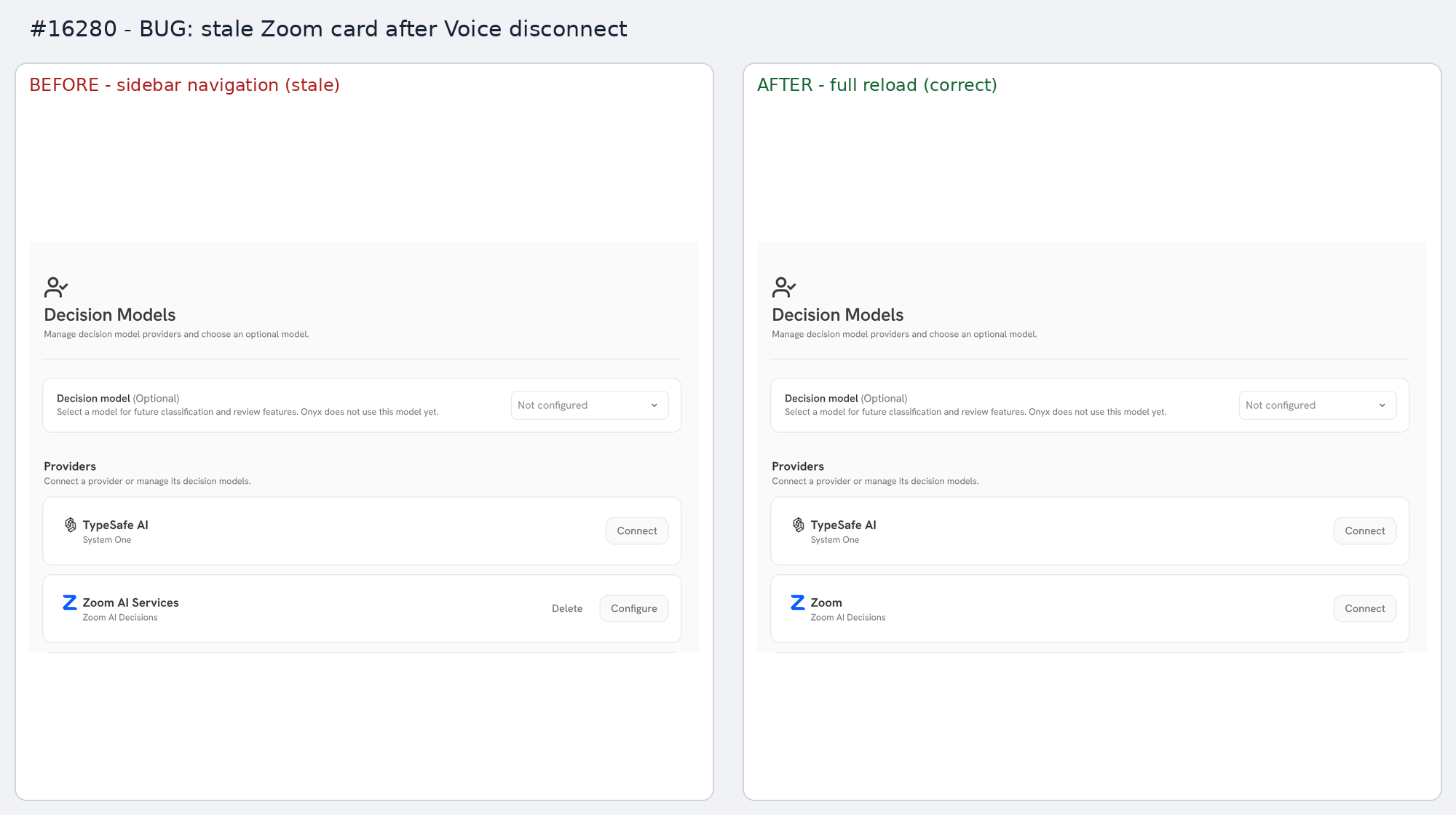 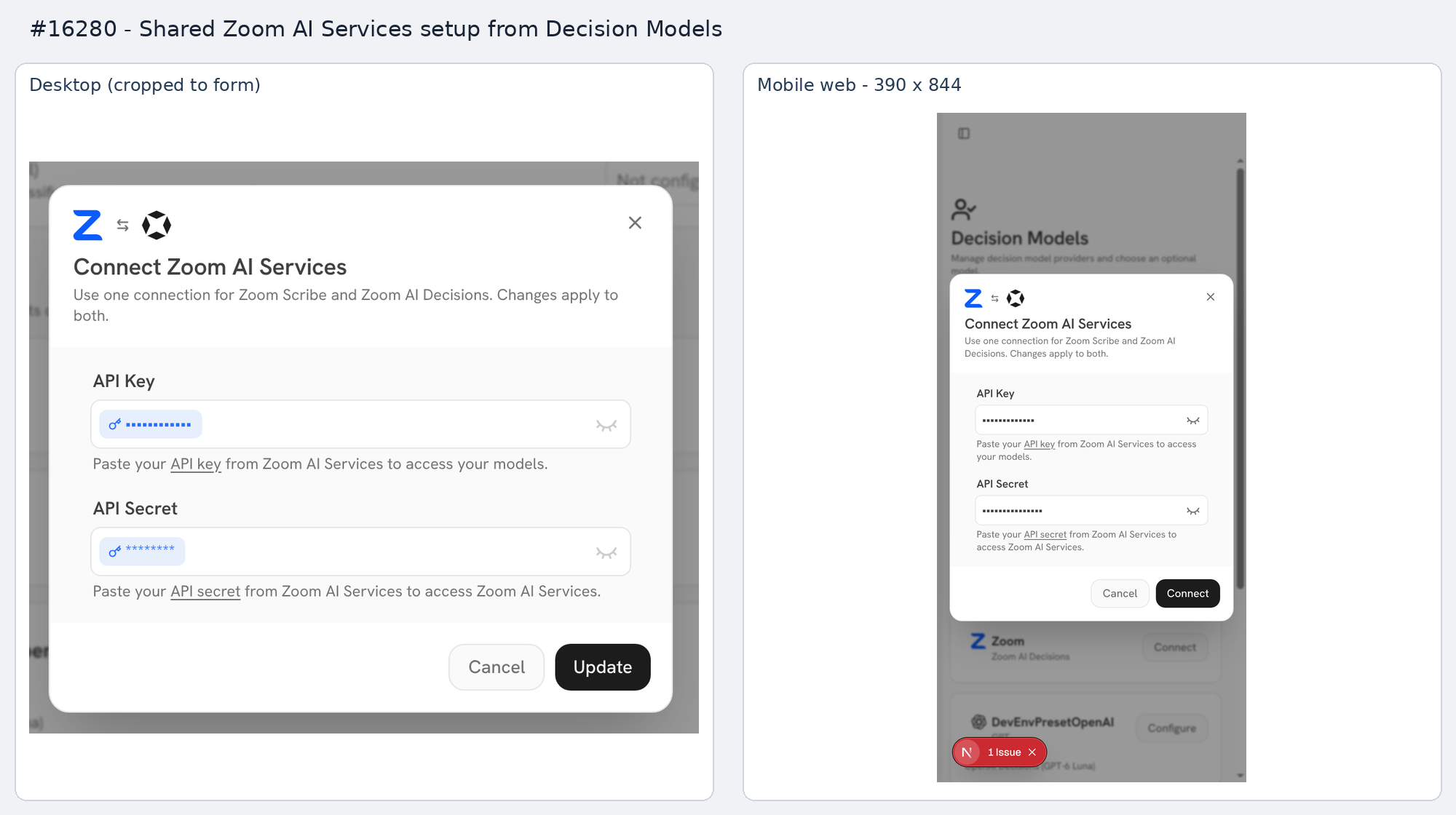 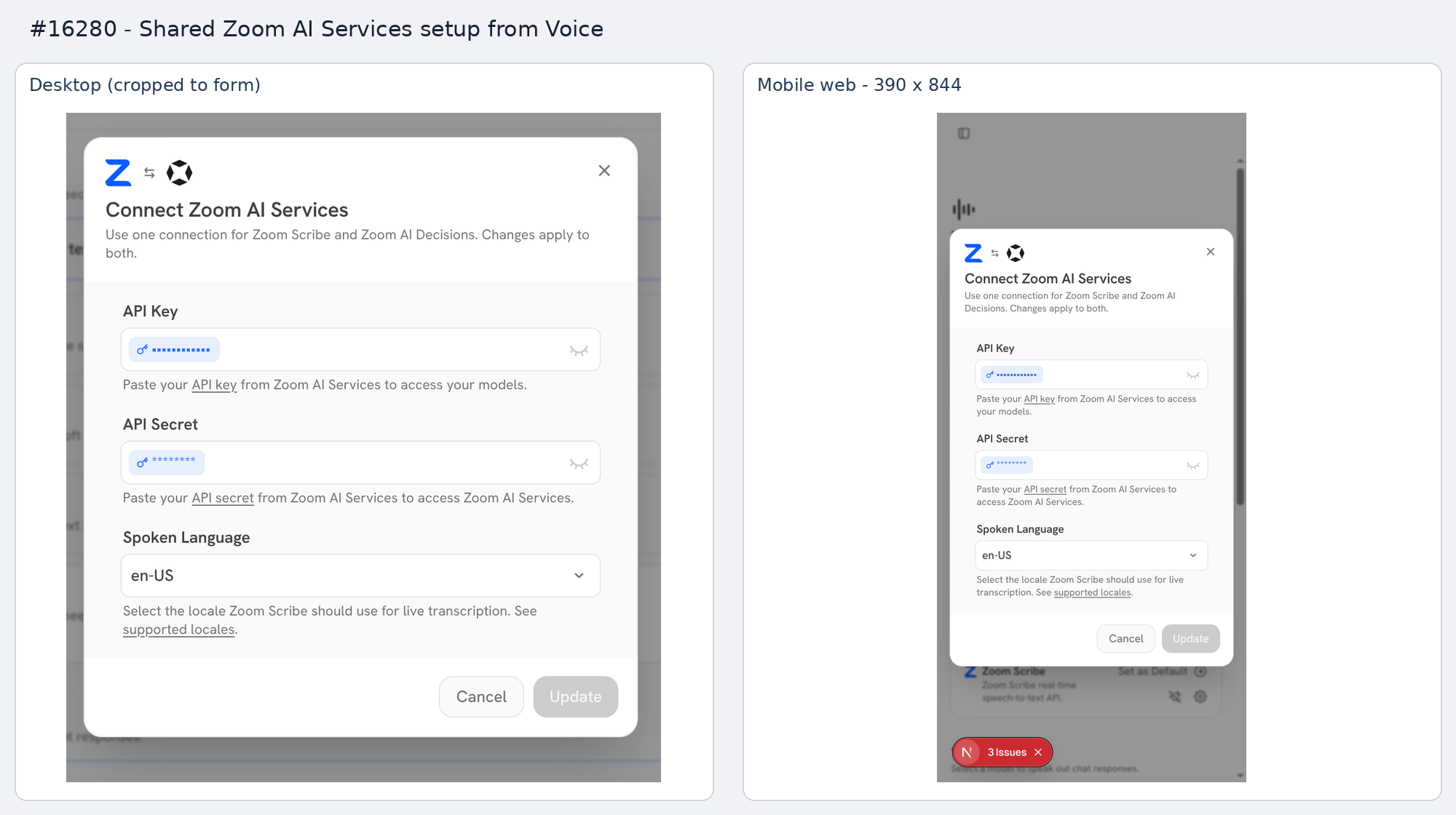   ## Stack PR 3 of 4: #16262 → #16276 → **#16280** → #16284. <!-- This is an auto-generated comment: release notes by coderabbit.ai --> ## Summary by CodeRabbit * **New Features** * Added Zoom AI Decisions with two models supporting text and image inputs. * Added shared Zoom AI Services setup across Voice and Decision Models, including connection selection, credential reuse, rotation, and removal. * Added provider discovery, model capability indicators, decision-specific validation, and localized interface text. * Renamed Zoom Scribe setup labels to Zoom AI Services. * **Bug Fixes** * Improved connection validation and rollback. * Improved credential handling and protection against deleting active shared connections. * Preserved existing shared connection settings when updating providers. <!-- end of auto-generated comment: release notes by coderabbit.ai --> Link to Devin session: https://app.devin.ai/sessions/39d77bde91c34b75922bb05c02b93b90 Open in Devin Desktop: https://app.devin.ai/desktop/session/39d77bde91c34b75922bb05c02b93b90?variant=devin Requested by: @rohoswagger
Backend Tests
Test Types
There are four test categories, ordered by increasing scope:
Unit Tests (tests/unit/)
No external services. Mock all I/O with unittest.mock. Use for complex, isolated
logic (e.g. citation processing, encryption).
pytest -xv backend/tests/unit
External Dependency Unit Tests (tests/external_dependency_unit/)
Real Postgres, Redis, MinIO, and OpenSearch available. Real OpenAI key when set. Real Docker daemon when a Docker-backend test opts into it. Onyx application processes (API server, Celery workers) are not running. Tests import and call functions directly and can mock selectively.
Conditional external dependencies such as OpenAI are gated by skipif at the
top of the test file so the suite stays runnable in environments that lack the
relevant env var or credential.
Use when you need a real database or real API calls but want control over setup.
uv run --env-file .vscode/.env pytest backend/tests/external_dependency_unit
Integration Tests (tests/integration/)
Full Onyx deployment running. Do not mock Onyx code. Faking an external service
(for example the scripted LLM server behind the mock_llm fixture) is fine.
Prefer this over other test types when possible. Most integration tests exercise
the product through HTTP API manager helpers under tests/integration/common_utils.
Craft Kubernetes coverage lives in tests/integration/tests/craft/k8s/ and
runs in the dedicated Helm-installed kind job
(pr-craft-k8s-tests.yml).
That suite is a full deployed Craft integration lane: the chart provides
Postgres, Redis, MinIO, OpenSearch, api_server, web_server, Celery workers,
sandbox-proxy, and real sandbox pods in kind. API-facing setup goes through the
deployed api_server; direct manager calls are reserved for low-level Kubernetes
contracts that do not have an HTTP API. Direct task/stub checks belong in
tests/external_dependency_unit/craft/.
uv run --env-file .vscode/.env pytest backend/tests/integration
Playwright / E2E Tests (web/tests/e2e/)
Full stack including web server. Use for frontend-backend coordination.
cd web && bun run playwright <TEST_NAME>
Shared Fixtures
Shared fixtures live in backend/tests/conftest.py. Test subdirectories can define
their own conftest.py for directory-scoped fixtures.
Running Tests Repeatedly (pytest-repeat)
Use pytest-repeat to catch flaky tests by running them multiple times:
# Run a specific test 50 times
pytest --count=50 backend/tests/unit/path/to/test.py::test_name

# Stop on first failure with -x
pytest --count=50 -x backend/tests/unit/path/to/test.py::test_name

# Repeat an entire test file
pytest --count=10 backend/tests/unit/path/to/test_file.py
Best Practices
Leave nothing behind
A test may reset or wipe shared state before it runs. It must not leave its own
state behind for a later test to see: rows, changed global defaults, Redis keys,
OpenSearch indexes, running threads, or settings on a pooled database connection.
Undo each change in a finally or a yield-fixture teardown.
External dependency unit tests check one case of this automatically. After each
test, an autouse fixture (no_leaked_db_session_settings) fails the test if it
returned a pooled connection with a session-level Postgres setting on it, such as
a plain SET lock_timeout. To change session state, use SET LOCAL, reset the
setting, or run on the isolated_engine fixture. Migration tests that run
migrations in-process must use isolated_engine.
Use enable_ee fixture instead of inlining
Enables EE mode for a test, with proper teardown and cache clearing.
# Whole file (in a test module, NOT in conftest.py)
pytestmark = pytest.mark.usefixtures("enable_ee")


# Whole directory — add an autouse wrapper to the directory's conftest.py
@pytest.fixture(autouse=True)
def _enable_ee_for_directory(enable_ee: None) -> None:
    """Wraps the shared enable_ee fixture with autouse for this directory."""


# Single test
def test_something(enable_ee: None) -> None: ...
Note: pytestmark in a conftest.py does NOT apply markers to tests in that
directory — it only affects tests defined in the conftest itself (which is none).
Use the autouse fixture wrapper pattern shown above instead.
Do NOT inline global_version.set_ee() — always use the fixture.
Craft sandbox network enforcement
Run the deployed Kubernetes networking suite against a disposable cluster with an enforcing CNI.
Test both sandboxPod.netAdminLockdown=true and false through the deployment's Helm values.
Set these variables for the target deployment:
export SANDBOX_TEST_FRONTEND_URL=http://localhost:3000
export SANDBOX_TEST_KUBE_CONTEXT=your-test-context
export SANDBOX_TEST_IP_FAMILY=ipv4
export SANDBOX_TEST_NET_ADMIN_LOCKDOWN=false
uv run pytest backend/tests/integration/tests/craft/k8s/networking
Set the expected lockdown value to match each Helm configuration.
The suite checks the actual pod configuration, proxy requests, and blocked direct API, public internet, and DNS connections.
DNS and public connection checks first verify that the target responds from the proxy.
Use an IPv6 cluster and SANDBOX_TEST_IP_FAMILY=ipv6 to check that family.