 roshan
fcc0cae05a
roshan
fcc0cae05a
## Summary Add Zoom Decisions and Zoom Decisions Pro to **Admin > Decision Models**. Configure Zoom from either Voice or Decision Models. Both pages use one shared connection and one encrypted API key and secret. Zoom Decisions is opt-in: a Zoom decision provider exists only after an admin connects Zoom on Decision Models. A Voice-only setup never creates one. Decision setup does not activate Voice defaults or select a decision model. Read current credentials and sign a fresh JWT for each request. Keep Zoom decision models out of chat. Removing Zoom from Decision Models deletes only the decision provider and keeps Scribe. Disconnecting Zoom on Voice also removes its linked decision provider, after selected-model checks. The migration only adds the link column; it writes no rows. Both setup links open the [Zoom AI Services documentation](https://developers.zoom.us/docs/ai-services/). ## Validation - 336 focused backend tests and nine frontend component tests passed. - Type checks, lint, translations, deterministic migration checks, and touched-file hooks passed. - A live Zoom Decision API request returned HTTP 200 with a JWT signed using the existing Scribe credentials. - The current-head preview opens the credential form directly from Decision Models. No Voice setup is required first. - PostgreSQL tests cover opt-in linking from Decision Models only, rotation, rollback, relink and duplicate-link rejection, and deletion. ## Screenshot Shared Zoom setup from Decision Models at `9b7792d`. Credentials are empty. This screenshot demonstrates the form, not a completed connection test.  ## Stack testing (`29eec61fb4`) Tested the full stack at the top commit on a local dev stack, desktop and 390×844 mobile. OpenAI decisions and chat used a real key. TypeSafe, Zoom, OpenRouter, and Vercel AI Gateway used local mock upstreams; Onyx auth, validation, persistence, encryption, and UI were real. - Fixed during testing: migration `9071f636d5f2` now revises `4d8453213439` (#16351 on main). The old `down_revision` left two alembic heads and failed most CI jobs on this PR and #16284. - Passed: Voice-only Zoom setup creates no decision provider. Decision Models opens the shared credential form directly. - Passed: one encrypted Voice connection; the linked LLM provider stores no duplicate key. JWT validation and the Scribe WebSocket handshake worked against the mock. - Passed: bad credentials fail. Both setup links open the Zoom AI Services docs. - Passed: selection guards block Zoom removal and Voice disconnect. Removing Zoom from Decision Models keeps Voice/Scribe. Zoom decision models are absent from chat. - **Fixed in #16276 (`37c248ec04`):** after Zoom is disconnected on Voice, sidebar navigation to Decision Models now shows **Connect** without a reload (retested at `78cf4ccb12`). Before the fix, the card showed **Configure/Delete** from a stale `adminLlmProvidersPaged` SWR cache. 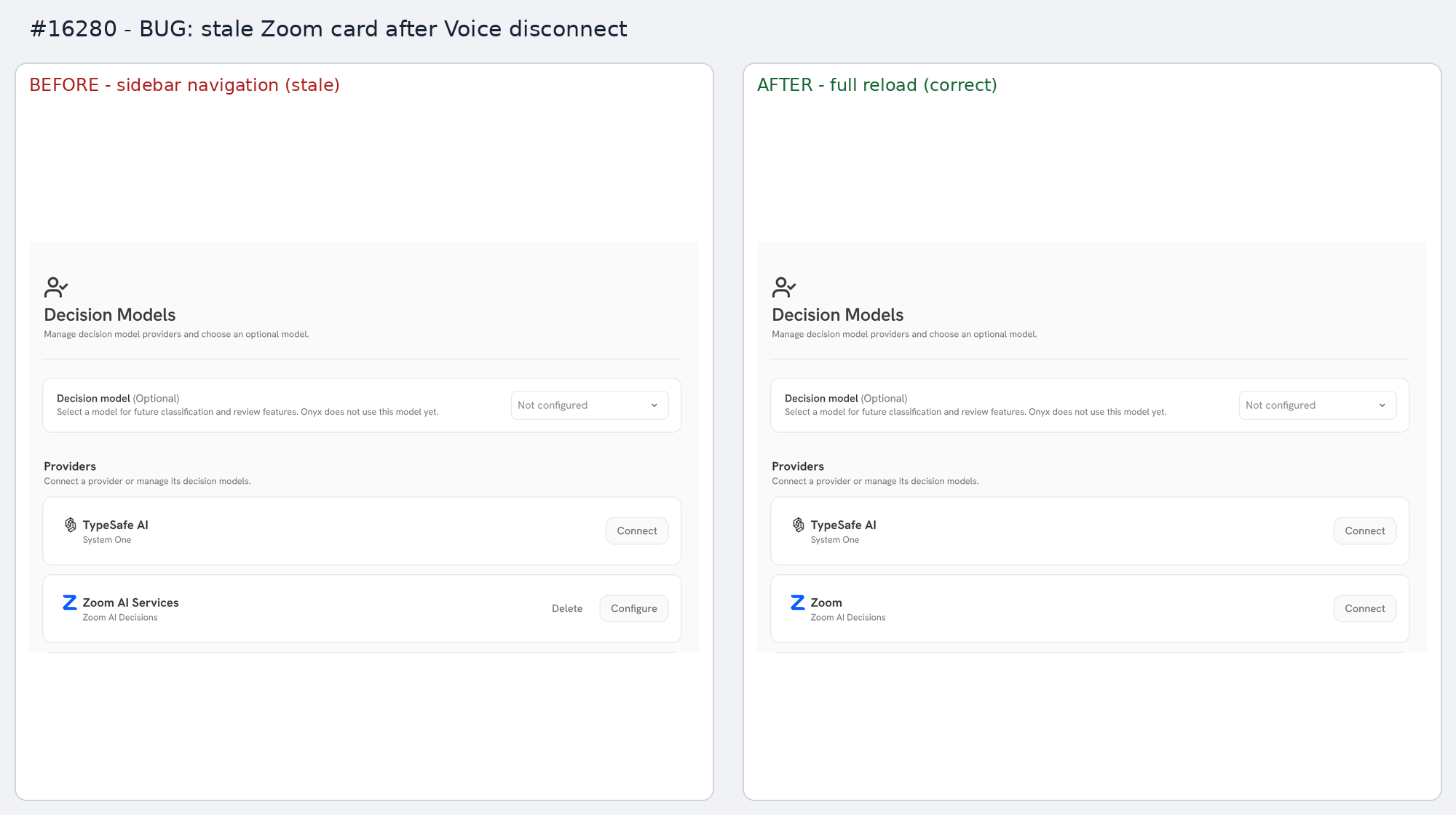 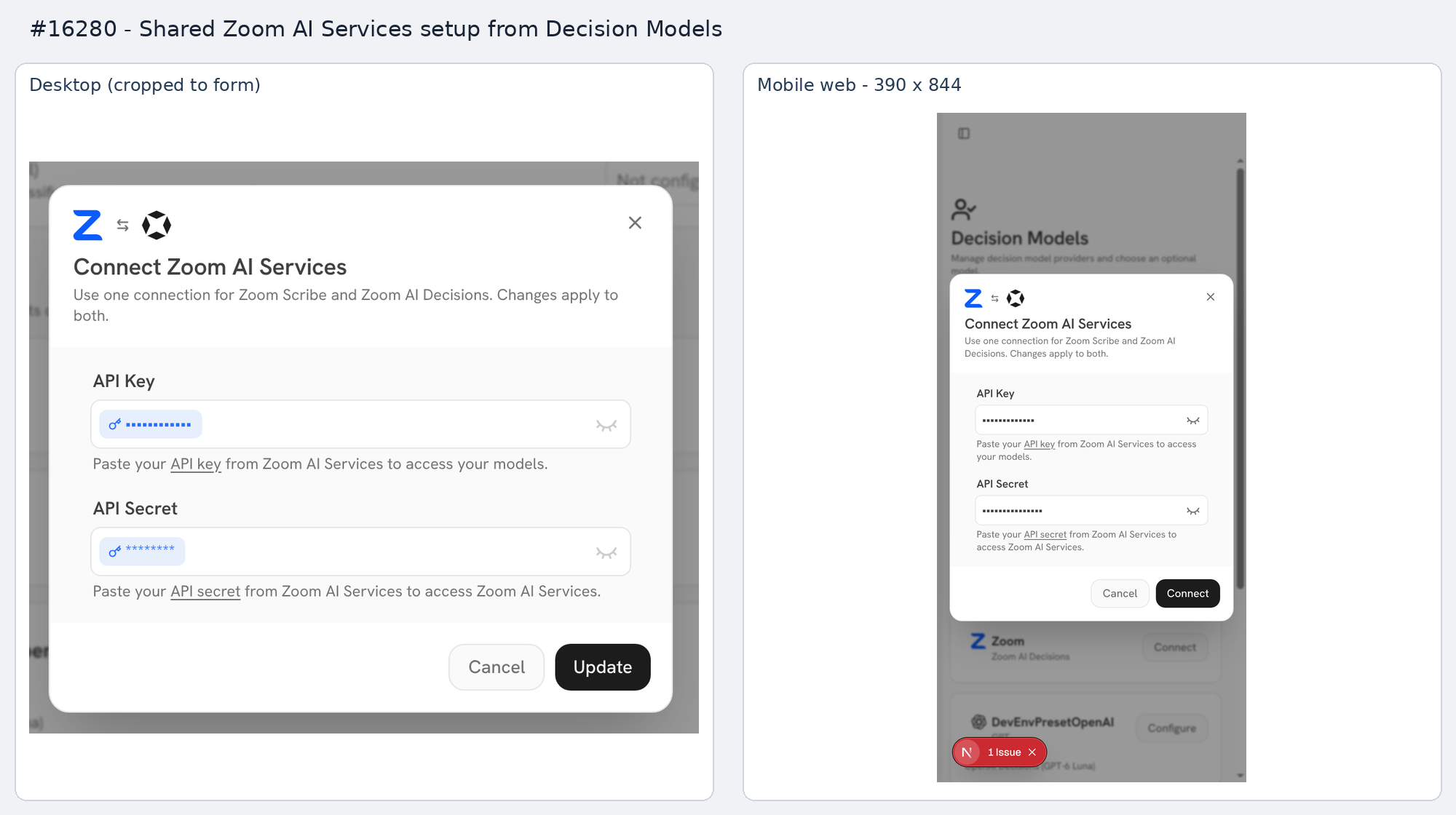 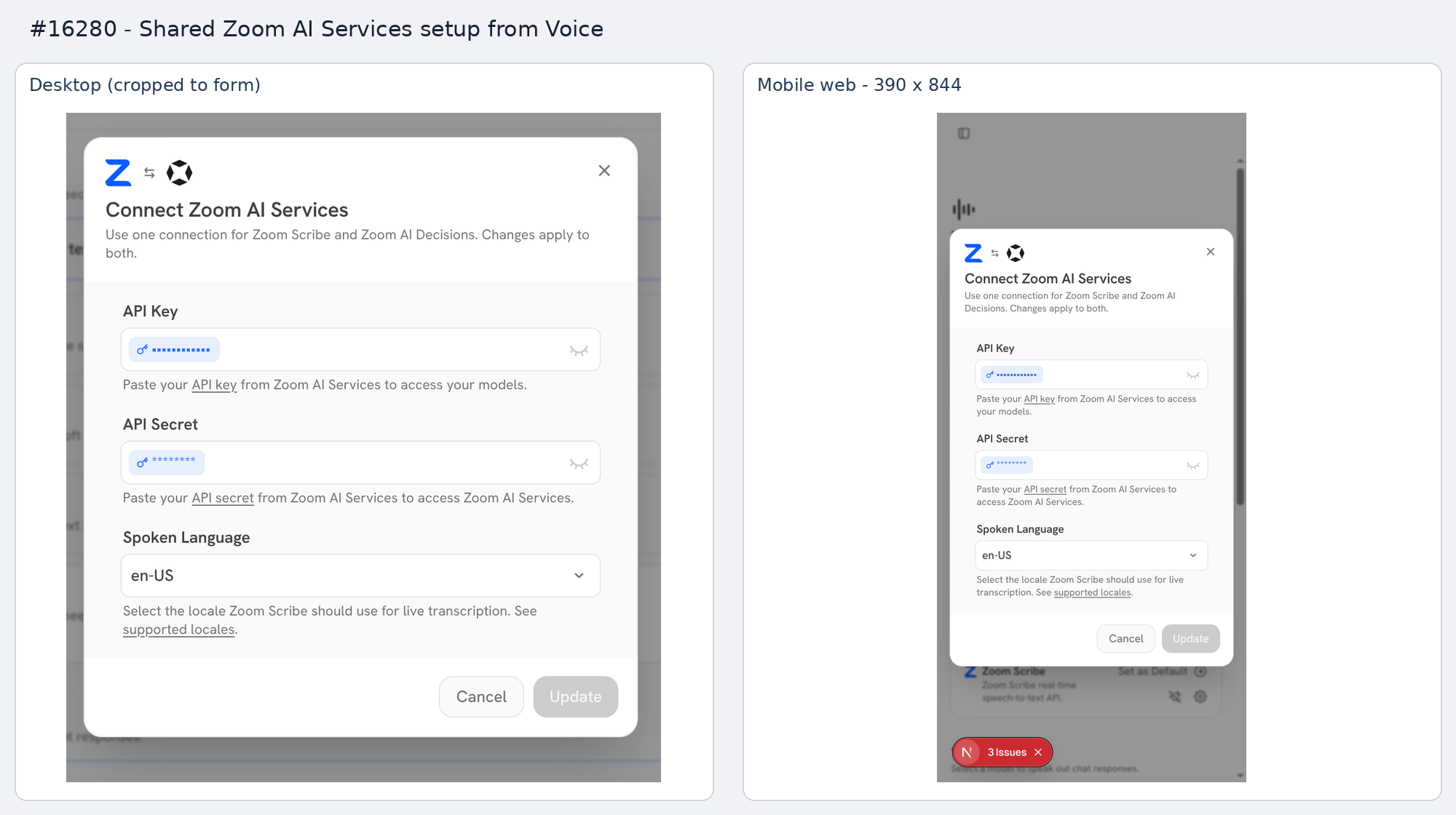   ## Stack PR 3 of 4: #16262 → #16276 → **#16280** → #16284. <!-- This is an auto-generated comment: release notes by coderabbit.ai --> ## Summary by CodeRabbit * **New Features** * Added Zoom AI Decisions with two models supporting text and image inputs. * Added shared Zoom AI Services setup across Voice and Decision Models, including connection selection, credential reuse, rotation, and removal. * Added provider discovery, model capability indicators, decision-specific validation, and localized interface text. * Renamed Zoom Scribe setup labels to Zoom AI Services. * **Bug Fixes** * Improved connection validation and rollback. * Improved credential handling and protection against deleting active shared connections. * Preserved existing shared connection settings when updating providers. <!-- end of auto-generated comment: release notes by coderabbit.ai --> Link to Devin session: https://app.devin.ai/sessions/39d77bde91c34b75922bb05c02b93b90 Open in Devin Desktop: https://app.devin.ai/desktop/session/39d77bde91c34b75922bb05c02b93b90?variant=devin Requested by: @rohoswagger
Playwright E2E Test Rules
Hard rules for tests under web/tests/e2e/. Read before adding or modifying a spec.
For the broader Onyx testing strategy and where Playwright fits among unit / external-dependency / integration tests, see backend/AGENTS.md ("Testing Strategy") and backend/tests/README.md. For Jest + React Testing Library guidance for component tests, see web/tests/README.md.
1. Use the Page Object Model
All locators and interactions for a UI surface live on a Page Object class — never inline in a spec.
- One class per surface (e.g.
ChatPage,InputBar,AdminUsersPage). - Page objects live in
tests/e2e/pages/— one file per class, named after the surface. Keep spec-only helpers (flow glue, assertion utilities) out ofpages/; those stay beside their specs or intests/e2e/utils/. - Composite pages expose nested objects:
chatPage.inputBar.someMethod(). - Specs call methods on the page object. They do not construct locators.
- When extending coverage for an area that has no page object, create one before writing the spec.
// ✅ Good — spec calls into the POM
await chatPage.goto();
await chatPage.inputBar.type("hello");
await chatPage.inputBar.send();
await chatPage.expectHumanMessage("hello");

// ❌ Bad — raw locators in the spec
await page.goto("/app");
await page.locator('[contenteditable="true"]').fill("hello");
await page.keyboard.press("Enter");
await expect(page.locator(".message")).toContainText("hello");
Why: specs that read like a description of user behavior are easier to scan, review, and refactor. Locator churn changes one POM method, not every spec that touched the surface.
Locator priority — when defining locators on a page object, prefer in this order:
data-testid/aria-label(getByTestId,getByLabel) — preferred for Onyx components.- Role-based (
getByRole) — standard HTML elements. - Text / label (
getByText,getByLabel) — visible text content. - CSS selectors (
locator(...)) — last resort, only when nothing above works.
Never reach for complex CSS/XPath when a built-in locator fits.
2. Use auto-retrying matchers — never getAttribute / evaluate for async state
Playwright's expect(locator).* matchers retry until the assertion passes or the timeout expires. locator.getAttribute() and page.evaluate() are single snapshots — they read the DOM exactly once and fail immediately on a stale read.
If the value can be set by a React state update, an effect, a microtask, or anything else asynchronous, snapshot reads will flake.
| Asserting on | Use | Don't use |
|---|---|---|
| Attribute | expect(locator).toHaveAttribute(name, value) |
locator.getAttribute(name) then expect(...) |
| Class | expect(locator).toHaveClass(/regex/) / .not.toHaveClass(...) |
page.evaluate(el => el.classList.contains(...)) |
| Text | expect(locator).toHaveText(value) / toContainText(value) |
locator.textContent() then expect(...) |
| Count | expect(locator).toHaveCount(n) |
locator.count() then expect(...) |
| Visibility | expect(locator).toBeVisible() / toBeHidden() |
manual isVisible() checks |
| Value | expect(locator).toHaveValue(value) |
locator.inputValue() then expect(...) |
// ✅ Good — retries until the attribute settles
await expect(tile).toHaveAttribute("data-text", "modified text");

// ❌ Bad — one-shot read, flakes when the attribute updates after a React render
const text = await tile.getAttribute("data-text");
expect(text).toBe("modified text");

// ✅ Good — retries until the class settles
await expect(tile.first()).toHaveClass(/rich-input-tile-selected/);

// ❌ Bad — one-shot DOM snapshot
const selected = await page.evaluate(
  () => !!document.querySelector(".rich-input-tile-selected")
);
expect(selected).toBe(true);
getAttribute / evaluate / textContent / count are still appropriate when you need the value for control flow inside the spec (e.g. branching on it, logging it). They are not appropriate as the basis of an assertion on async state.
3. The LLM is the scripted mock LLM server
Every LLM call of the Playwright deployment goes to the scripted mock LLM server
(backend/tests/integration/mock_services/mock_llm_server/server.py). Global setup registers its default script and
makes the public openai_compatible provider "PW Mock LLM" the default. The script's default reply answers every
request that no conversation serves with This is a mock LLM response.
To script a turn, use tests/e2e/utils/mockLlm.ts. Add a conversation to the default script that matches a nonce,
and put the nonce in the chat message. Do not change the default provider to script a spec: all workers share it.
const nonce = mockLlmNonce();
await addMockLlmConversation({
  name: nonce,
  conditions: { prompt_contains: [nonce] },
  replies: [
    { tool_calls: [{ id: `call-${nonce}`, name: "tool_0", arguments: {} }] },
    { text: "Done.", conditions: { has_results_for: [`call-${nonce}`] } },
  ],
});
await sendMessage(page, `Run tool_0. ${nonce}`);
A tool-free request (no tools and no tool results), such as session naming, gets the default reply unless a
conversation or reply conditions set has_tools: false. The web app names a new chat after the first answer without
waiting for it, so its naming request can overlap the next turn. Set has_tools: false only on a reply that must
answer a tool-free chat turn.
To run the specs locally, start the server with the rest of the stack:
cd deployment/docker_compose
docker compose -f docker-compose.yml -f docker-compose.dev.yml -f docker-compose.mock-llm-test.yml up -d
You can also run it on the host with
cd backend && MOCK_LLM_SERVER_PORT=8095 python -m tests.integration.mock_services.mock_llm_server.server.
The runner reaches the server at MOCK_LLM_SERVER_URL (default http://localhost:8095), and the backend reaches it
at MOCK_LLM_BACKEND_URL (default http://mock_llm_server:8095). When the backend runs on the host, set
MOCK_LLM_BACKEND_URL=http://localhost:8095. Global setup replaces the default LLM of the target deployment.